

Documentation Index
Fetch the complete documentation index at: https://docs.coreflux.org/llms.txt
Use this file to discover all available pages before exploring further.
What are Routes?
Routes define connections between your Coreflux MQTT broker and external systems. They enable broker-to-broker communication, database storage, industrial protocol integration, REST API connectivity, email notifications, AI integration, and media processing - all without writing custom middleware.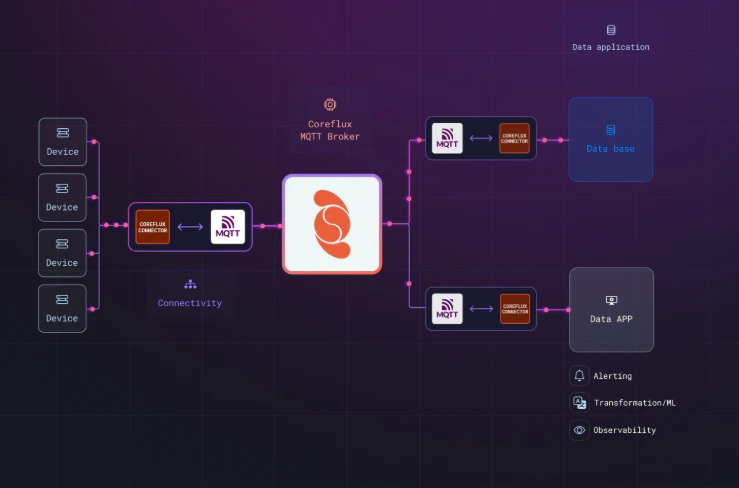
Route Categories
System Routes
Broker clustering and scalability configurations for high-availability deployments.
Data Pipeline Routes
MQTT bridges, email notifications, and MQTT-to-REST forwarding.
Data Storage Routes
Store MQTT data in PostgreSQL, MySQL, MongoDB, OpenSearch, Snowflake, and more.
REST API Routes
HTTP client/server for external API integration and webhook endpoints.
Industrial Routes
Connect to PLCs via Modbus, Siemens S7, OPC UA, ADS, Allen-Bradley, and FINS.
MCP Routes
Connect to external tools and services through MCP.
AI Routes
Add an autonomous AI assistant that can read topics and call tools.
Media Routes
Barcode scanning and video streaming capabilities.
Basic Syntax
Components
Unique identifier for the route. Use descriptive names like
CloudBridge, SensorDataIndexer, AlertEmailer.The type of route (see Available Route Types below).
Configuration blocks specific to the route type (e.g.,
MQTT_CONFIG, MONGODB_CONFIG, REST_API_CONFIG).Defines topic mappings for data flow between source and destination.
Available Route Types
- System
- Data Pipeline
- Data Storage
- Industrial
- Other
| Route Type | Description |
|---|---|
MQTT_CLUSTER | Broker clustering and scalability |
Quick Examples
- Email Alerts
- Modbus TCP
- REST API
- PostgreSQL Storage
- MQTT Bridge
Send email notifications from MQTT events:
Understanding Route Configuration
Routes share two common building blocks: MQTT configuration and topic mappings. You’ll see these across most route types, so understanding them here saves time when setting up any specific route.Connecting to a Broker
Routes that communicate with MQTT brokers — like bridges — need to know which broker to talk to. The simplest option isBROKER SELF, which tells the route to use your local Coreflux broker:
Not every route type requires an
MQTT_CONFIG block. Database routes, email routes, and REST routes have their own configuration sections. Check the specific route page for details.Controlling Data Flow with Mappings
Mappings define which MQTT topics flow through a route and in which direction. For example, to push local sensor readings to a cloud broker:DIRECTION parameter controls where data goes:
| Direction | What it does | Example scenario |
|---|---|---|
out | Local broker to destination | Push edge data to the cloud |
in | Destination to local broker | Pull remote commands locally |
both | Bidirectional sync | Keep two brokers in sync |
Route Status Monitoring
Every route automatically publishes real-time health and status information to a dedicated MQTT topic. No additional configuration is required — the status topic is created as soon as the route is defined.Status updates are published to a
$SYS topic and are available to any client subscribed to the broker.Status Topic
The topic follows this pattern:MyS7Route publishes its status to $SYS/Coreflux/Routes/MyS7Route/status.
Status Payload
The status topic publishes a JSON object with connection health, message statistics, and timing information:Field Reference
| Field | Type | Description |
|---|---|---|
name | string | The route name as defined in LoT |
type | string | The route type (e.g., SIEMENS_S7, MQTT_BRIDGE, POSTGRESQL) |
connection | string | Current connection state (Connected, Disconnected, etc.) |
health | string | Overall health indicator (Green, Yellow, Red) |
errors.total | integer | Total number of errors since the route started |
errors.consecutive | integer | Number of consecutive errors without a successful message |
errors.rate | number | Current error rate |
messages.total | integer | Total messages processed |
messages.succeeded | integer | Messages processed successfully |
messages.failed | integer | Messages that failed processing |
lastActivity | string | ISO 8601 timestamp of the last message (success or failure) |
lastSuccess | string | ISO 8601 timestamp of the last successful message |
lastError | string | null | ISO 8601 timestamp of the last error, or null if no errors occurred |
uptime | string | Time the route has been running (HH:MM:SS) |
connectedSince | string | ISO 8601 timestamp of when the route established its current connection |
timestamp | string | ISO 8601 timestamp of when this status update was generated |
Checking Route Status
You can monitor any route’s health by subscribing to its status topic. Use MQTT Explorer or any MQTT client to subscribe:Use Cases
- Edge-to-Cloud Sync
- Industrial Integration
- Real-Time Analytics
- Alert Notifications
Bridge local edge data to cloud brokers:
Next Steps
Industrial Routes
Connect to PLCs and industrial equipment.
Data Storage
Store MQTT data in databases.