You’ve installed Coreflux and deployed your first Action. Now what if you could describe your next feature in plain English and have an AI assistant write the LoT (Language of Things) code for you — correctly, using verified syntax, following best practices?That’s exactly what Coreflux’s AI integration enables. By connecting your AI assistant to the Coreflux MCP (Model Context Protocol), you give it real-time access to the official documentation. The result: you describe your goal, and the AI produces production-ready LoT code — Actions, Routes, Models, and more — without you memorizing a single keyword.
Like hiring a LoT specialist who never sleeps. You explain what your factory floor needs — “alert me when temperature spikes” — and the specialist drafts the code, wires the database, and writes the documentation.
Before using AI with Coreflux, ensure the core environment is running.
Requirement
Details
Coreflux Broker
Installed and running on your machine or server
AI Assistant
Cursor, Claude Desktop, Claude.ai, or VS Code with GitHub Copilot
MQTT Client
MQTT Explorer or any MQTT client for verifying results
1
Install the Coreflux Broker
Follow the Installation Guide for your platform (Docker, Windows, Linux, or Raspberry Pi). Verify the broker is running by connecting with MQTT Explorer.
2
Verify Your Setup
Connect to the broker and subscribe to $SYS/#. If you see system topics, the broker is ready.
Setting
Default Value
Host
localhost
Port
1883
Username
root
Password
coreflux
If you haven’t completed the Getting Started guide yet, do that first. It takes under 15 minutes and confirms your environment is working.
Coreflux uses the Model Context Protocol (MCP) to give your AI assistant real-time access to the official documentation. This means the AI doesn’t guess at LoT syntax — it looks it up. Combined with an AGENTS.md file that defines your project’s conventions, your AI assistant becomes a LoT expert that follows your team’s rules.
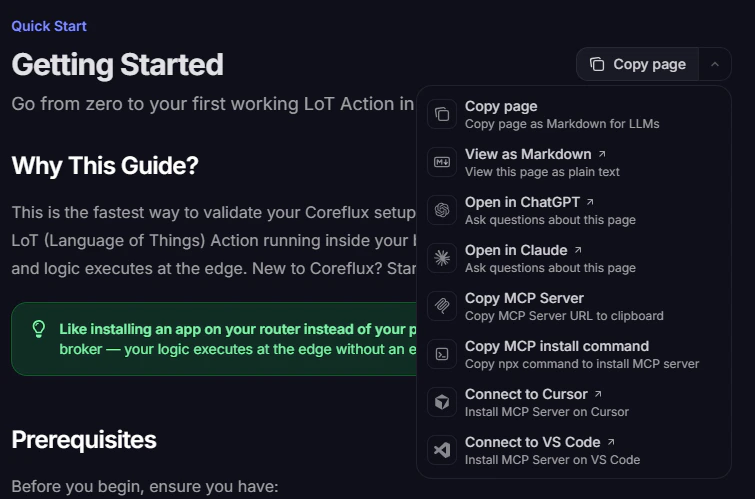
Add the Coreflux documentation MCP server to your AI client. Use Native to install from the contextual menu on any docs page, or Manual to add the server URL to a config file.
Native
Manual
Open the Copy page menu (top right) on any Coreflux documentation page. From there you can copy the MCP URL, run the install command, or connect directly to VS Code or Cursor.
Contextual menu with MCP install options
VS Code
Cursor
Other clients
1
Connect from the menu
Select Connect to VS Code from the contextual menu.
2
Install the server
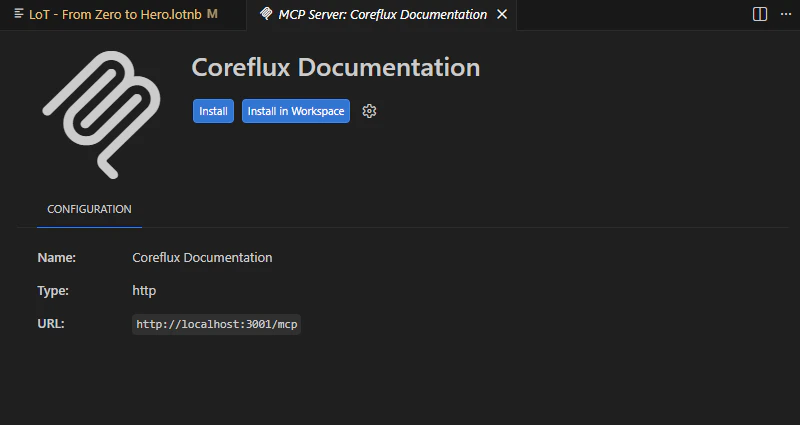
Click Install or Install in Workspace on the MCP server page.
VS Code MCP server install page
3
Enable in Copilot
Reload VS Code if needed, open Copilot Chat in Agent mode, and enable the Coreflux tools.
1
Connect from the menu
Select Connect to Cursor from the contextual menu.
2
Install the server
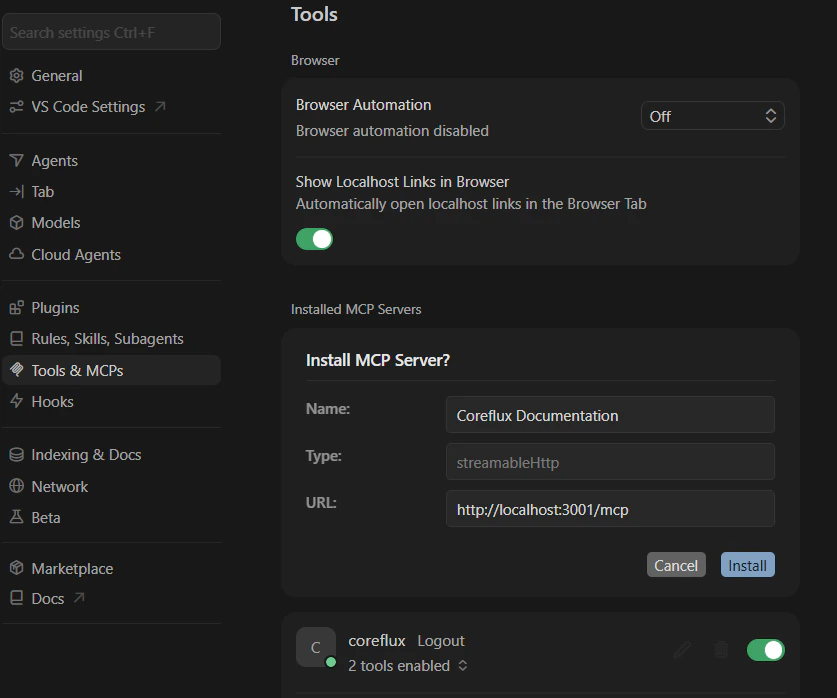
In Settings → Tools & MCPs, confirm the Install MCP Server? details and click Install.
Cursor MCP server install dialog
3
Confirm the connection
Verify Coreflux Documentation appears under Installed MCP Servers with tools enabled.
Use Copy MCP Server or Copy MCP install command from the menu, then follow the Manual tab below or the MCP Configuration Guide for Claude Desktop and other clients.
Add this URL to your editor’s MCP configuration:
https://docs.coreflux.org/mcp
VS Code
Cursor
Claude Desktop
Create or open .vscode/mcp.json in your workspace:
An AGENTS.md file in your project root tells your AI assistant how to write LoT code — naming conventions, patterns, and what to avoid. Without it, the AI may use inconsistent styles or invent syntax.Create an AGENTS.md file in your project root with your project’s conventions. The Best Practices & AGENTS.md page provides a complete starter template covering:
Naming rules — PascalCase for entities, snake_case for variables
Code standards — Type casting, state management, modular Actions
Boundaries — What the AI should always do, ask about, and never do
For a faster start, clone the Coreflux AI Starter repo — it includes ready-to-use templates and pre-built MCP configs for every editor.
Once both the MCP and AGENTS.md are configured, your AI assistant has real-time documentation access and your project’s coding standards. You’re ready to build.
With your AI assistant connected via MCP, you can use natural language to perform complex IIoT tasks. The following examples demonstrate the full workflow — from prompt to deployable code.
The most common starting point: you describe a behavior, and the AI writes the Action.The Prompt:
Create a LoT Action called TempAlert that monitors the topic
"factory/sensor/temp". If the temperature value (from a JSON payload
with key "value") goes above 50, publish an alert to "alerts/hvac"
with the current value. Use proper type casting.
AI-Generated Output:The AI consults the Coreflux MCP documentation and produces verified LoT syntax:
DEFINE ACTION TempAlertON TOPIC "factory/sensor/temp" DO SET "current_temp" WITH (GET JSON "value" IN PAYLOAD AS DOUBLE) IF {current_temp} > 50 THEN PUBLISH TOPIC "alerts/hvac" WITH "High Temperature Detected: " + {current_temp}
Why this works:
Line
What It Does
DEFINE ACTION TempAlert
Creates an Action named TempAlert (PascalCase, verb-like)
ON TOPIC "factory/sensor/temp" DO
Triggers every time a message arrives on this topic
SET "current_temp" WITH (GET JSON "value" IN PAYLOAD AS DOUBLE)
Extracts the value field from the JSON payload and casts it to a number
IF {current_temp} > 50 THEN
Conditional check against the threshold
PUBLISH TOPIC "alerts/hvac" WITH ...
Sends an alert with a descriptive message and the value
Deploy and Test:
1
Deploy the Action
Paste the code into a LoT Notebook cell (.lotnb file) and run it, or publish to $SYS/Coreflux/Command with the -addAction prefix.
A real-world scenario: you have a Siemens S7 PLC on the factory floor, and you want its data flowing into a PostgreSQL database. This requires two Routes — one to read from the PLC, and one to store in the database. Topics are the bridge between them.The Prompt:
I have a Siemens S7-1500 PLC at IP 192.168.1.10. I need to:1. Read the temperature (REAL at DB1.DBD100) and pressure (REAL at DB1.DBD104) every 500 milliseconds and publish them to MQTT topics2. Store all readings in a PostgreSQL database called "production_db" at 192.168.1.50, user "flux_user", password "secure_pass"Create the LoT Routes for both.
AI Logic:
Analyze — The AI identifies the source (Siemens S7 PLC), the data bridge (MQTT topics), and the destination (PostgreSQL)
Design — It creates two Routes: an industrial Route for the PLC, and a data storage Route for the database
Generate — Using the MCP to verify syntax, it produces:
Route 1 — Read from the PLC:
DEFINE ROUTE S7Factory WITH TYPE SIEMENS_S7
    ADD S7_CONFIG
        WITH IP "192.168.1.10"
        WITH CPU_TYPE "S71500"
        WITH RACK '0'
        WITH SLOT '1'
    ADD MAPPING SensorData
        WITH EVERY 500 MILLISECONDS
        ADD TAG Temperature
            WITH ADDRESS "DB1.DBD100"
            WITH DATA_TYPE "REAL"
            WITH SOURCE_TOPIC "plc/s7/temperature"
            WITH UNIT "°C"
            WITH DECIMAL_PLACES "2"
        ADD TAG Pressure
            WITH ADDRESS "DB1.DBD104"
            WITH DATA_TYPE "REAL"
            WITH SOURCE_TOPIC "plc/s7/pressure"
            WITH UNIT "bar"
            WITH DECIMAL_PLACES "2"
This Route reads PLC data and publishes it to MQTT topics every 500ms.Route 2 — Store in PostgreSQL:
DEFINE ROUTE ProductionDB WITH TYPE POSTGRESQL
    ADD SQL_CONFIG
        WITH SERVER "192.168.1.50"
        WITH PORT '5432'
        WITH DATABASE "production_db"
        WITH USERNAME "flux_user"
        WITH PASSWORD "secure_pass"
    ADD EVENT StoreTemperature
        WITH SOURCE_TOPIC "plc/s7/temperature"
        WITH QUERY "INSERT INTO sensor_readings (recorded_at, sensor, value) VALUES (NOW(), 'temperature', '{value}')"
    ADD EVENT StorePressure
        WITH SOURCE_TOPIC "plc/s7/pressure"
        WITH QUERY "INSERT INTO sensor_readings (recorded_at, sensor, value) VALUES (NOW(), 'pressure', '{value}')"
The AI generates a database Route that subscribes to the MQTT topics published by the PLC Route and inserts every reading into a sensor_readings table — complete with SQL templates, connection config, and event triggers, without you writing a single line of SQL manually.The Data Flow:
Step
Component
What Happens
1
S7 Route
Reads DB1.DBD100 and DB1.DBD104 from the PLC
2
MQTT Topics
Values published to plc/s7/temperature and plc/s7/pressure
3
PostgreSQL Route
Inserts each reading into the sensor_readings table
The PLC Route and PostgreSQL Route are independent — they communicate through MQTT topics. This decoupled architecture means you can add more consumers (alerts, dashboards, other databases) without modifying the PLC Route. For a step-by-step walkthrough of building a database Route from scratch, see the Developing with LoT Using AI guide.
AI excels at iterating on existing code and producing documentation alongside it.The Prompt:
Update the TempAlert action to also log every alert to "system/logs"
with a timestamp. Then generate a markdown summary documenting this
action on a project-specific LoT Notebook (LoTNB file).
AI-Updated Code:The AI modifies the existing Action and adds the logging line:
DEFINE ACTION TempAlertON TOPIC "factory/sensor/temp" DO SET "current_temp" WITH (GET JSON "value" IN PAYLOAD AS DOUBLE) IF {current_temp} > 50 THEN PUBLISH TOPIC "alerts/hvac" WITH "High Temperature Detected: " + {current_temp} SET "log_time" WITH TIMESTAMP "UTC" PUBLISH TOPIC "system/logs" WITH "TempAlert triggered at " + {log_time} + " — value: " + {current_temp}
What Changed
Why
Added SET "log_time" WITH TIMESTAMP "UTC"
Captures the current UTC timestamp into a variable
Added PUBLISH TOPIC "system/logs"
Creates an audit trail with timestamp and value
AI-Generated Documentation:The AI also produces a markdown summary you can add directly to your project’s LoT Notebook (LoTNB):
## Action: TempAlert**Description:** Monitors temperature thresholds for the HVAC system. Triggers an alert when the factory temperature sensor exceeds 50°C and logs every alert event for auditing.| Property | Value ||----------|-------|| **Trigger** | `factory/sensor/temp` || **Condition** | Temperature > 50°C |**Outputs:**| Topic | Purpose ||-------|---------|| `alerts/hvac` | Real-time alert with temperature value || `system/logs` | Timestamped audit trail of all triggered alerts |**Payload Format:** Expects JSON with a `value` key (e.g., `{"value": 62.5}`)
This is the complete cycle: build → modify → document — all driven by natural language prompts.
To get the most out of AI-assisted LoT development, keep these principles in mind:
Always verify the MCP connection before starting a session. Without it, the AI may generate plausible-looking but incorrect LoT syntax
Be specific in your prompts — include topic names, payload formats, thresholds, and hardware details. The more context you provide, the more accurate the output
Build incrementally — deploy and test one Action, Route, or Model at a time before moving to the next
If your AI assistant generates LoT code without consulting the MCP, the syntax may be invented. Always verify that the MCP tools are active before trusting the output.
Deploy AI agents on the broker — chat, automation, and multi-agent teams defined in LoT.
Developing with LoT Using AI
Deep-dive into the full AI-assisted workflow — planning, building, verifying, and scaling your IIoT system.
Best Practices & AGENTS.md
Set up naming conventions, code patterns, and a project rules template to keep your AI assistant consistent.
Last modified on August 28, 2026
Was this page helpful?
⌘I
{"docsConfig":{"theme":"luma","$schema":"https://mintlify.com/docs.json","name":"Coreflux Documentation","colors":{"primary":"#eb470b","light":"#fc833b","dark":"#c3330b"},"logo":{"light":"https://mintcdn.com/coreflux/7tBTxEEkDVX4IRGH/images/logo/logo_light_docs_glyph.png?fit=max\u0026auto=format\u0026n=7tBTxEEkDVX4IRGH\u0026q=85\u0026s=56a469c914780a6d8c40a4329c0b0879","dark":"https://mintcdn.com/coreflux/7tBTxEEkDVX4IRGH/images/logo/logo_dark_docs_glyph.png?fit=max\u0026auto=format\u0026n=7tBTxEEkDVX4IRGH\u0026q=85\u0026s=b14cc68d9c3e2e98017af536fefc8670"},"favicon":"https://mintcdn.com/coreflux/A0D_IE52Pl2ItO0u/images/favicon.ico?fit=max\u0026auto=format\u0026n=A0D_IE52Pl2ItO0u\u0026q=85\u0026s=e8416ed10b42351291ab50f0dcdb31a8","appearance":{"default":"dark"},"background":{"color":{"light":"#FFFFFF","dark":"#010c10"}},"navbar":{"primary":{"type":"button","label":"Start Free","href":"https://portal.coreflux.org/"}},"footer":{"socials":{"github":"https://github.com/CorefluxCommunity","discord":"https://discord.com/invite/A3pPrptNMm","linkedin":"https://www.linkedin.com/company/coreflux","youtube":"https://www.youtube.com/@Coreflux","website":"https://www.coreflux.org/"}},"fonts":{"family":"Plus Jakarta Sans"},"styling":{"eyebrows":"breadcrumbs","codeblocks":{"theme":{"light":"css-variables","dark":"css-variables"},"languages":{"custom":["/languages/lot.json"]}},"latex":true},"integrations":{"ga4":{"measurementId":"G-1WXMSGSFY6"}},"contextual":{"options":["chatgpt","claude","mcp","cursor","vscode"],"display":"header"},"metadata":{"timestamp":true},"navigation":{"pages":[]}},"deployment":{"deploymentMetadataValue":{"subdomain":"coreflux","hasAudioNarration":false,"actualSubdomain":"coreflux","customDomains":["docs.coreflux.org"],"gitSource":{"type":"github","owner":"corefluxcommunity","repo":"documentation","deployBranch":"main","contentDirectory":"","isPrivate":true,"mountPath":"","label":""},"chroma":{"liveDeploymentHistoryId":"6adf28df1cea9adffa70bbce","collectionId":"54e175c9-f8df-4f82-8be0-ec9bf6a23513","schemaVersion":"v3","latestBuiltDeploymentHistoryId":"6adf28df1cea9adffa70bbce"},"feedback":{"thumbs":true,"agentFeedback":true},"entitlements":{"AI_CHAT":{"status":"ENABLED"},"WEB_MCP":{"status":"ENABLED"},"NARRATION":{"status":"ENABLED"}},"buildId":"6adf28df1cea9adffa70bbce","clientVersion":"0.0.3990","searchFilterCounts":[{"language":"default","tag":"LoT Language","count":608},{"language":"default","tag":"LoT CONNECTOR","count":307},{"language":"default","tag":"REST API apps","count":268},{"language":"default","tag":"LoT ROUTE","count":146},{"language":"default","tag":"Coreflux MQTT Broker","count":82},{"language":"default","tag":"Developing and Managing Coreflux","count":72},{"language":"default","tag":"Coreflux HUB","count":71},{"language":"default","tag":"Best Practices and Usage Patterns","count":54},{"language":"default","tag":"Industrial Routes","count":52},{"language":"default","tag":"Quick Start","count":50}]},"assistantConfig":{"enableAskAiButton":true,"enableStarterQuestions":true,"enableContextualStarterQuestions":true,"enableAskAiSearchBar":true,"deflection":{"enabled":true,"email":"joao.leiriao@coreflux.org","showHelpButton":true}},"basePath":"","hasChatPermissions":true,"hasWebMcpPermissions":true,"toggles":[{"name":"kill-isr","enabled":true,"variant":{"name":"disabled","enabled":false,"feature_enabled":true},"impressionData":false},{"name":"agent-mintlify-slack","enabled":true,"variant":{"name":"disabled","enabled":false,"feature_enabled":true},"impressionData":false},{"name":"editor-v7-file-tree","enabled":true,"variant":{"name":"disabled","enabled":false,"feature_enabled":true},"impressionData":false},{"name":"agent-integrations-settings","enabled":true,"variant":{"name":"disabled","enabled":false,"feature_enabled":true},"impressionData":false},{"name":"automations-pr-grouping","enabled":true,"variant":{"name":"disabled","enabled":false,"feature_enabled":true},"impressionData":false},{"name":"custom-prefix","enabled":true,"variant":{"name":"disabled","enabled":false,"feature_enabled":true},"impressionData":false},{"name":"analytics-v7","enabled":true,"variant":{"name":"disabled","enabled":false,"feature_enabled":true},"impressionData":false},{"name":"user-flows-analytics","enabled":true,"variant":{"name":"disabled","enabled":false,"feature_enabled":true},"impressionData":false},{"name":"no-publish-flow","enabled":true,"variant":{"name":"disabled","enabled":false,"feature_enabled":true},"impressionData":false},{"name":"workos-onboarding","enabled":true,"variant":{"name":"disabled","enabled":false,"feature_enabled":true},"impressionData":false},{"name":"llms-txt-v2","enabled":true,"variant":{"name":"disabled","enabled":false,"feature_enabled":true},"impressionData":false},{"name":"pause-universal-search-reconcile","enabled":true,"variant":{"name":"disabled","enabled":false,"feature_enabled":true},"impressionData":false},{"name":"snapshot-serving-live","enabled":true,"variant":{"name":"disabled","enabled":false,"feature_enabled":true},"impressionData":false},{"name":"stripTemperatureMiddleware","enabled":true,"variant":{"name":"disabled","enabled":false,"feature_enabled":true},"impressionData":false},{"name":"per-site-search-delta","enabled":true,"variant":{"name":"disabled","enabled":false,"feature_enabled":true},"impressionData":false},{"name":"support-platform-pylon-zendesk","enabled":true,"variant":{"name":"disabled","enabled":false,"feature_enabled":true},"impressionData":false},{"name":"snapshot-serving","enabled":true,"variant":{"name":"disabled","enabled":false,"feature_enabled":true},"impressionData":false},{"name":"instant-rollback","enabled":true,"variant":{"name":"disabled","enabled":false,"feature_enabled":true},"impressionData":false},{"name":"granular-notifications-server","enabled":true,"variant":{"name":"disabled","enabled":false,"feature_enabled":true},"impressionData":false},{"name":"granular-notifications","enabled":true,"variant":{"name":"disabled","enabled":false,"feature_enabled":true},"impressionData":false},{"name":"editor-private-page-search","enabled":true,"variant":{"name":"disabled","enabled":false,"feature_enabled":true},"impressionData":false},{"name":"automations-fable","enabled":true,"variant":{"name":"disabled","enabled":false,"feature_enabled":true},"impressionData":false},{"name":"fixed-ai-action-pricing","enabled":true,"variant":{"name":"disabled","enabled":false,"feature_enabled":true},"impressionData":false},{"name":"automation-resolve-merge-conflict","enabled":true,"variant":{"name":"disabled","enabled":false,"feature_enabled":true},"impressionData":false},{"name":"scoped-publishing","enabled":true,"variant":{"name":"disabled","enabled":false,"feature_enabled":true},"impressionData":false},{"name":"mintql","enabled":true,"variant":{"name":"disabled","enabled":false,"feature_enabled":true},"impressionData":false},{"name":"page-level-analytics","enabled":true,"variant":{"name":"disabled","enabled":false,"feature_enabled":true},"impressionData":false},{"name":"editor-version-history-v2","enabled":true,"variant":{"name":"disabled","enabled":false,"feature_enabled":true},"impressionData":false},{"name":"editor-nav-generations","enabled":true,"variant":{"name":"disabled","enabled":false,"feature_enabled":true},"impressionData":false},{"name":"billing-page-v2","enabled":true,"variant":{"name":"disabled","enabled":false,"feature_enabled":true},"impressionData":false},{"name":"workspace-projects","enabled":true,"variant":{"name":"disabled","enabled":false,"feature_enabled":true},"impressionData":false},{"name":"assistant-v5","enabled":true,"variant":{"name":"disabled","enabled":false,"feature_enabled":true},"impressionData":false},{"name":"byok-sep-25","enabled":true,"variant":{"name":"disabled","enabled":false,"feature_enabled":true},"impressionData":false},{"name":"fork-pr-previews","enabled":true,"variant":{"name":"disabled","enabled":false,"feature_enabled":true},"impressionData":false},{"name":"revalidation-jwt","enabled":true,"variant":{"name":"disabled","enabled":false,"feature_enabled":true},"impressionData":false},{"name":"vite-origin","enabled":true,"variant":{"name":"disabled","enabled":false,"feature_enabled":true},"impressionData":false},{"name":"editor-agent-model-picker","enabled":true,"variant":{"name":"disabled","enabled":false,"feature_enabled":true},"impressionData":false},{"name":"billing-updated-9-15","enabled":true,"variant":{"name":"disabled","enabled":false,"feature_enabled":true},"impressionData":false},{"name":"workos-sso-scim","enabled":true,"variant":{"name":"disabled","enabled":false,"feature_enabled":true},"impressionData":false},{"name":"hobby-abuse-scan","enabled":true,"variant":{"name":"disabled","enabled":false,"feature_enabled":true},"impressionData":false},{"name":"dashboard-inbox","enabled":true,"variant":{"name":"disabled","enabled":false,"feature_enabled":true},"impressionData":false},{"name":"workos-signup","enabled":true,"variant":{"name":"disabled","enabled":false,"feature_enabled":true},"impressionData":false},{"name":"workos-enabled","enabled":true,"variant":{"name":"disabled","enabled":false,"feature_enabled":true},"impressionData":false}],"starterQuestions":[{"_id":"695521f38da86e410a42ce70","deploymentId":"69317161c82f64ea7c1871b0","questionText":"What is LoT and how does it work?","status":"active","generatedBy":"manual","createdAt":"2025-12-31T13:15:31.284Z","updatedAt":"2025-12-31T13:15:31.284Z","__v":0},{"_id":"695521ec8da86e410a42ce3c","deploymentId":"69317161c82f64ea7c1871b0","questionText":"How do I install Coreflux locally?","status":"active","generatedBy":"manual","createdAt":"2025-12-31T13:15:24.487Z","updatedAt":"2025-12-31T13:15:24.487Z","__v":0},{"_id":"695521e68da86e410a42ce23","deploymentId":"69317161c82f64ea7c1871b0","questionText":"How do I create my first action?","status":"active","generatedBy":"manual","createdAt":"2025-12-31T13:15:18.088Z","updatedAt":"2025-12-31T13:15:18.088Z","__v":0}],"isAtlas":false,"googleFontsInlined":true},"customCss":[{"filePath":"global.css","href":"/_mintlify/custom/coreflux/0c480ab36c4d46ee/global.css"}],"page":{"pagePath":"v2.2/quick-start/using-ai","slug":"/v2.2/quick-start/using-ai","pageMetadata":{"title":"Using AI with Coreflux","description":"Go from installation to AI-generated LoT code in minutes — build Actions, Routes, and documentation with natural language prompts.","keywords":["AI","artificial intelligence","MCP","Cursor","Claude","Copilot","assistant","AGENTS.md","prompt","LoT development","coreflux"],"icon":"wand-magic-sparkles","href":"/v2.2/quick-start/using-ai"},"description":{"compiledSource":"\"use strict\";\nconst {jsx: _jsx} = arguments[0];\nconst {useMDXComponents: _provideComponents} = arguments[0];\nfunction _createMdxContent(props) {\n const _components = {\n p: \"p\",\n ..._provideComponents(),\n ...props.components\n };\n return _jsx(_components.p, {\n children: \"Go from installation to AI-generated LoT code in minutes — build Actions, Routes, and documentation with natural language prompts.\"\n });\n}\nfunction MDXContent(props = {}) {\n const {wrapper: MDXLayout} = {\n ..._provideComponents(),\n ...props.components\n };\n return MDXLayout ? _jsx(MDXLayout, {\n ...props,\n children: _jsx(_createMdxContent, {\n ...props\n })\n }) : _createMdxContent(props);\n}\nreturn {\n default: MDXContent\n};\n","frontmatter":{},"scope":{}},"pageType":"default","mdx":{"mdxSource":{"compiledSource":"\"use strict\";const{Fragment:_Fragment,jsx:_jsx,jsxs:_jsxs}=arguments[0];const{useMDXComponents:_provideComponents}=arguments[0];function _createMdxContent(props){const _components={a:`a`,code:`code`,hr:`hr`,li:`li`,ol:`ol`,p:`p`,pre:`pre`,span:`span`,strong:`strong`,tbody:`tbody`,td:`td`,th:`th`,thead:`thead`,tr:`tr`,ul:`ul`,..._provideComponents(),...props.components},{Card,CardGroup,Check,CodeBlock,Frame,Heading,Note,OptimizedImage,Step,Steps,Tab,Table,Tabs,Tip,Warning}=_components;if(!Card)_missingMdxReference(`Card`,true);if(!CardGroup)_missingMdxReference(`CardGroup`,true);if(!Check)_missingMdxReference(`Check`,true);if(!CodeBlock)_missingMdxReference(`CodeBlock`,true);if(!Frame)_missingMdxReference(`Frame`,true);if(!Heading)_missingMdxReference(`Heading`,true);if(!Note)_missingMdxReference(`Note`,true);if(!OptimizedImage)_missingMdxReference(`OptimizedImage`,true);if(!Step)_missingMdxReference(`Step`,true);if(!Steps)_missingMdxReference(`Steps`,true);if(!Tab)_missingMdxReference(`Tab`,true);if(!Table)_missingMdxReference(`Table`,true);if(!Tabs)_missingMdxReference(`Tabs`,true);if(!Tip)_missingMdxReference(`Tip`,true);if(!Warning)_missingMdxReference(`Warning`,true);return _jsxs(_Fragment,{children:[_jsx(Heading,{level:`2`,id:`accelerate-your-iiot-development-with-ai`,children:`Accelerate Your IIoT Development with AI`}),`\n`,_jsx(_components.p,{children:`You’ve installed Coreflux and deployed your first Action. Now what if you could describe your next feature in plain English and have an AI assistant write the LoT (Language of Things) code for you — correctly, using verified syntax, following best practices?`}),`\n`,_jsx(_components.p,{children:`That’s exactly what Coreflux’s AI integration enables. By connecting your AI assistant to the Coreflux MCP (Model Context Protocol), you give it real-time access to the official documentation. The result: you describe your goal, and the AI produces production-ready LoT code — Actions, Routes, Models, and more — without you memorizing a single keyword.`}),`\n`,_jsx(Tip,{children:_jsxs(_components.p,{children:[_jsx(_components.strong,{children:`Like hiring a LoT specialist who never sleeps.`}),` You explain what your factory floor needs — “alert me when temperature spikes” — and the specialist drafts the code, wires the database, and writes the documentation.`]})}),`\n`,_jsx(Heading,{level:`3`,id:`when-to-use-this`,children:`When to Use This`}),`\n`,_jsxs(_components.ul,{children:[`\n`,_jsxs(_components.li,{children:[`You want to `,_jsx(_components.strong,{children:`build IIoT features faster`}),` by describing them in natural language`]}),`\n`,_jsxs(_components.li,{children:[`You’re `,_jsx(_components.strong,{children:`new to LoT syntax`}),` and want correct code without a learning curve`]}),`\n`,_jsxs(_components.li,{children:[`You need to `,_jsx(_components.strong,{children:`connect PLCs, databases, and alerts`}),` and want AI to handle the wiring`]}),`\n`,_jsxs(_components.li,{children:[`You want AI to `,_jsx(_components.strong,{children:`document your system`}),` as you build it`]}),`\n`]}),`\n`,_jsx(_components.hr,{}),`\n`,_jsx(Heading,{level:`2`,id:`step-1-installation-\u0026-prerequisites`,children:`Step 1: Installation \u0026 Prerequisites`}),`\n`,_jsx(_components.p,{children:`Before using AI with Coreflux, ensure the core environment is running.`}),`\n`,_jsxs(Table,{children:[_jsx(_components.thead,{children:_jsxs(_components.tr,{children:[_jsx(_components.th,{children:`Requirement`}),_jsx(_components.th,{children:`Details`})]})}),_jsxs(_components.tbody,{children:[_jsxs(_components.tr,{children:[_jsx(_components.td,{children:_jsx(_components.strong,{children:`Coreflux Broker`})}),_jsx(_components.td,{children:`Installed and running on your machine or server`})]}),_jsxs(_components.tr,{children:[_jsx(_components.td,{children:_jsx(_components.strong,{children:`AI Assistant`})}),_jsx(_components.td,{children:`Cursor, Claude Desktop, Claude.ai, or VS Code with GitHub Copilot`})]}),_jsxs(_components.tr,{children:[_jsx(_components.td,{children:_jsx(_components.strong,{children:`MQTT Client`})}),_jsx(_components.td,{children:`MQTT Explorer or any MQTT client for verifying results`})]})]})]}),`\n`,_jsxs(Steps,{children:[_jsx(Step,{title:`Install the Coreflux Broker`,children:_jsxs(_components.p,{children:[`Follow the `,_jsx(_components.a,{href:`/latest/quick-start/installation`,children:`Installation Guide`}),` for your platform (Docker, Windows, Linux, or Raspberry Pi). Verify the broker is running by connecting with MQTT Explorer.`]})}),_jsxs(Step,{title:`Verify Your Setup`,children:[_jsxs(_components.p,{children:[`Connect to the broker and subscribe to `,_jsx(_components.code,{children:`$SYS/#`}),`. If you see system topics, the broker is ready.`]}),_jsxs(Table,{children:[_jsx(_components.thead,{children:_jsxs(_components.tr,{children:[_jsx(_components.th,{children:`Setting`}),_jsx(_components.th,{children:`Default Value`})]})}),_jsxs(_components.tbody,{children:[_jsxs(_components.tr,{children:[_jsx(_components.td,{children:`Host`}),_jsx(_components.td,{children:_jsx(_components.code,{children:`localhost`})})]}),_jsxs(_components.tr,{children:[_jsx(_components.td,{children:`Port`}),_jsx(_components.td,{\"data-numeric\":`true`,children:_jsx(_components.code,{children:`1883`})})]}),_jsxs(_components.tr,{children:[_jsx(_components.td,{children:`Username`}),_jsx(_components.td,{children:_jsx(_components.code,{children:`root`})})]}),_jsxs(_components.tr,{children:[_jsx(_components.td,{children:`Password`}),_jsx(_components.td,{children:_jsx(_components.code,{children:`coreflux`})})]})]})]})]})]}),`\n`,_jsx(Note,{children:_jsxs(_components.p,{children:[`If you haven’t completed the `,_jsx(_components.a,{href:`/latest/quick-start/getting-started`,children:`Getting Started`}),` guide yet, do that first. It takes under 15 minutes and confirms your environment is working.`]})}),`\n`,_jsx(_components.hr,{}),`\n`,_jsx(Heading,{level:`2`,id:`step-2-setup-ai-mcp-\u0026-agents`,children:`Step 2: Setup AI (MCP \u0026 Agents)`}),`\n`,_jsxs(_components.p,{children:[`Coreflux uses the `,_jsx(_components.strong,{children:`Model Context Protocol (MCP)`}),` to give your AI assistant real-time access to the official documentation. This means the AI doesn’t guess at LoT syntax — it looks it up. Combined with an `,_jsx(_components.strong,{children:`AGENTS.md`}),` file that defines your project’s conventions, your AI assistant becomes a LoT expert that follows your team’s rules.`]}),`\n`,_jsx(Heading,{level:`3`,id:`configure-the-mcp-connection`,children:`Configure the MCP Connection`}),`\n`,_jsxs(_components.p,{children:[`Add the Coreflux documentation MCP server to your AI client. Use `,_jsx(_components.strong,{children:`Native`}),` to install from the contextual menu on any docs page, or `,_jsx(_components.strong,{children:`Manual`}),` to add the server URL to a config file.`]}),`\n`,_jsxs(Tabs,{children:[_jsxs(Tab,{title:`Native`,icon:`bolt`,id:`native`,\"data-child-tab-ids\":`[\"vs-code\",\"cursor\",\"other-clients\"]`,children:[_jsxs(_components.p,{children:[`Open the `,_jsx(_components.strong,{children:`Copy page`}),` menu (top right) on any Coreflux documentation page. From there you can copy the MCP URL, run the install command, or connect directly to VS Code or Cursor.`]}),_jsx(Frame,{caption:`Contextual menu with MCP install options`,children:_jsx(OptimizedImage,{src:`https://mintcdn.com/coreflux/2Qlxw_T8xvkddvBy/images/MCP/action-menu-install-mcp.png?fit=max\u0026auto=format\u0026n=2Qlxw_T8xvkddvBy\u0026q=85\u0026s=ab62d6ffe924c7ef063007d4fc93c08b`,alt:`Documentation page contextual menu showing Copy MCP Server, Copy MCP install command, Connect to Cursor, and Connect to VS Code`,\"data-og-width\":`755`,width:`755`,\"data-og-height\":`499`,height:`499`,\"data-path\":`images/MCP/action-menu-install-mcp.png`,\"data-optimize\":`true`,\"data-opv\":`3`,srcset:`https://mintcdn.com/coreflux/2Qlxw_T8xvkddvBy/images/MCP/action-menu-install-mcp.png?w=280\u0026fit=max\u0026auto=format\u0026n=2Qlxw_T8xvkddvBy\u0026q=85\u0026s=f473bb759ff2cdb80b314643b42e96d8 280w, https://mintcdn.com/coreflux/2Qlxw_T8xvkddvBy/images/MCP/action-menu-install-mcp.png?w=560\u0026fit=max\u0026auto=format\u0026n=2Qlxw_T8xvkddvBy\u0026q=85\u0026s=de8d91a41b824099b7c9d5cb41ab8b96 560w, https://mintcdn.com/coreflux/2Qlxw_T8xvkddvBy/images/MCP/action-menu-install-mcp.png?w=840\u0026fit=max\u0026auto=format\u0026n=2Qlxw_T8xvkddvBy\u0026q=85\u0026s=c831fce786ba5ce713eed9e7dee7154b 840w, https://mintcdn.com/coreflux/2Qlxw_T8xvkddvBy/images/MCP/action-menu-install-mcp.png?w=1100\u0026fit=max\u0026auto=format\u0026n=2Qlxw_T8xvkddvBy\u0026q=85\u0026s=02b38c7ae7eb798d617a8eeb6c174e46 1100w, https://mintcdn.com/coreflux/2Qlxw_T8xvkddvBy/images/MCP/action-menu-install-mcp.png?w=1650\u0026fit=max\u0026auto=format\u0026n=2Qlxw_T8xvkddvBy\u0026q=85\u0026s=0cd515b0a784637ba22f9ae199c1647b 1650w, https://mintcdn.com/coreflux/2Qlxw_T8xvkddvBy/images/MCP/action-menu-install-mcp.png?w=2500\u0026fit=max\u0026auto=format\u0026n=2Qlxw_T8xvkddvBy\u0026q=85\u0026s=16fde884a7ef2aaca5a13921b1209671 2500w`})}),_jsxs(Tabs,{children:[_jsx(Tab,{title:`VS Code`,icon:`window`,id:`vs-code`,children:_jsxs(Steps,{children:[_jsx(Step,{title:`Connect from the menu`,children:_jsxs(_components.p,{children:[`Select `,_jsx(_components.strong,{children:`Connect to VS Code`}),` from the contextual menu.`]})}),_jsxs(Step,{title:`Install the server`,children:[_jsxs(_components.p,{children:[`Click `,_jsx(_components.strong,{children:`Install`}),` or `,_jsx(_components.strong,{children:`Install in Workspace`}),` on the MCP server page.`]}),_jsx(Frame,{caption:`VS Code MCP server install page`,children:_jsx(OptimizedImage,{src:`https://mintcdn.com/coreflux/2Qlxw_T8xvkddvBy/images/MCP/vscode-install-mcp.png?fit=max\u0026auto=format\u0026n=2Qlxw_T8xvkddvBy\u0026q=85\u0026s=e83435c5b09e548d23b3b3ef1cb90b4a`,alt:`VS Code MCP Server tab for Coreflux Documentation with Install buttons and server URL configuration`,\"data-og-width\":`800`,width:`800`,\"data-og-height\":`425`,height:`425`,\"data-path\":`images/MCP/vscode-install-mcp.png`,\"data-optimize\":`true`,\"data-opv\":`3`,srcset:`https://mintcdn.com/coreflux/2Qlxw_T8xvkddvBy/images/MCP/vscode-install-mcp.png?w=280\u0026fit=max\u0026auto=format\u0026n=2Qlxw_T8xvkddvBy\u0026q=85\u0026s=79222ed778ae4a8414afe18d57c07ff6 280w, https://mintcdn.com/coreflux/2Qlxw_T8xvkddvBy/images/MCP/vscode-install-mcp.png?w=560\u0026fit=max\u0026auto=format\u0026n=2Qlxw_T8xvkddvBy\u0026q=85\u0026s=fcaa5ff6b22b0f47fe109dc4d5a7a82b 560w, https://mintcdn.com/coreflux/2Qlxw_T8xvkddvBy/images/MCP/vscode-install-mcp.png?w=840\u0026fit=max\u0026auto=format\u0026n=2Qlxw_T8xvkddvBy\u0026q=85\u0026s=211c733f54cbf277e674961e4868789d 840w, https://mintcdn.com/coreflux/2Qlxw_T8xvkddvBy/images/MCP/vscode-install-mcp.png?w=1100\u0026fit=max\u0026auto=format\u0026n=2Qlxw_T8xvkddvBy\u0026q=85\u0026s=9e241286997f6a52730183184a65058a 1100w, https://mintcdn.com/coreflux/2Qlxw_T8xvkddvBy/images/MCP/vscode-install-mcp.png?w=1650\u0026fit=max\u0026auto=format\u0026n=2Qlxw_T8xvkddvBy\u0026q=85\u0026s=fe1b0a70aa7aba1385dcc6d09a14868a 1650w, https://mintcdn.com/coreflux/2Qlxw_T8xvkddvBy/images/MCP/vscode-install-mcp.png?w=2500\u0026fit=max\u0026auto=format\u0026n=2Qlxw_T8xvkddvBy\u0026q=85\u0026s=a4f1f6b437420e8de2edbb9a4949abdf 2500w`})})]}),_jsx(Step,{title:`Enable in Copilot`,children:_jsxs(_components.p,{children:[`Reload VS Code if needed, open Copilot Chat in `,_jsx(_components.strong,{children:`Agent`}),` mode, and enable the Coreflux tools.`]})})]})}),_jsx(Tab,{title:`Cursor`,icon:`code`,id:`cursor`,children:_jsxs(Steps,{children:[_jsx(Step,{title:`Connect from the menu`,children:_jsxs(_components.p,{children:[`Select `,_jsx(_components.strong,{children:`Connect to Cursor`}),` from the contextual menu.`]})}),_jsxs(Step,{title:`Install the server`,children:[_jsxs(_components.p,{children:[`In `,_jsx(_components.strong,{children:`Settings → Tools \u0026 MCPs`}),`, confirm the `,_jsx(_components.strong,{children:`Install MCP Server?`}),` details and click `,_jsx(_components.strong,{children:`Install`}),`.`]}),_jsx(Frame,{caption:`Cursor MCP server install dialog`,children:_jsx(OptimizedImage,{src:`https://mintcdn.com/coreflux/2Qlxw_T8xvkddvBy/images/MCP/cursor-install-mcp.png?fit=max\u0026auto=format\u0026n=2Qlxw_T8xvkddvBy\u0026q=85\u0026s=4ba9395dd8281d8683178457bfcb5f20`,alt:`Cursor Settings Tools page with Install MCP Server dialog for Coreflux Documentation`,\"data-og-width\":`837`,width:`837`,\"data-og-height\":`698`,height:`698`,\"data-path\":`images/MCP/cursor-install-mcp.png`,\"data-optimize\":`true`,\"data-opv\":`3`,srcset:`https://mintcdn.com/coreflux/2Qlxw_T8xvkddvBy/images/MCP/cursor-install-mcp.png?w=280\u0026fit=max\u0026auto=format\u0026n=2Qlxw_T8xvkddvBy\u0026q=85\u0026s=fa762b319ee8549ff343e8ed51979857 280w, https://mintcdn.com/coreflux/2Qlxw_T8xvkddvBy/images/MCP/cursor-install-mcp.png?w=560\u0026fit=max\u0026auto=format\u0026n=2Qlxw_T8xvkddvBy\u0026q=85\u0026s=28cbd915eaaa8530bfd1e67986c1b6bd 560w, https://mintcdn.com/coreflux/2Qlxw_T8xvkddvBy/images/MCP/cursor-install-mcp.png?w=840\u0026fit=max\u0026auto=format\u0026n=2Qlxw_T8xvkddvBy\u0026q=85\u0026s=163b55ba4950e103a3feea09f5168dfd 840w, https://mintcdn.com/coreflux/2Qlxw_T8xvkddvBy/images/MCP/cursor-install-mcp.png?w=1100\u0026fit=max\u0026auto=format\u0026n=2Qlxw_T8xvkddvBy\u0026q=85\u0026s=70720856d8f65193e1a7249655334b69 1100w, https://mintcdn.com/coreflux/2Qlxw_T8xvkddvBy/images/MCP/cursor-install-mcp.png?w=1650\u0026fit=max\u0026auto=format\u0026n=2Qlxw_T8xvkddvBy\u0026q=85\u0026s=c0c0dbe5e9ead32902180165d55bd296 1650w, https://mintcdn.com/coreflux/2Qlxw_T8xvkddvBy/images/MCP/cursor-install-mcp.png?w=2500\u0026fit=max\u0026auto=format\u0026n=2Qlxw_T8xvkddvBy\u0026q=85\u0026s=e0341c18ec4f46490796af1be1343a4a 2500w`})})]}),_jsx(Step,{title:`Confirm the connection`,children:_jsxs(_components.p,{children:[`Verify `,_jsx(_components.strong,{children:`Coreflux Documentation`}),` appears under `,_jsx(_components.strong,{children:`Installed MCP Servers`}),` with tools enabled.`]})})]})}),_jsx(Tab,{title:`Other clients`,icon:`plug`,id:`other-clients`,children:_jsxs(_components.p,{children:[`Use `,_jsx(_components.strong,{children:`Copy MCP Server`}),` or `,_jsx(_components.strong,{children:`Copy MCP install command`}),` from the menu, then follow the `,_jsx(_components.strong,{children:`Manual`}),` tab below or the `,_jsx(_components.a,{href:`/ai/mcp#setup`,children:`MCP Configuration Guide`}),` for Claude Desktop and other clients.`]})})]})]}),_jsxs(Tab,{title:`Manual`,icon:`wrench`,id:`manual`,\"data-child-tab-ids\":`[\"vs-code-2\",\"cursor-2\",\"claude-desktop\"]`,children:[_jsx(_components.p,{children:`Add this URL to your editor’s MCP configuration:`}),_jsx(CodeBlock,{filename:``,wrap:`true`,numberOfLines:`2`,language:`text`,children:_jsx(_components.pre,{className:`shiki shiki-themes css-variables css-variables`,style:{backgroundColor:`var(--mint-background)`,\"--shiki-dark-bg\":`var(--mint-background)`,color:`var(--mint-foreground)`,\"--shiki-dark\":`var(--mint-foreground)`},language:`text`,children:_jsxs(_components.code,{language:`text`,numberOfLines:`2`,children:[_jsx(_components.span,{className:`line`,children:_jsx(_components.span,{children:`https://docs.coreflux.org/mcp`})}),`\n`,_jsx(_components.span,{className:`line`,children:_jsx(_components.span,{})})]})})}),_jsxs(Tabs,{children:[_jsxs(Tab,{title:`VS Code`,icon:`window`,id:`vs-code-2`,children:[_jsxs(_components.p,{children:[`Create or open `,_jsx(_components.code,{children:`.vscode/mcp.json`}),` in your workspace:`]}),_jsx(CodeBlock,{filename:``,wrap:`true`,numberOfLines:`8`,language:`json`,children:_jsx(_components.pre,{className:`shiki shiki-themes css-variables css-variables`,style:{backgroundColor:`var(--mint-background)`,\"--shiki-dark-bg\":`var(--mint-background)`,color:`var(--mint-foreground)`,\"--shiki-dark\":`var(--mint-foreground)`},language:`json`,children:_jsxs(_components.code,{language:`json`,numberOfLines:`8`,children:[_jsx(_components.span,{className:`line`,children:_jsx(_components.span,{style:{color:`var(--mint-foreground)`,\"--shiki-dark\":`var(--mint-foreground)`},children:`{`})}),`\n`,_jsxs(_components.span,{className:`line`,children:[_jsx(_components.span,{style:{color:`var(--mint-token-keyword, #bd2864)`,\"--shiki-dark\":`var(--mint-token-keyword, #bd2864)`},children:` \"servers\"`}),_jsx(_components.span,{style:{color:`var(--mint-token-punctuation, #171717)`,\"--shiki-dark\":`var(--mint-token-punctuation, #171717)`},children:`:`}),_jsx(_components.span,{style:{color:`var(--mint-foreground)`,\"--shiki-dark\":`var(--mint-foreground)`},children:` {`})]}),`\n`,_jsxs(_components.span,{className:`line`,children:[_jsx(_components.span,{style:{color:`var(--mint-token-keyword, #bd2864)`,\"--shiki-dark\":`var(--mint-token-keyword, #bd2864)`},children:` \"coreflux\"`}),_jsx(_components.span,{style:{color:`var(--mint-token-punctuation, #171717)`,\"--shiki-dark\":`var(--mint-token-punctuation, #171717)`},children:`:`}),_jsx(_components.span,{style:{color:`var(--mint-foreground)`,\"--shiki-dark\":`var(--mint-foreground)`},children:` {`})]}),`\n`,_jsxs(_components.span,{className:`line`,children:[_jsx(_components.span,{style:{color:`var(--mint-token-keyword, #bd2864)`,\"--shiki-dark\":`var(--mint-token-keyword, #bd2864)`},children:` \"type\"`}),_jsx(_components.span,{style:{color:`var(--mint-token-punctuation, #171717)`,\"--shiki-dark\":`var(--mint-token-punctuation, #171717)`},children:`:`}),_jsx(_components.span,{style:{color:`var(--mint-token-string-expression, #297a3a)`,\"--shiki-dark\":`var(--mint-token-string-expression, #297a3a)`},children:` \"sse\"`}),_jsx(_components.span,{style:{color:`var(--mint-token-punctuation, #171717)`,\"--shiki-dark\":`var(--mint-token-punctuation, #171717)`},children:`,`})]}),`\n`,_jsxs(_components.span,{className:`line`,children:[_jsx(_components.span,{style:{color:`var(--mint-token-keyword, #bd2864)`,\"--shiki-dark\":`var(--mint-token-keyword, #bd2864)`},children:` \"url\"`}),_jsx(_components.span,{style:{color:`var(--mint-token-punctuation, #171717)`,\"--shiki-dark\":`var(--mint-token-punctuation, #171717)`},children:`:`}),_jsx(_components.span,{style:{color:`var(--mint-token-string-expression, #297a3a)`,\"--shiki-dark\":`var(--mint-token-string-expression, #297a3a)`},children:` \"https://docs.coreflux.org/mcp\"`})]}),`\n`,_jsx(_components.span,{className:`line`,children:_jsx(_components.span,{style:{color:`var(--mint-foreground)`,\"--shiki-dark\":`var(--mint-foreground)`},children:` }`})}),`\n`,_jsx(_components.span,{className:`line`,children:_jsx(_components.span,{style:{color:`var(--mint-foreground)`,\"--shiki-dark\":`var(--mint-foreground)`},children:` }`})}),`\n`,_jsx(_components.span,{className:`line`,children:_jsx(_components.span,{style:{color:`var(--mint-foreground)`,\"--shiki-dark\":`var(--mint-foreground)`},children:`}`})}),`\n`]})})}),_jsxs(_components.p,{children:[`Reload VS Code. The tools become available in Copilot’s `,_jsx(_components.strong,{children:`Agent`}),` mode.`]})]}),_jsxs(Tab,{title:`Cursor`,icon:`code`,id:`cursor-2`,children:[_jsxs(_components.p,{children:[`Add the following to `,_jsx(_components.code,{children:`.cursor/mcp.json`}),` (project) or `,_jsx(_components.code,{children:`~/.cursor/mcp.json`}),` (global):`]}),_jsx(CodeBlock,{filename:``,wrap:`true`,numberOfLines:`7`,language:`json`,children:_jsx(_components.pre,{className:`shiki shiki-themes css-variables css-variables`,style:{backgroundColor:`var(--mint-background)`,\"--shiki-dark-bg\":`var(--mint-background)`,color:`var(--mint-foreground)`,\"--shiki-dark\":`var(--mint-foreground)`},language:`json`,children:_jsxs(_components.code,{language:`json`,numberOfLines:`7`,children:[_jsx(_components.span,{className:`line`,children:_jsx(_components.span,{style:{color:`var(--mint-foreground)`,\"--shiki-dark\":`var(--mint-foreground)`},children:`{`})}),`\n`,_jsxs(_components.span,{className:`line`,children:[_jsx(_components.span,{style:{color:`var(--mint-token-keyword, #bd2864)`,\"--shiki-dark\":`var(--mint-token-keyword, #bd2864)`},children:` \"mcpServers\"`}),_jsx(_components.span,{style:{color:`var(--mint-token-punctuation, #171717)`,\"--shiki-dark\":`var(--mint-token-punctuation, #171717)`},children:`:`}),_jsx(_components.span,{style:{color:`var(--mint-foreground)`,\"--shiki-dark\":`var(--mint-foreground)`},children:` {`})]}),`\n`,_jsxs(_components.span,{className:`line`,children:[_jsx(_components.span,{style:{color:`var(--mint-token-keyword, #bd2864)`,\"--shiki-dark\":`var(--mint-token-keyword, #bd2864)`},children:` \"coreflux\"`}),_jsx(_components.span,{style:{color:`var(--mint-token-punctuation, #171717)`,\"--shiki-dark\":`var(--mint-token-punctuation, #171717)`},children:`:`}),_jsx(_components.span,{style:{color:`var(--mint-foreground)`,\"--shiki-dark\":`var(--mint-foreground)`},children:` {`})]}),`\n`,_jsxs(_components.span,{className:`line`,children:[_jsx(_components.span,{style:{color:`var(--mint-token-keyword, #bd2864)`,\"--shiki-dark\":`var(--mint-token-keyword, #bd2864)`},children:` \"url\"`}),_jsx(_components.span,{style:{color:`var(--mint-token-punctuation, #171717)`,\"--shiki-dark\":`var(--mint-token-punctuation, #171717)`},children:`:`}),_jsx(_components.span,{style:{color:`var(--mint-token-string-expression, #297a3a)`,\"--shiki-dark\":`var(--mint-token-string-expression, #297a3a)`},children:` \"https://docs.coreflux.org/mcp\"`})]}),`\n`,_jsx(_components.span,{className:`line`,children:_jsx(_components.span,{style:{color:`var(--mint-foreground)`,\"--shiki-dark\":`var(--mint-foreground)`},children:` }`})}),`\n`,_jsx(_components.span,{className:`line`,children:_jsx(_components.span,{style:{color:`var(--mint-foreground)`,\"--shiki-dark\":`var(--mint-foreground)`},children:` }`})}),`\n`,_jsx(_components.span,{className:`line`,children:_jsx(_components.span,{style:{color:`var(--mint-foreground)`,\"--shiki-dark\":`var(--mint-foreground)`},children:`}`})}),`\n`]})})}),_jsxs(_components.p,{children:[`Restart Cursor and verify the connection under `,_jsx(_components.strong,{children:`Settings → MCP`}),`.`]})]}),_jsxs(Tab,{title:`Claude Desktop`,icon:`message-bot`,id:`claude-desktop`,\"data-child-tab-ids\":`[\"windows\",\"macos\",\"linux\"]`,children:[_jsx(_components.p,{children:`Add the following to your Claude Desktop configuration file:`}),_jsxs(Tabs,{children:[_jsx(Tab,{title:`Windows`,id:`windows`,children:_jsx(_components.p,{children:_jsx(_components.code,{children:`%APPDATA%\\\\Claude\\\\claude_desktop_config.json`})})}),_jsx(Tab,{title:`macOS`,id:`macos`,children:_jsx(_components.p,{children:_jsx(_components.code,{children:`~/Library/Application Support/Claude/claude_desktop_config.json`})})}),_jsx(Tab,{title:`Linux`,id:`linux`,children:_jsx(_components.p,{children:_jsx(_components.code,{children:`~/.config/Claude/claude_desktop_config.json`})})})]}),_jsx(CodeBlock,{filename:``,wrap:`true`,numberOfLines:`7`,language:`json`,children:_jsx(_components.pre,{className:`shiki shiki-themes css-variables css-variables`,style:{backgroundColor:`var(--mint-background)`,\"--shiki-dark-bg\":`var(--mint-background)`,color:`var(--mint-foreground)`,\"--shiki-dark\":`var(--mint-foreground)`},language:`json`,children:_jsxs(_components.code,{language:`json`,numberOfLines:`7`,children:[_jsx(_components.span,{className:`line`,children:_jsx(_components.span,{style:{color:`var(--mint-foreground)`,\"--shiki-dark\":`var(--mint-foreground)`},children:`{`})}),`\n`,_jsxs(_components.span,{className:`line`,children:[_jsx(_components.span,{style:{color:`var(--mint-token-keyword, #bd2864)`,\"--shiki-dark\":`var(--mint-token-keyword, #bd2864)`},children:` \"mcpServers\"`}),_jsx(_components.span,{style:{color:`var(--mint-token-punctuation, #171717)`,\"--shiki-dark\":`var(--mint-token-punctuation, #171717)`},children:`:`}),_jsx(_components.span,{style:{color:`var(--mint-foreground)`,\"--shiki-dark\":`var(--mint-foreground)`},children:` {`})]}),`\n`,_jsxs(_components.span,{className:`line`,children:[_jsx(_components.span,{style:{color:`var(--mint-token-keyword, #bd2864)`,\"--shiki-dark\":`var(--mint-token-keyword, #bd2864)`},children:` \"coreflux\"`}),_jsx(_components.span,{style:{color:`var(--mint-token-punctuation, #171717)`,\"--shiki-dark\":`var(--mint-token-punctuation, #171717)`},children:`:`}),_jsx(_components.span,{style:{color:`var(--mint-foreground)`,\"--shiki-dark\":`var(--mint-foreground)`},children:` {`})]}),`\n`,_jsxs(_components.span,{className:`line`,children:[_jsx(_components.span,{style:{color:`var(--mint-token-keyword, #bd2864)`,\"--shiki-dark\":`var(--mint-token-keyword, #bd2864)`},children:` \"url\"`}),_jsx(_components.span,{style:{color:`var(--mint-token-punctuation, #171717)`,\"--shiki-dark\":`var(--mint-token-punctuation, #171717)`},children:`:`}),_jsx(_components.span,{style:{color:`var(--mint-token-string-expression, #297a3a)`,\"--shiki-dark\":`var(--mint-token-string-expression, #297a3a)`},children:` \"https://docs.coreflux.org/mcp\"`})]}),`\n`,_jsx(_components.span,{className:`line`,children:_jsx(_components.span,{style:{color:`var(--mint-foreground)`,\"--shiki-dark\":`var(--mint-foreground)`},children:` }`})}),`\n`,_jsx(_components.span,{className:`line`,children:_jsx(_components.span,{style:{color:`var(--mint-foreground)`,\"--shiki-dark\":`var(--mint-foreground)`},children:` }`})}),`\n`,_jsx(_components.span,{className:`line`,children:_jsx(_components.span,{style:{color:`var(--mint-foreground)`,\"--shiki-dark\":`var(--mint-foreground)`},children:`}`})}),`\n`]})})}),_jsx(_components.p,{children:`Restart Claude Desktop. The Coreflux tools appear in the tool picker (hammer icon).`})]})]})]})]}),`\n`,_jsxs(_components.p,{children:[`For full setup details, editor-specific steps, and verification, see the `,_jsx(_components.a,{href:`/ai/mcp#setup`,children:`MCP Configuration Guide`}),`.`]}),`\n`,_jsx(Heading,{level:`3`,id:`set-up-agents-md-project-rules`,children:`Set Up AGENTS.md (Project Rules)`}),`\n`,_jsxs(_components.p,{children:[`An `,_jsx(_components.strong,{children:`AGENTS.md`}),` file in your project root tells your AI assistant how to write LoT code — naming conventions, patterns, and what to avoid. Without it, the AI may use inconsistent styles or invent syntax.`]}),`\n`,_jsxs(_components.p,{children:[`Create an `,_jsx(_components.code,{children:`AGENTS.md`}),` file in your project root with your project’s conventions. The `,_jsx(_components.a,{href:`/ai/best-practices#setting-up-your-ai-assistant`,children:`Best Practices \u0026 AGENTS.md`}),` page provides a complete starter template covering:`]}),`\n`,_jsxs(_components.ul,{children:[`\n`,_jsxs(_components.li,{children:[_jsx(_components.strong,{children:`Naming rules`}),` — PascalCase for entities, snake_case for variables`]}),`\n`,_jsxs(_components.li,{children:[_jsx(_components.strong,{children:`Topic hierarchy`}),` — `,_jsx(_components.code,{children:`sensors/`}),`, `,_jsx(_components.code,{children:`processed/`}),`, `,_jsx(_components.code,{children:`alerts/`}),` namespaces`]}),`\n`,_jsxs(_components.li,{children:[_jsx(_components.strong,{children:`Code standards`}),` — Type casting, state management, modular Actions`]}),`\n`,_jsxs(_components.li,{children:[_jsx(_components.strong,{children:`Boundaries`}),` — What the AI should always do, ask about, and never do`]}),`\n`]}),`\n`,_jsxs(_components.p,{children:[`For a faster start, clone the `,_jsx(_components.a,{href:`https://github.com/CorefluxCommunity/coreflux-ai-starter`,children:`Coreflux AI Starter`}),` repo — it includes ready-to-use templates and pre-built MCP configs for every editor.`]}),`\n`,_jsx(Check,{children:_jsxs(_components.p,{children:[`Once both the MCP and AGENTS.md are configured, your AI assistant has real-time documentation access `,_jsx(_components.strong,{children:`and`}),` your project’s coding standards. You’re ready to build.`]})}),`\n`,_jsx(_components.hr,{}),`\n`,_jsx(Heading,{level:`2`,id:`step-3-create-lot-with-ai`,children:`Step 3: Create LoT with AI`}),`\n`,_jsx(_components.p,{children:`With your AI assistant connected via MCP, you can use natural language to perform complex IIoT tasks. The following examples demonstrate the full workflow — from prompt to deployable code.`}),`\n`,_jsx(Heading,{level:`3`,id:`a-generate-a-lot-action-from-scratch`,children:`A. Generate a LoT Action from Scratch`}),`\n`,_jsx(_components.p,{children:`The most common starting point: you describe a behavior, and the AI writes the Action.`}),`\n`,_jsx(_components.p,{children:_jsx(_components.strong,{children:`The Prompt:`})}),`\n`,_jsx(CodeBlock,{filename:``,wrap:`true`,numberOfLines:`5`,language:`text`,children:_jsx(_components.pre,{className:`shiki shiki-themes css-variables css-variables`,style:{backgroundColor:`var(--mint-background)`,\"--shiki-dark-bg\":`var(--mint-background)`,color:`var(--mint-foreground)`,\"--shiki-dark\":`var(--mint-foreground)`},language:`text`,children:_jsxs(_components.code,{language:`text`,numberOfLines:`5`,children:[_jsx(_components.span,{className:`line`,children:_jsx(_components.span,{children:`Create a LoT Action called TempAlert that monitors the topic `})}),`\n`,_jsx(_components.span,{className:`line`,children:_jsx(_components.span,{children:`\"factory/sensor/temp\". If the temperature value (from a JSON payload `})}),`\n`,_jsx(_components.span,{className:`line`,children:_jsx(_components.span,{children:`with key \"value\") goes above 50, publish an alert to \"alerts/hvac\" `})}),`\n`,_jsx(_components.span,{className:`line`,children:_jsx(_components.span,{children:`with the current value. Use proper type casting.`})}),`\n`,_jsx(_components.span,{className:`line`,children:_jsx(_components.span,{})})]})})}),`\n`,_jsx(_components.p,{children:_jsx(_components.strong,{children:`AI-Generated Output:`})}),`\n`,_jsx(_components.p,{children:`The AI consults the Coreflux MCP documentation and produces verified LoT syntax:`}),`\n`,_jsx(CodeBlock,{filename:``,wrap:`true`,numberOfLines:`5`,language:`lot`,children:_jsx(_components.pre,{className:`shiki shiki-themes css-variables css-variables`,style:{backgroundColor:`var(--mint-background)`,\"--shiki-dark-bg\":`var(--mint-background)`,color:`var(--mint-foreground)`,\"--shiki-dark\":`var(--mint-foreground)`},language:`lot`,children:_jsxs(_components.code,{language:`lot`,numberOfLines:`5`,children:[_jsxs(_components.span,{className:`line`,children:[_jsx(_components.span,{style:{color:`var(--mint-token-keyword, #bd2864)`,\"--shiki-dark\":`var(--mint-token-keyword, #bd2864)`},children:`DEFINE`}),_jsx(_components.span,{style:{color:`var(--mint-token-keyword, #bd2864)`,\"--shiki-dark\":`var(--mint-token-keyword, #bd2864)`},children:` ACTION`}),_jsx(_components.span,{style:{color:`var(--mint-foreground)`,\"--shiki-dark\":`var(--mint-foreground)`},children:` TempAlert`})]}),`\n`,_jsxs(_components.span,{className:`line`,children:[_jsx(_components.span,{style:{color:`var(--mint-token-keyword, #bd2864)`,\"--shiki-dark\":`var(--mint-token-keyword, #bd2864)`},children:`ON`}),_jsx(_components.span,{style:{color:`var(--mint-token-keyword, #bd2864)`,\"--shiki-dark\":`var(--mint-token-keyword, #bd2864)`},children:` TOPIC`}),_jsx(_components.span,{style:{color:`var(--mint-token-string-expression, #297a3a)`,\"--shiki-dark\":`var(--mint-token-string-expression, #297a3a)`},children:` \"factory/sensor/temp\"`}),_jsx(_components.span,{style:{color:`var(--mint-token-keyword, #bd2864)`,\"--shiki-dark\":`var(--mint-token-keyword, #bd2864)`},children:` DO`})]}),`\n`,_jsxs(_components.span,{className:`line`,children:[_jsx(_components.span,{style:{color:`var(--mint-token-keyword, #bd2864)`,\"--shiki-dark\":`var(--mint-token-keyword, #bd2864)`},children:` SET`}),_jsx(_components.span,{style:{color:`var(--mint-token-string-expression, #297a3a)`,\"--shiki-dark\":`var(--mint-token-string-expression, #297a3a)`},children:` \"current_temp\"`}),_jsx(_components.span,{style:{color:`var(--mint-token-keyword, #bd2864)`,\"--shiki-dark\":`var(--mint-token-keyword, #bd2864)`},children:` WITH`}),_jsx(_components.span,{style:{color:`var(--mint-foreground)`,\"--shiki-dark\":`var(--mint-foreground)`},children:` (`}),_jsx(_components.span,{style:{color:`var(--mint-token-keyword, #bd2864)`,\"--shiki-dark\":`var(--mint-token-keyword, #bd2864)`},children:`GET`}),_jsx(_components.span,{style:{color:`var(--mint-token-keyword, #bd2864)`,\"--shiki-dark\":`var(--mint-token-keyword, #bd2864)`},children:` JSON`}),_jsx(_components.span,{style:{color:`var(--mint-token-string-expression, #297a3a)`,\"--shiki-dark\":`var(--mint-token-string-expression, #297a3a)`},children:` \"value\"`}),_jsx(_components.span,{style:{color:`var(--mint-token-keyword, #bd2864)`,\"--shiki-dark\":`var(--mint-token-keyword, #bd2864)`},children:` IN`}),_jsx(_components.span,{style:{color:`var(--mint-token-constant, #171717)`,\"--shiki-dark\":`var(--mint-token-constant, #171717)`},children:` PAYLOAD`}),_jsx(_components.span,{style:{color:`var(--mint-token-keyword, #bd2864)`,\"--shiki-dark\":`var(--mint-token-keyword, #bd2864)`},children:` AS`}),_jsx(_components.span,{style:{color:`var(--mint-token-keyword, #bd2864)`,\"--shiki-dark\":`var(--mint-token-keyword, #bd2864)`},children:` DOUBLE`}),_jsx(_components.span,{style:{color:`var(--mint-foreground)`,\"--shiki-dark\":`var(--mint-foreground)`},children:`)`})]}),`\n`,_jsxs(_components.span,{className:`line`,children:[_jsx(_components.span,{style:{color:`var(--mint-token-keyword, #bd2864)`,\"--shiki-dark\":`var(--mint-token-keyword, #bd2864)`},children:` IF`}),_jsx(_components.span,{style:{color:`var(--mint-foreground)`,\"--shiki-dark\":`var(--mint-foreground)`},children:` {current_temp} `}),_jsx(_components.span,{style:{color:`var(--mint-token-keyword, #bd2864)`,\"--shiki-dark\":`var(--mint-token-keyword, #bd2864)`},children:`>`}),_jsx(_components.span,{style:{color:`var(--mint-token-constant, #171717)`,\"--shiki-dark\":`var(--mint-token-constant, #171717)`},children:` 50`}),_jsx(_components.span,{style:{color:`var(--mint-token-keyword, #bd2864)`,\"--shiki-dark\":`var(--mint-token-keyword, #bd2864)`},children:` THEN`})]}),`\n`,_jsxs(_components.span,{className:`line`,children:[_jsx(_components.span,{style:{color:`var(--mint-token-keyword, #bd2864)`,\"--shiki-dark\":`var(--mint-token-keyword, #bd2864)`},children:` PUBLISH`}),_jsx(_components.span,{style:{color:`var(--mint-token-keyword, #bd2864)`,\"--shiki-dark\":`var(--mint-token-keyword, #bd2864)`},children:` TOPIC`}),_jsx(_components.span,{style:{color:`var(--mint-token-string-expression, #297a3a)`,\"--shiki-dark\":`var(--mint-token-string-expression, #297a3a)`},children:` \"alerts/hvac\"`}),_jsx(_components.span,{style:{color:`var(--mint-token-keyword, #bd2864)`,\"--shiki-dark\":`var(--mint-token-keyword, #bd2864)`},children:` WITH`}),_jsx(_components.span,{style:{color:`var(--mint-token-string-expression, #297a3a)`,\"--shiki-dark\":`var(--mint-token-string-expression, #297a3a)`},children:` \"High Temperature Detected: \"`}),_jsx(_components.span,{style:{color:`var(--mint-token-keyword, #bd2864)`,\"--shiki-dark\":`var(--mint-token-keyword, #bd2864)`},children:` +`}),_jsx(_components.span,{style:{color:`var(--mint-foreground)`,\"--shiki-dark\":`var(--mint-foreground)`},children:` {current_temp}`})]}),`\n`]})})}),`\n`,_jsx(_components.p,{children:_jsx(_components.strong,{children:`Why this works:`})}),`\n`,_jsxs(Table,{children:[_jsx(_components.thead,{children:_jsxs(_components.tr,{children:[_jsx(_components.th,{children:`Line`}),_jsx(_components.th,{children:`What It Does`})]})}),_jsxs(_components.tbody,{children:[_jsxs(_components.tr,{children:[_jsx(_components.td,{children:_jsx(_components.code,{children:`DEFINE ACTION TempAlert`})}),_jsxs(_components.td,{children:[`Creates an Action named `,_jsx(_components.code,{children:`TempAlert`}),` (PascalCase, verb-like)`]})]}),_jsxs(_components.tr,{children:[_jsx(_components.td,{children:_jsx(_components.code,{children:`ON TOPIC \"factory/sensor/temp\" DO`})}),_jsx(_components.td,{children:`Triggers every time a message arrives on this topic`})]}),_jsxs(_components.tr,{children:[_jsx(_components.td,{children:_jsx(_components.code,{children:`SET \"current_temp\" WITH (GET JSON \"value\" IN PAYLOAD AS DOUBLE)`})}),_jsxs(_components.td,{children:[`Extracts the `,_jsx(_components.code,{children:`value`}),` field from the JSON payload and casts it to a number`]})]}),_jsxs(_components.tr,{children:[_jsx(_components.td,{children:_jsx(_components.code,{children:`IF {current_temp} > 50 THEN`})}),_jsx(_components.td,{children:`Conditional check against the threshold`})]}),_jsxs(_components.tr,{children:[_jsx(_components.td,{children:_jsx(_components.code,{children:`PUBLISH TOPIC \"alerts/hvac\" WITH ...`})}),_jsx(_components.td,{children:`Sends an alert with a descriptive message and the value`})]})]})]}),`\n`,_jsx(_components.p,{children:_jsx(_components.strong,{children:`Deploy and Test:`})}),`\n`,_jsxs(Steps,{children:[_jsx(Step,{title:`Deploy the Action`,children:_jsxs(_components.p,{children:[`Paste the code into a LoT Notebook cell (`,_jsx(_components.code,{children:`.lotnb`}),` file) and run it, or publish to `,_jsx(_components.code,{children:`$SYS/Coreflux/Command`}),` with the `,_jsx(_components.code,{children:`-addAction`}),` prefix.`]})}),_jsxs(Step,{title:`Send a Test Message`,children:[_jsxs(_components.p,{children:[`Publish to `,_jsx(_components.code,{children:`factory/sensor/temp`}),`:`]}),_jsx(CodeBlock,{filename:``,wrap:`true`,numberOfLines:`1`,language:`json`,children:_jsx(_components.pre,{className:`shiki shiki-themes css-variables css-variables`,style:{backgroundColor:`var(--mint-background)`,\"--shiki-dark-bg\":`var(--mint-background)`,color:`var(--mint-foreground)`,\"--shiki-dark\":`var(--mint-foreground)`},language:`json`,children:_jsxs(_components.code,{language:`json`,numberOfLines:`1`,children:[_jsxs(_components.span,{className:`line`,children:[_jsx(_components.span,{style:{color:`var(--mint-foreground)`,\"--shiki-dark\":`var(--mint-foreground)`},children:`{`}),_jsx(_components.span,{style:{color:`var(--mint-token-keyword, #bd2864)`,\"--shiki-dark\":`var(--mint-token-keyword, #bd2864)`},children:`\"value\"`}),_jsx(_components.span,{style:{color:`var(--mint-token-punctuation, #171717)`,\"--shiki-dark\":`var(--mint-token-punctuation, #171717)`},children:`:`}),_jsx(_components.span,{style:{color:`var(--mint-token-constant, #171717)`,\"--shiki-dark\":`var(--mint-token-constant, #171717)`},children:` 62.5`}),_jsx(_components.span,{style:{color:`var(--mint-foreground)`,\"--shiki-dark\":`var(--mint-foreground)`},children:`}`})]}),`\n`]})})})]}),_jsxs(Step,{title:`Verify the Alert`,children:[_jsxs(_components.p,{children:[`Subscribe to `,_jsx(_components.code,{children:`alerts/hvac`}),`. You should see:`]}),_jsx(CodeBlock,{filename:``,wrap:`true`,numberOfLines:`2`,language:`text`,children:_jsx(_components.pre,{className:`shiki shiki-themes css-variables css-variables`,style:{backgroundColor:`var(--mint-background)`,\"--shiki-dark-bg\":`var(--mint-background)`,color:`var(--mint-foreground)`,\"--shiki-dark\":`var(--mint-foreground)`},language:`text`,children:_jsxs(_components.code,{language:`text`,numberOfLines:`2`,children:[_jsx(_components.span,{className:`line`,children:_jsx(_components.span,{children:`High Temperature Detected: 62.5`})}),`\n`,_jsx(_components.span,{className:`line`,children:_jsx(_components.span,{})})]})})})]})]}),`\n`,_jsx(_components.hr,{}),`\n`,_jsx(Heading,{level:`3`,id:`b-plc-integration-\u0026-automated-routing`,children:`B. PLC Integration \u0026 Automated Routing`}),`\n`,_jsxs(_components.p,{children:[`A real-world scenario: you have a Siemens S7 PLC on the factory floor, and you want its data flowing into a PostgreSQL database. This requires `,_jsx(_components.strong,{children:`two Routes`}),` — one to read from the PLC, and one to store in the database. Topics are the bridge between them.`]}),`\n`,_jsx(_components.p,{children:_jsx(_components.strong,{children:`The Prompt:`})}),`\n`,_jsx(CodeBlock,{filename:``,wrap:`true`,numberOfLines:`8`,language:`text`,children:_jsx(_components.pre,{className:`shiki shiki-themes css-variables css-variables`,style:{backgroundColor:`var(--mint-background)`,\"--shiki-dark-bg\":`var(--mint-background)`,color:`var(--mint-foreground)`,\"--shiki-dark\":`var(--mint-foreground)`},language:`text`,children:_jsxs(_components.code,{language:`text`,numberOfLines:`8`,children:[_jsx(_components.span,{className:`line`,children:_jsx(_components.span,{children:`I have a Siemens S7-1500 PLC at IP 192.168.1.10. I need to:`})}),`\n`,_jsx(_components.span,{className:`line`,children:_jsx(_components.span,{children:`1. Read the temperature (REAL at DB1.DBD100) and pressure (REAL at DB1.DBD104) `})}),`\n`,_jsx(_components.span,{className:`line`,children:_jsx(_components.span,{children:` every 500 milliseconds and publish them to MQTT topics`})}),`\n`,_jsx(_components.span,{className:`line`,children:_jsx(_components.span,{children:`2. Store all readings in a PostgreSQL database called \"production_db\" `})}),`\n`,_jsx(_components.span,{className:`line`,children:_jsx(_components.span,{children:` at 192.168.1.50, user \"flux_user\", password \"secure_pass\"`})}),`\n`,_jsx(_components.span,{className:`line`,children:_jsx(_components.span,{})}),`\n`,_jsx(_components.span,{className:`line`,children:_jsx(_components.span,{children:`Create the LoT Routes for both.`})}),`\n`,_jsx(_components.span,{className:`line`,children:_jsx(_components.span,{})})]})})}),`\n`,_jsx(_components.p,{children:_jsx(_components.strong,{children:`AI Logic:`})}),`\n`,_jsxs(_components.ol,{children:[`\n`,_jsxs(_components.li,{children:[_jsx(_components.strong,{children:`Analyze`}),` — The AI identifies the source (Siemens S7 PLC), the data bridge (MQTT topics), and the destination (PostgreSQL)`]}),`\n`,_jsxs(_components.li,{children:[_jsx(_components.strong,{children:`Design`}),` — It creates two Routes: an industrial Route for the PLC, and a data storage Route for the database`]}),`\n`,_jsxs(_components.li,{children:[_jsx(_components.strong,{children:`Generate`}),` — Using the MCP to verify syntax, it produces:`]}),`\n`]}),`\n`,_jsx(_components.p,{children:_jsx(_components.strong,{children:`Route 1 — Read from the PLC:`})}),`\n`,_jsx(CodeBlock,{filename:``,wrap:`true`,numberOfLines:`20`,language:`lot`,children:_jsx(_components.pre,{className:`shiki shiki-themes css-variables css-variables`,style:{backgroundColor:`var(--mint-background)`,\"--shiki-dark-bg\":`var(--mint-background)`,color:`var(--mint-foreground)`,\"--shiki-dark\":`var(--mint-foreground)`},language:`lot`,children:_jsxs(_components.code,{language:`lot`,numberOfLines:`20`,children:[_jsxs(_components.span,{className:`line`,children:[_jsx(_components.span,{style:{color:`var(--mint-token-keyword, #bd2864)`,\"--shiki-dark\":`var(--mint-token-keyword, #bd2864)`},children:`DEFINE`}),_jsx(_components.span,{style:{color:`var(--mint-token-keyword, #bd2864)`,\"--shiki-dark\":`var(--mint-token-keyword, #bd2864)`},children:` ROUTE`}),_jsx(_components.span,{style:{color:`var(--mint-foreground)`,\"--shiki-dark\":`var(--mint-foreground)`},children:` S7Factory `}),_jsx(_components.span,{style:{color:`var(--mint-token-keyword, #bd2864)`,\"--shiki-dark\":`var(--mint-token-keyword, #bd2864)`},children:`WITH`}),_jsx(_components.span,{style:{color:`var(--mint-token-keyword, #bd2864)`,\"--shiki-dark\":`var(--mint-token-keyword, #bd2864)`},children:` TYPE`}),_jsx(_components.span,{style:{color:`var(--mint-token-function, #0068d6)`,\"--shiki-dark\":`var(--mint-token-function, #0068d6)`},children:` SIEMENS_S7`})]}),`\n`,_jsxs(_components.span,{className:`line`,children:[_jsx(_components.span,{style:{color:`var(--mint-token-keyword, #bd2864)`,\"--shiki-dark\":`var(--mint-token-keyword, #bd2864)`},children:` ADD`}),_jsx(_components.span,{style:{color:`var(--mint-foreground)`,\"--shiki-dark\":`var(--mint-foreground)`},children:` S7_CONFIG`})]}),`\n`,_jsxs(_components.span,{className:`line`,children:[_jsx(_components.span,{style:{color:`var(--mint-token-keyword, #bd2864)`,\"--shiki-dark\":`var(--mint-token-keyword, #bd2864)`},children:` WITH`}),_jsx(_components.span,{style:{color:`var(--mint-foreground)`,\"--shiki-dark\":`var(--mint-foreground)`},children:` IP `}),_jsx(_components.span,{style:{color:`var(--mint-token-string-expression, #297a3a)`,\"--shiki-dark\":`var(--mint-token-string-expression, #297a3a)`},children:`\"192.168.1.10\"`})]}),`\n`,_jsxs(_components.span,{className:`line`,children:[_jsx(_components.span,{style:{color:`var(--mint-token-keyword, #bd2864)`,\"--shiki-dark\":`var(--mint-token-keyword, #bd2864)`},children:` WITH`}),_jsx(_components.span,{style:{color:`var(--mint-foreground)`,\"--shiki-dark\":`var(--mint-foreground)`},children:` CPU_TYPE `}),_jsx(_components.span,{style:{color:`var(--mint-token-string-expression, #297a3a)`,\"--shiki-dark\":`var(--mint-token-string-expression, #297a3a)`},children:`\"S71500\"`})]}),`\n`,_jsxs(_components.span,{className:`line`,children:[_jsx(_components.span,{style:{color:`var(--mint-token-keyword, #bd2864)`,\"--shiki-dark\":`var(--mint-token-keyword, #bd2864)`},children:` WITH`}),_jsx(_components.span,{style:{color:`var(--mint-foreground)`,\"--shiki-dark\":`var(--mint-foreground)`},children:` RACK '`}),_jsx(_components.span,{style:{color:`var(--mint-token-constant, #171717)`,\"--shiki-dark\":`var(--mint-token-constant, #171717)`},children:`0`}),_jsx(_components.span,{style:{color:`var(--mint-foreground)`,\"--shiki-dark\":`var(--mint-foreground)`},children:`'`})]}),`\n`,_jsxs(_components.span,{className:`line`,children:[_jsx(_components.span,{style:{color:`var(--mint-token-keyword, #bd2864)`,\"--shiki-dark\":`var(--mint-token-keyword, #bd2864)`},children:` WITH`}),_jsx(_components.span,{style:{color:`var(--mint-foreground)`,\"--shiki-dark\":`var(--mint-foreground)`},children:` SLOT '`}),_jsx(_components.span,{style:{color:`var(--mint-token-constant, #171717)`,\"--shiki-dark\":`var(--mint-token-constant, #171717)`},children:`1`}),_jsx(_components.span,{style:{color:`var(--mint-foreground)`,\"--shiki-dark\":`var(--mint-foreground)`},children:`'`})]}),`\n`,_jsxs(_components.span,{className:`line`,children:[_jsx(_components.span,{style:{color:`var(--mint-token-keyword, #bd2864)`,\"--shiki-dark\":`var(--mint-token-keyword, #bd2864)`},children:` ADD`}),_jsx(_components.span,{style:{color:`var(--mint-token-keyword, #bd2864)`,\"--shiki-dark\":`var(--mint-token-keyword, #bd2864)`},children:` MAPPING`}),_jsx(_components.span,{style:{color:`var(--mint-foreground)`,\"--shiki-dark\":`var(--mint-foreground)`},children:` SensorData`})]}),`\n`,_jsxs(_components.span,{className:`line`,children:[_jsx(_components.span,{style:{color:`var(--mint-token-keyword, #bd2864)`,\"--shiki-dark\":`var(--mint-token-keyword, #bd2864)`},children:` WITH`}),_jsx(_components.span,{style:{color:`var(--mint-token-keyword, #bd2864)`,\"--shiki-dark\":`var(--mint-token-keyword, #bd2864)`},children:` EVERY`}),_jsx(_components.span,{style:{color:`var(--mint-token-constant, #171717)`,\"--shiki-dark\":`var(--mint-token-constant, #171717)`},children:` 500`}),_jsx(_components.span,{style:{color:`var(--mint-foreground)`,\"--shiki-dark\":`var(--mint-foreground)`},children:` MILLISECONDS`})]}),`\n`,_jsxs(_components.span,{className:`line`,children:[_jsx(_components.span,{style:{color:`var(--mint-token-keyword, #bd2864)`,\"--shiki-dark\":`var(--mint-token-keyword, #bd2864)`},children:` ADD`}),_jsx(_components.span,{style:{color:`var(--mint-token-keyword, #bd2864)`,\"--shiki-dark\":`var(--mint-token-keyword, #bd2864)`},children:` TAG`}),_jsx(_components.span,{style:{color:`var(--mint-foreground)`,\"--shiki-dark\":`var(--mint-foreground)`},children:` Temperature`})]}),`\n`,_jsxs(_components.span,{className:`line`,children:[_jsx(_components.span,{style:{color:`var(--mint-token-keyword, #bd2864)`,\"--shiki-dark\":`var(--mint-token-keyword, #bd2864)`},children:` WITH`}),_jsx(_components.span,{style:{color:`var(--mint-foreground)`,\"--shiki-dark\":`var(--mint-foreground)`},children:` ADDRESS `}),_jsx(_components.span,{style:{color:`var(--mint-token-string-expression, #297a3a)`,\"--shiki-dark\":`var(--mint-token-string-expression, #297a3a)`},children:`\"DB1.DBD100\"`})]}),`\n`,_jsxs(_components.span,{className:`line`,children:[_jsx(_components.span,{style:{color:`var(--mint-token-keyword, #bd2864)`,\"--shiki-dark\":`var(--mint-token-keyword, #bd2864)`},children:` WITH`}),_jsx(_components.span,{style:{color:`var(--mint-foreground)`,\"--shiki-dark\":`var(--mint-foreground)`},children:` DATA_TYPE `}),_jsx(_components.span,{style:{color:`var(--mint-token-string-expression, #297a3a)`,\"--shiki-dark\":`var(--mint-token-string-expression, #297a3a)`},children:`\"REAL\"`})]}),`\n`,_jsxs(_components.span,{className:`line`,children:[_jsx(_components.span,{style:{color:`var(--mint-token-keyword, #bd2864)`,\"--shiki-dark\":`var(--mint-token-keyword, #bd2864)`},children:` WITH`}),_jsx(_components.span,{style:{color:`var(--mint-token-keyword, #bd2864)`,\"--shiki-dark\":`var(--mint-token-keyword, #bd2864)`},children:` SOURCE_TOPIC`}),_jsx(_components.span,{style:{color:`var(--mint-token-string-expression, #297a3a)`,\"--shiki-dark\":`var(--mint-token-string-expression, #297a3a)`},children:` \"plc/s7/temperature\"`})]}),`\n`,_jsxs(_components.span,{className:`line`,children:[_jsx(_components.span,{style:{color:`var(--mint-token-keyword, #bd2864)`,\"--shiki-dark\":`var(--mint-token-keyword, #bd2864)`},children:` WITH`}),_jsx(_components.span,{style:{color:`var(--mint-foreground)`,\"--shiki-dark\":`var(--mint-foreground)`},children:` UNIT `}),_jsx(_components.span,{style:{color:`var(--mint-token-string-expression, #297a3a)`,\"--shiki-dark\":`var(--mint-token-string-expression, #297a3a)`},children:`\"°C\"`})]}),`\n`,_jsxs(_components.span,{className:`line`,children:[_jsx(_components.span,{style:{color:`var(--mint-token-keyword, #bd2864)`,\"--shiki-dark\":`var(--mint-token-keyword, #bd2864)`},children:` WITH`}),_jsx(_components.span,{style:{color:`var(--mint-foreground)`,\"--shiki-dark\":`var(--mint-foreground)`},children:` DECIMAL_PLACES `}),_jsx(_components.span,{style:{color:`var(--mint-token-string-expression, #297a3a)`,\"--shiki-dark\":`var(--mint-token-string-expression, #297a3a)`},children:`\"2\"`})]}),`\n`,_jsxs(_components.span,{className:`line`,children:[_jsx(_components.span,{style:{color:`var(--mint-token-keyword, #bd2864)`,\"--shiki-dark\":`var(--mint-token-keyword, #bd2864)`},children:` ADD`}),_jsx(_components.span,{style:{color:`var(--mint-token-keyword, #bd2864)`,\"--shiki-dark\":`var(--mint-token-keyword, #bd2864)`},children:` TAG`}),_jsx(_components.span,{style:{color:`var(--mint-foreground)`,\"--shiki-dark\":`var(--mint-foreground)`},children:` Pressure`})]}),`\n`,_jsxs(_components.span,{className:`line`,children:[_jsx(_components.span,{style:{color:`var(--mint-token-keyword, #bd2864)`,\"--shiki-dark\":`var(--mint-token-keyword, #bd2864)`},children:` WITH`}),_jsx(_components.span,{style:{color:`var(--mint-foreground)`,\"--shiki-dark\":`var(--mint-foreground)`},children:` ADDRESS `}),_jsx(_components.span,{style:{color:`var(--mint-token-string-expression, #297a3a)`,\"--shiki-dark\":`var(--mint-token-string-expression, #297a3a)`},children:`\"DB1.DBD104\"`})]}),`\n`,_jsxs(_components.span,{className:`line`,children:[_jsx(_components.span,{style:{color:`var(--mint-token-keyword, #bd2864)`,\"--shiki-dark\":`var(--mint-token-keyword, #bd2864)`},children:` WITH`}),_jsx(_components.span,{style:{color:`var(--mint-foreground)`,\"--shiki-dark\":`var(--mint-foreground)`},children:` DATA_TYPE `}),_jsx(_components.span,{style:{color:`var(--mint-token-string-expression, #297a3a)`,\"--shiki-dark\":`var(--mint-token-string-expression, #297a3a)`},children:`\"REAL\"`})]}),`\n`,_jsxs(_components.span,{className:`line`,children:[_jsx(_components.span,{style:{color:`var(--mint-token-keyword, #bd2864)`,\"--shiki-dark\":`var(--mint-token-keyword, #bd2864)`},children:` WITH`}),_jsx(_components.span,{style:{color:`var(--mint-token-keyword, #bd2864)`,\"--shiki-dark\":`var(--mint-token-keyword, #bd2864)`},children:` SOURCE_TOPIC`}),_jsx(_components.span,{style:{color:`var(--mint-token-string-expression, #297a3a)`,\"--shiki-dark\":`var(--mint-token-string-expression, #297a3a)`},children:` \"plc/s7/pressure\"`})]}),`\n`,_jsxs(_components.span,{className:`line`,children:[_jsx(_components.span,{style:{color:`var(--mint-token-keyword, #bd2864)`,\"--shiki-dark\":`var(--mint-token-keyword, #bd2864)`},children:` WITH`}),_jsx(_components.span,{style:{color:`var(--mint-foreground)`,\"--shiki-dark\":`var(--mint-foreground)`},children:` UNIT `}),_jsx(_components.span,{style:{color:`var(--mint-token-string-expression, #297a3a)`,\"--shiki-dark\":`var(--mint-token-string-expression, #297a3a)`},children:`\"bar\"`})]}),`\n`,_jsxs(_components.span,{className:`line`,children:[_jsx(_components.span,{style:{color:`var(--mint-token-keyword, #bd2864)`,\"--shiki-dark\":`var(--mint-token-keyword, #bd2864)`},children:` WITH`}),_jsx(_components.span,{style:{color:`var(--mint-foreground)`,\"--shiki-dark\":`var(--mint-foreground)`},children:` DECIMAL_PLACES `}),_jsx(_components.span,{style:{color:`var(--mint-token-string-expression, #297a3a)`,\"--shiki-dark\":`var(--mint-token-string-expression, #297a3a)`},children:`\"2\"`})]}),`\n`]})})}),`\n`,_jsx(_components.p,{children:`This Route reads PLC data and publishes it to MQTT topics every 500ms.`}),`\n`,_jsx(_components.p,{children:_jsx(_components.strong,{children:`Route 2 — Store in PostgreSQL:`})}),`\n`,_jsx(CodeBlock,{filename:``,wrap:`true`,numberOfLines:`13`,language:`lot`,children:_jsx(_components.pre,{className:`shiki shiki-themes css-variables css-variables`,style:{backgroundColor:`var(--mint-background)`,\"--shiki-dark-bg\":`var(--mint-background)`,color:`var(--mint-foreground)`,\"--shiki-dark\":`var(--mint-foreground)`},language:`lot`,children:_jsxs(_components.code,{language:`lot`,numberOfLines:`13`,children:[_jsxs(_components.span,{className:`line`,children:[_jsx(_components.span,{style:{color:`var(--mint-token-keyword, #bd2864)`,\"--shiki-dark\":`var(--mint-token-keyword, #bd2864)`},children:`DEFINE`}),_jsx(_components.span,{style:{color:`var(--mint-token-keyword, #bd2864)`,\"--shiki-dark\":`var(--mint-token-keyword, #bd2864)`},children:` ROUTE`}),_jsx(_components.span,{style:{color:`var(--mint-foreground)`,\"--shiki-dark\":`var(--mint-foreground)`},children:` ProductionDB `}),_jsx(_components.span,{style:{color:`var(--mint-token-keyword, #bd2864)`,\"--shiki-dark\":`var(--mint-token-keyword, #bd2864)`},children:`WITH`}),_jsx(_components.span,{style:{color:`var(--mint-token-keyword, #bd2864)`,\"--shiki-dark\":`var(--mint-token-keyword, #bd2864)`},children:` TYPE`}),_jsx(_components.span,{style:{color:`var(--mint-token-function, #0068d6)`,\"--shiki-dark\":`var(--mint-token-function, #0068d6)`},children:` POSTGRESQL`})]}),`\n`,_jsxs(_components.span,{className:`line`,children:[_jsx(_components.span,{style:{color:`var(--mint-token-keyword, #bd2864)`,\"--shiki-dark\":`var(--mint-token-keyword, #bd2864)`},children:` ADD`}),_jsx(_components.span,{style:{color:`var(--mint-foreground)`,\"--shiki-dark\":`var(--mint-foreground)`},children:` SQL_CONFIG`})]}),`\n`,_jsxs(_components.span,{className:`line`,children:[_jsx(_components.span,{style:{color:`var(--mint-token-keyword, #bd2864)`,\"--shiki-dark\":`var(--mint-token-keyword, #bd2864)`},children:` WITH`}),_jsx(_components.span,{style:{color:`var(--mint-foreground)`,\"--shiki-dark\":`var(--mint-foreground)`},children:` SERVER `}),_jsx(_components.span,{style:{color:`var(--mint-token-string-expression, #297a3a)`,\"--shiki-dark\":`var(--mint-token-string-expression, #297a3a)`},children:`\"192.168.1.50\"`})]}),`\n`,_jsxs(_components.span,{className:`line`,children:[_jsx(_components.span,{style:{color:`var(--mint-token-keyword, #bd2864)`,\"--shiki-dark\":`var(--mint-token-keyword, #bd2864)`},children:` WITH`}),_jsx(_components.span,{style:{color:`var(--mint-foreground)`,\"--shiki-dark\":`var(--mint-foreground)`},children:` PORT '`}),_jsx(_components.span,{style:{color:`var(--mint-token-constant, #171717)`,\"--shiki-dark\":`var(--mint-token-constant, #171717)`},children:`5432`}),_jsx(_components.span,{style:{color:`var(--mint-foreground)`,\"--shiki-dark\":`var(--mint-foreground)`},children:`'`})]}),`\n`,_jsxs(_components.span,{className:`line`,children:[_jsx(_components.span,{style:{color:`var(--mint-token-keyword, #bd2864)`,\"--shiki-dark\":`var(--mint-token-keyword, #bd2864)`},children:` WITH`}),_jsx(_components.span,{style:{color:`var(--mint-foreground)`,\"--shiki-dark\":`var(--mint-foreground)`},children:` DATABASE `}),_jsx(_components.span,{style:{color:`var(--mint-token-string-expression, #297a3a)`,\"--shiki-dark\":`var(--mint-token-string-expression, #297a3a)`},children:`\"production_db\"`})]}),`\n`,_jsxs(_components.span,{className:`line`,children:[_jsx(_components.span,{style:{color:`var(--mint-token-keyword, #bd2864)`,\"--shiki-dark\":`var(--mint-token-keyword, #bd2864)`},children:` WITH`}),_jsx(_components.span,{style:{color:`var(--mint-foreground)`,\"--shiki-dark\":`var(--mint-foreground)`},children:` USERNAME `}),_jsx(_components.span,{style:{color:`var(--mint-token-string-expression, #297a3a)`,\"--shiki-dark\":`var(--mint-token-string-expression, #297a3a)`},children:`\"flux_user\"`})]}),`\n`,_jsxs(_components.span,{className:`line`,children:[_jsx(_components.span,{style:{color:`var(--mint-token-keyword, #bd2864)`,\"--shiki-dark\":`var(--mint-token-keyword, #bd2864)`},children:` WITH`}),_jsx(_components.span,{style:{color:`var(--mint-foreground)`,\"--shiki-dark\":`var(--mint-foreground)`},children:` PASSWORD `}),_jsx(_components.span,{style:{color:`var(--mint-token-string-expression, #297a3a)`,\"--shiki-dark\":`var(--mint-token-string-expression, #297a3a)`},children:`\"secure_pass\"`})]}),`\n`,_jsxs(_components.span,{className:`line`,children:[_jsx(_components.span,{style:{color:`var(--mint-token-keyword, #bd2864)`,\"--shiki-dark\":`var(--mint-token-keyword, #bd2864)`},children:` ADD`}),_jsx(_components.span,{style:{color:`var(--mint-token-keyword, #bd2864)`,\"--shiki-dark\":`var(--mint-token-keyword, #bd2864)`},children:` EVENT`}),_jsx(_components.span,{style:{color:`var(--mint-foreground)`,\"--shiki-dark\":`var(--mint-foreground)`},children:` StoreTemperature`})]}),`\n`,_jsxs(_components.span,{className:`line`,children:[_jsx(_components.span,{style:{color:`var(--mint-token-keyword, #bd2864)`,\"--shiki-dark\":`var(--mint-token-keyword, #bd2864)`},children:` WITH`}),_jsx(_components.span,{style:{color:`var(--mint-token-keyword, #bd2864)`,\"--shiki-dark\":`var(--mint-token-keyword, #bd2864)`},children:` SOURCE_TOPIC`}),_jsx(_components.span,{style:{color:`var(--mint-token-string-expression, #297a3a)`,\"--shiki-dark\":`var(--mint-token-string-expression, #297a3a)`},children:` \"plc/s7/temperature\"`})]}),`\n`,_jsxs(_components.span,{className:`line`,children:[_jsx(_components.span,{style:{color:`var(--mint-token-keyword, #bd2864)`,\"--shiki-dark\":`var(--mint-token-keyword, #bd2864)`},children:` WITH`}),_jsx(_components.span,{style:{color:`var(--mint-foreground)`,\"--shiki-dark\":`var(--mint-foreground)`},children:` QUERY `}),_jsx(_components.span,{style:{color:`var(--mint-token-string-expression, #297a3a)`,\"--shiki-dark\":`var(--mint-token-string-expression, #297a3a)`},children:`\"INSERT INTO sensor_readings (recorded_at, sensor, value) VALUES (NOW(), 'temperature', '{value}')\"`})]}),`\n`,_jsxs(_components.span,{className:`line`,children:[_jsx(_components.span,{style:{color:`var(--mint-token-keyword, #bd2864)`,\"--shiki-dark\":`var(--mint-token-keyword, #bd2864)`},children:` ADD`}),_jsx(_components.span,{style:{color:`var(--mint-token-keyword, #bd2864)`,\"--shiki-dark\":`var(--mint-token-keyword, #bd2864)`},children:` EVENT`}),_jsx(_components.span,{style:{color:`var(--mint-foreground)`,\"--shiki-dark\":`var(--mint-foreground)`},children:` StorePressure`})]}),`\n`,_jsxs(_components.span,{className:`line`,children:[_jsx(_components.span,{style:{color:`var(--mint-token-keyword, #bd2864)`,\"--shiki-dark\":`var(--mint-token-keyword, #bd2864)`},children:` WITH`}),_jsx(_components.span,{style:{color:`var(--mint-token-keyword, #bd2864)`,\"--shiki-dark\":`var(--mint-token-keyword, #bd2864)`},children:` SOURCE_TOPIC`}),_jsx(_components.span,{style:{color:`var(--mint-token-string-expression, #297a3a)`,\"--shiki-dark\":`var(--mint-token-string-expression, #297a3a)`},children:` \"plc/s7/pressure\"`})]}),`\n`,_jsxs(_components.span,{className:`line`,children:[_jsx(_components.span,{style:{color:`var(--mint-token-keyword, #bd2864)`,\"--shiki-dark\":`var(--mint-token-keyword, #bd2864)`},children:` WITH`}),_jsx(_components.span,{style:{color:`var(--mint-foreground)`,\"--shiki-dark\":`var(--mint-foreground)`},children:` QUERY `}),_jsx(_components.span,{style:{color:`var(--mint-token-string-expression, #297a3a)`,\"--shiki-dark\":`var(--mint-token-string-expression, #297a3a)`},children:`\"INSERT INTO sensor_readings (recorded_at, sensor, value) VALUES (NOW(), 'pressure', '{value}')\"`})]}),`\n`]})})}),`\n`,_jsxs(_components.p,{children:[`The AI generates a database Route that subscribes to the MQTT topics published by the PLC Route and inserts every reading into a `,_jsx(_components.code,{children:`sensor_readings`}),` table — complete with SQL templates, connection config, and event triggers, without you writing a single line of SQL manually.`]}),`\n`,_jsx(_components.p,{children:_jsx(_components.strong,{children:`The Data Flow:`})}),`\n`,_jsxs(Table,{children:[_jsx(_components.thead,{children:_jsxs(_components.tr,{children:[_jsx(_components.th,{children:`Step`}),_jsx(_components.th,{children:`Component`}),_jsx(_components.th,{children:`What Happens`})]})}),_jsxs(_components.tbody,{children:[_jsxs(_components.tr,{children:[_jsx(_components.td,{\"data-numeric\":`true`,children:`1`}),_jsx(_components.td,{children:`S7 Route`}),_jsxs(_components.td,{children:[`Reads `,_jsx(_components.code,{children:`DB1.DBD100`}),` and `,_jsx(_components.code,{children:`DB1.DBD104`}),` from the PLC`]})]}),_jsxs(_components.tr,{children:[_jsx(_components.td,{\"data-numeric\":`true`,children:`2`}),_jsx(_components.td,{children:`MQTT Topics`}),_jsxs(_components.td,{children:[`Values published to `,_jsx(_components.code,{children:`plc/s7/temperature`}),` and `,_jsx(_components.code,{children:`plc/s7/pressure`})]})]}),_jsxs(_components.tr,{children:[_jsx(_components.td,{\"data-numeric\":`true`,children:`3`}),_jsx(_components.td,{children:`PostgreSQL Route`}),_jsxs(_components.td,{children:[`Inserts each reading into the `,_jsx(_components.code,{children:`sensor_readings`}),` table`]})]})]})]}),`\n`,_jsx(Note,{children:_jsxs(_components.p,{children:[`The PLC Route and PostgreSQL Route are independent — they communicate through MQTT topics. This decoupled architecture means you can add more consumers (alerts, dashboards, other databases) without modifying the PLC Route. For a step-by-step walkthrough of building a database Route from scratch, see the `,_jsx(_components.a,{href:`/ai/developing-with-lot#step-4-connect-to-a-database-route`,children:`Developing with LoT Using AI`}),` guide.`]})}),`\n`,_jsx(_components.hr,{}),`\n`,_jsx(Heading,{level:`3`,id:`c-modify-existing-code-\u0026-generate-documentation`,children:`C. Modify Existing Code \u0026 Generate Documentation`}),`\n`,_jsx(_components.p,{children:`AI excels at iterating on existing code and producing documentation alongside it.`}),`\n`,_jsx(_components.p,{children:_jsx(_components.strong,{children:`The Prompt:`})}),`\n`,_jsx(CodeBlock,{filename:``,wrap:`true`,numberOfLines:`4`,language:`text`,children:_jsx(_components.pre,{className:`shiki shiki-themes css-variables css-variables`,style:{backgroundColor:`var(--mint-background)`,\"--shiki-dark-bg\":`var(--mint-background)`,color:`var(--mint-foreground)`,\"--shiki-dark\":`var(--mint-foreground)`},language:`text`,children:_jsxs(_components.code,{language:`text`,numberOfLines:`4`,children:[_jsx(_components.span,{className:`line`,children:_jsx(_components.span,{children:`Update the TempAlert action to also log every alert to \"system/logs\" `})}),`\n`,_jsx(_components.span,{className:`line`,children:_jsx(_components.span,{children:`with a timestamp. Then generate a markdown summary documenting this `})}),`\n`,_jsx(_components.span,{className:`line`,children:_jsx(_components.span,{children:`action on a project-specific LoT Notebook (LoTNB file).`})}),`\n`,_jsx(_components.span,{className:`line`,children:_jsx(_components.span,{})})]})})}),`\n`,_jsx(_components.p,{children:_jsx(_components.strong,{children:`AI-Updated Code:`})}),`\n`,_jsx(_components.p,{children:`The AI modifies the existing Action and adds the logging line:`}),`\n`,_jsx(CodeBlock,{filename:``,wrap:`true`,numberOfLines:`7`,language:`lot`,children:_jsx(_components.pre,{className:`shiki shiki-themes css-variables css-variables`,style:{backgroundColor:`var(--mint-background)`,\"--shiki-dark-bg\":`var(--mint-background)`,color:`var(--mint-foreground)`,\"--shiki-dark\":`var(--mint-foreground)`},language:`lot`,children:_jsxs(_components.code,{language:`lot`,numberOfLines:`7`,children:[_jsxs(_components.span,{className:`line`,children:[_jsx(_components.span,{style:{color:`var(--mint-token-keyword, #bd2864)`,\"--shiki-dark\":`var(--mint-token-keyword, #bd2864)`},children:`DEFINE`}),_jsx(_components.span,{style:{color:`var(--mint-token-keyword, #bd2864)`,\"--shiki-dark\":`var(--mint-token-keyword, #bd2864)`},children:` ACTION`}),_jsx(_components.span,{style:{color:`var(--mint-foreground)`,\"--shiki-dark\":`var(--mint-foreground)`},children:` TempAlert`})]}),`\n`,_jsxs(_components.span,{className:`line`,children:[_jsx(_components.span,{style:{color:`var(--mint-token-keyword, #bd2864)`,\"--shiki-dark\":`var(--mint-token-keyword, #bd2864)`},children:`ON`}),_jsx(_components.span,{style:{color:`var(--mint-token-keyword, #bd2864)`,\"--shiki-dark\":`var(--mint-token-keyword, #bd2864)`},children:` TOPIC`}),_jsx(_components.span,{style:{color:`var(--mint-token-string-expression, #297a3a)`,\"--shiki-dark\":`var(--mint-token-string-expression, #297a3a)`},children:` \"factory/sensor/temp\"`}),_jsx(_components.span,{style:{color:`var(--mint-token-keyword, #bd2864)`,\"--shiki-dark\":`var(--mint-token-keyword, #bd2864)`},children:` DO`})]}),`\n`,_jsxs(_components.span,{className:`line`,children:[_jsx(_components.span,{style:{color:`var(--mint-token-keyword, #bd2864)`,\"--shiki-dark\":`var(--mint-token-keyword, #bd2864)`},children:` SET`}),_jsx(_components.span,{style:{color:`var(--mint-token-string-expression, #297a3a)`,\"--shiki-dark\":`var(--mint-token-string-expression, #297a3a)`},children:` \"current_temp\"`}),_jsx(_components.span,{style:{color:`var(--mint-token-keyword, #bd2864)`,\"--shiki-dark\":`var(--mint-token-keyword, #bd2864)`},children:` WITH`}),_jsx(_components.span,{style:{color:`var(--mint-foreground)`,\"--shiki-dark\":`var(--mint-foreground)`},children:` (`}),_jsx(_components.span,{style:{color:`var(--mint-token-keyword, #bd2864)`,\"--shiki-dark\":`var(--mint-token-keyword, #bd2864)`},children:`GET`}),_jsx(_components.span,{style:{color:`var(--mint-token-keyword, #bd2864)`,\"--shiki-dark\":`var(--mint-token-keyword, #bd2864)`},children:` JSON`}),_jsx(_components.span,{style:{color:`var(--mint-token-string-expression, #297a3a)`,\"--shiki-dark\":`var(--mint-token-string-expression, #297a3a)`},children:` \"value\"`}),_jsx(_components.span,{style:{color:`var(--mint-token-keyword, #bd2864)`,\"--shiki-dark\":`var(--mint-token-keyword, #bd2864)`},children:` IN`}),_jsx(_components.span,{style:{color:`var(--mint-token-constant, #171717)`,\"--shiki-dark\":`var(--mint-token-constant, #171717)`},children:` PAYLOAD`}),_jsx(_components.span,{style:{color:`var(--mint-token-keyword, #bd2864)`,\"--shiki-dark\":`var(--mint-token-keyword, #bd2864)`},children:` AS`}),_jsx(_components.span,{style:{color:`var(--mint-token-keyword, #bd2864)`,\"--shiki-dark\":`var(--mint-token-keyword, #bd2864)`},children:` DOUBLE`}),_jsx(_components.span,{style:{color:`var(--mint-foreground)`,\"--shiki-dark\":`var(--mint-foreground)`},children:`)`})]}),`\n`,_jsxs(_components.span,{className:`line`,children:[_jsx(_components.span,{style:{color:`var(--mint-token-keyword, #bd2864)`,\"--shiki-dark\":`var(--mint-token-keyword, #bd2864)`},children:` IF`}),_jsx(_components.span,{style:{color:`var(--mint-foreground)`,\"--shiki-dark\":`var(--mint-foreground)`},children:` {current_temp} `}),_jsx(_components.span,{style:{color:`var(--mint-token-keyword, #bd2864)`,\"--shiki-dark\":`var(--mint-token-keyword, #bd2864)`},children:`>`}),_jsx(_components.span,{style:{color:`var(--mint-token-constant, #171717)`,\"--shiki-dark\":`var(--mint-token-constant, #171717)`},children:` 50`}),_jsx(_components.span,{style:{color:`var(--mint-token-keyword, #bd2864)`,\"--shiki-dark\":`var(--mint-token-keyword, #bd2864)`},children:` THEN`})]}),`\n`,_jsxs(_components.span,{className:`line`,children:[_jsx(_components.span,{style:{color:`var(--mint-token-keyword, #bd2864)`,\"--shiki-dark\":`var(--mint-token-keyword, #bd2864)`},children:` PUBLISH`}),_jsx(_components.span,{style:{color:`var(--mint-token-keyword, #bd2864)`,\"--shiki-dark\":`var(--mint-token-keyword, #bd2864)`},children:` TOPIC`}),_jsx(_components.span,{style:{color:`var(--mint-token-string-expression, #297a3a)`,\"--shiki-dark\":`var(--mint-token-string-expression, #297a3a)`},children:` \"alerts/hvac\"`}),_jsx(_components.span,{style:{color:`var(--mint-token-keyword, #bd2864)`,\"--shiki-dark\":`var(--mint-token-keyword, #bd2864)`},children:` WITH`}),_jsx(_components.span,{style:{color:`var(--mint-token-string-expression, #297a3a)`,\"--shiki-dark\":`var(--mint-token-string-expression, #297a3a)`},children:` \"High Temperature Detected: \"`}),_jsx(_components.span,{style:{color:`var(--mint-token-keyword, #bd2864)`,\"--shiki-dark\":`var(--mint-token-keyword, #bd2864)`},children:` +`}),_jsx(_components.span,{style:{color:`var(--mint-foreground)`,\"--shiki-dark\":`var(--mint-foreground)`},children:` {current_temp}`})]}),`\n`,_jsxs(_components.span,{className:`line`,children:[_jsx(_components.span,{style:{color:`var(--mint-token-keyword, #bd2864)`,\"--shiki-dark\":`var(--mint-token-keyword, #bd2864)`},children:` SET`}),_jsx(_components.span,{style:{color:`var(--mint-token-string-expression, #297a3a)`,\"--shiki-dark\":`var(--mint-token-string-expression, #297a3a)`},children:` \"log_time\"`}),_jsx(_components.span,{style:{color:`var(--mint-token-keyword, #bd2864)`,\"--shiki-dark\":`var(--mint-token-keyword, #bd2864)`},children:` WITH`}),_jsx(_components.span,{style:{color:`var(--mint-token-keyword, #bd2864)`,\"--shiki-dark\":`var(--mint-token-keyword, #bd2864)`},children:` TIMESTAMP`}),_jsx(_components.span,{style:{color:`var(--mint-token-string-expression, #297a3a)`,\"--shiki-dark\":`var(--mint-token-string-expression, #297a3a)`},children:` \"UTC\"`})]}),`\n`,_jsxs(_components.span,{className:`line`,children:[_jsx(_components.span,{style:{color:`var(--mint-token-keyword, #bd2864)`,\"--shiki-dark\":`var(--mint-token-keyword, #bd2864)`},children:` PUBLISH`}),_jsx(_components.span,{style:{color:`var(--mint-token-keyword, #bd2864)`,\"--shiki-dark\":`var(--mint-token-keyword, #bd2864)`},children:` TOPIC`}),_jsx(_components.span,{style:{color:`var(--mint-token-string-expression, #297a3a)`,\"--shiki-dark\":`var(--mint-token-string-expression, #297a3a)`},children:` \"system/logs\"`}),_jsx(_components.span,{style:{color:`var(--mint-token-keyword, #bd2864)`,\"--shiki-dark\":`var(--mint-token-keyword, #bd2864)`},children:` WITH`}),_jsx(_components.span,{style:{color:`var(--mint-token-string-expression, #297a3a)`,\"--shiki-dark\":`var(--mint-token-string-expression, #297a3a)`},children:` \"TempAlert triggered at \"`}),_jsx(_components.span,{style:{color:`var(--mint-token-keyword, #bd2864)`,\"--shiki-dark\":`var(--mint-token-keyword, #bd2864)`},children:` +`}),_jsx(_components.span,{style:{color:`var(--mint-foreground)`,\"--shiki-dark\":`var(--mint-foreground)`},children:` {log_time} `}),_jsx(_components.span,{style:{color:`var(--mint-token-keyword, #bd2864)`,\"--shiki-dark\":`var(--mint-token-keyword, #bd2864)`},children:`+`}),_jsx(_components.span,{style:{color:`var(--mint-token-string-expression, #297a3a)`,\"--shiki-dark\":`var(--mint-token-string-expression, #297a3a)`},children:` \" — value: \"`}),_jsx(_components.span,{style:{color:`var(--mint-token-keyword, #bd2864)`,\"--shiki-dark\":`var(--mint-token-keyword, #bd2864)`},children:` +`}),_jsx(_components.span,{style:{color:`var(--mint-foreground)`,\"--shiki-dark\":`var(--mint-foreground)`},children:` {current_temp}`})]}),`\n`]})})}),`\n`,_jsxs(Table,{children:[_jsx(_components.thead,{children:_jsxs(_components.tr,{children:[_jsx(_components.th,{children:`What Changed`}),_jsx(_components.th,{children:`Why`})]})}),_jsxs(_components.tbody,{children:[_jsxs(_components.tr,{children:[_jsxs(_components.td,{children:[`Added `,_jsx(_components.code,{children:`SET \"log_time\" WITH TIMESTAMP \"UTC\"`})]}),_jsx(_components.td,{children:`Captures the current UTC timestamp into a variable`})]}),_jsxs(_components.tr,{children:[_jsxs(_components.td,{children:[`Added `,_jsx(_components.code,{children:`PUBLISH TOPIC \"system/logs\"`})]}),_jsx(_components.td,{children:`Creates an audit trail with timestamp and value`})]})]})]}),`\n`,_jsx(_components.p,{children:_jsx(_components.strong,{children:`AI-Generated Documentation:`})}),`\n`,_jsx(_components.p,{children:`The AI also produces a markdown summary you can add directly to your project’s LoT Notebook (LoTNB):`}),`\n`,_jsx(CodeBlock,{filename:``,wrap:`true`,numberOfLines:`19`,language:`markdown`,children:_jsx(_components.pre,{className:`shiki shiki-themes css-variables css-variables`,style:{backgroundColor:`var(--mint-background)`,\"--shiki-dark-bg\":`var(--mint-background)`,color:`var(--mint-foreground)`,\"--shiki-dark\":`var(--mint-foreground)`},language:`markdown`,children:_jsxs(_components.code,{language:`markdown`,numberOfLines:`19`,children:[_jsx(_components.span,{className:`line`,children:_jsx(_components.span,{style:{color:`var(--mint-foreground)`,\"--shiki-light-font-weight\":`bold`,\"--shiki-dark\":`var(--mint-foreground)`,\"--shiki-dark-font-weight\":`bold`},children:`## Action: TempAlert`})}),`\n`,_jsx(_components.span,{className:`line`}),`\n`,_jsxs(_components.span,{className:`line`,children:[_jsx(_components.span,{style:{color:`var(--mint-foreground)`,\"--shiki-light-font-weight\":`bold`,\"--shiki-dark\":`var(--mint-foreground)`,\"--shiki-dark-font-weight\":`bold`},children:`**Description:**`}),_jsx(_components.span,{style:{color:`var(--mint-foreground)`,\"--shiki-dark\":`var(--mint-foreground)`},children:` Monitors temperature thresholds for the HVAC system. `})]}),`\n`,_jsx(_components.span,{className:`line`,children:_jsx(_components.span,{style:{color:`var(--mint-foreground)`,\"--shiki-dark\":`var(--mint-foreground)`},children:`Triggers an alert when the factory temperature sensor exceeds 50°C and `})}),`\n`,_jsx(_components.span,{className:`line`,children:_jsx(_components.span,{style:{color:`var(--mint-foreground)`,\"--shiki-dark\":`var(--mint-foreground)`},children:`logs every alert event for auditing.`})}),`\n`,_jsx(_components.span,{className:`line`}),`\n`,_jsx(_components.span,{className:`line`,children:_jsx(_components.span,{style:{color:`var(--mint-foreground)`,\"--shiki-dark\":`var(--mint-foreground)`},children:`| Property | Value |`})}),`\n`,_jsxs(_components.span,{className:`line`,children:[_jsx(_components.span,{style:{color:`var(--mint-foreground)`,\"--shiki-dark\":`var(--mint-foreground)`},children:`|`}),_jsx(_components.span,{style:{color:`var(--mint-token-punctuation, #171717)`,\"--shiki-dark\":`var(--mint-token-punctuation, #171717)`},children:`----------`}),_jsx(_components.span,{style:{color:`var(--mint-foreground)`,\"--shiki-dark\":`var(--mint-foreground)`},children:`|`}),_jsx(_components.span,{style:{color:`var(--mint-token-punctuation, #171717)`,\"--shiki-dark\":`var(--mint-token-punctuation, #171717)`},children:`-------`}),_jsx(_components.span,{style:{color:`var(--mint-foreground)`,\"--shiki-dark\":`var(--mint-foreground)`},children:`|`})]}),`\n`,_jsxs(_components.span,{className:`line`,children:[_jsx(_components.span,{style:{color:`var(--mint-foreground)`,\"--shiki-dark\":`var(--mint-foreground)`},children:`| `}),_jsx(_components.span,{style:{color:`var(--mint-foreground)`,\"--shiki-light-font-weight\":`bold`,\"--shiki-dark\":`var(--mint-foreground)`,\"--shiki-dark-font-weight\":`bold`},children:`**Trigger**`}),_jsx(_components.span,{style:{color:`var(--mint-foreground)`,\"--shiki-dark\":`var(--mint-foreground)`},children:` | `}),_jsx(_components.span,{style:{color:`var(--mint-token-string, #297a3a)`,\"--shiki-dark\":`var(--mint-token-string, #297a3a)`},children:\"`factory/sensor/temp`\"}),_jsx(_components.span,{style:{color:`var(--mint-foreground)`,\"--shiki-dark\":`var(--mint-foreground)`},children:` |`})]}),`\n`,_jsxs(_components.span,{className:`line`,children:[_jsx(_components.span,{style:{color:`var(--mint-foreground)`,\"--shiki-dark\":`var(--mint-foreground)`},children:`| `}),_jsx(_components.span,{style:{color:`var(--mint-foreground)`,\"--shiki-light-font-weight\":`bold`,\"--shiki-dark\":`var(--mint-foreground)`,\"--shiki-dark-font-weight\":`bold`},children:`**Condition**`}),_jsx(_components.span,{style:{color:`var(--mint-foreground)`,\"--shiki-dark\":`var(--mint-foreground)`},children:` | Temperature > 50°C |`})]}),`\n`,_jsx(_components.span,{className:`line`}),`\n`,_jsx(_components.span,{className:`line`,children:_jsx(_components.span,{style:{color:`var(--mint-foreground)`,\"--shiki-light-font-weight\":`bold`,\"--shiki-dark\":`var(--mint-foreground)`,\"--shiki-dark-font-weight\":`bold`},children:`**Outputs:**`})}),`\n`,_jsx(_components.span,{className:`line`}),`\n`,_jsx(_components.span,{className:`line`,children:_jsx(_components.span,{style:{color:`var(--mint-foreground)`,\"--shiki-dark\":`var(--mint-foreground)`},children:`| Topic | Purpose |`})}),`\n`,_jsxs(_components.span,{className:`line`,children:[_jsx(_components.span,{style:{color:`var(--mint-foreground)`,\"--shiki-dark\":`var(--mint-foreground)`},children:`|`}),_jsx(_components.span,{style:{color:`var(--mint-token-punctuation, #171717)`,\"--shiki-dark\":`var(--mint-token-punctuation, #171717)`},children:`-------`}),_jsx(_components.span,{style:{color:`var(--mint-foreground)`,\"--shiki-dark\":`var(--mint-foreground)`},children:`|`}),_jsx(_components.span,{style:{color:`var(--mint-token-punctuation, #171717)`,\"--shiki-dark\":`var(--mint-token-punctuation, #171717)`},children:`---------`}),_jsx(_components.span,{style:{color:`var(--mint-foreground)`,\"--shiki-dark\":`var(--mint-foreground)`},children:`|`})]}),`\n`,_jsxs(_components.span,{className:`line`,children:[_jsx(_components.span,{style:{color:`var(--mint-foreground)`,\"--shiki-dark\":`var(--mint-foreground)`},children:`| `}),_jsx(_components.span,{style:{color:`var(--mint-token-string, #297a3a)`,\"--shiki-dark\":`var(--mint-token-string, #297a3a)`},children:\"`alerts/hvac`\"}),_jsx(_components.span,{style:{color:`var(--mint-foreground)`,\"--shiki-dark\":`var(--mint-foreground)`},children:` | Real-time alert with temperature value |`})]}),`\n`,_jsxs(_components.span,{className:`line`,children:[_jsx(_components.span,{style:{color:`var(--mint-foreground)`,\"--shiki-dark\":`var(--mint-foreground)`},children:`| `}),_jsx(_components.span,{style:{color:`var(--mint-token-string, #297a3a)`,\"--shiki-dark\":`var(--mint-token-string, #297a3a)`},children:\"`system/logs`\"}),_jsx(_components.span,{style:{color:`var(--mint-foreground)`,\"--shiki-dark\":`var(--mint-foreground)`},children:` | Timestamped audit trail of all triggered alerts |`})]}),`\n`,_jsx(_components.span,{className:`line`}),`\n`,_jsxs(_components.span,{className:`line`,children:[_jsx(_components.span,{style:{color:`var(--mint-foreground)`,\"--shiki-light-font-weight\":`bold`,\"--shiki-dark\":`var(--mint-foreground)`,\"--shiki-dark-font-weight\":`bold`},children:`**Payload Format:**`}),_jsx(_components.span,{style:{color:`var(--mint-foreground)`,\"--shiki-dark\":`var(--mint-foreground)`},children:` Expects JSON with a `}),_jsx(_components.span,{style:{color:`var(--mint-token-string, #297a3a)`,\"--shiki-dark\":`var(--mint-token-string, #297a3a)`},children:\"`value`\"}),_jsx(_components.span,{style:{color:`var(--mint-foreground)`,\"--shiki-dark\":`var(--mint-foreground)`},children:` key (e.g., `}),_jsx(_components.span,{style:{color:`var(--mint-token-string, #297a3a)`,\"--shiki-dark\":`var(--mint-token-string, #297a3a)`},children:'`{\"value\": 62.5}`'}),_jsx(_components.span,{style:{color:`var(--mint-foreground)`,\"--shiki-dark\":`var(--mint-foreground)`},children:`)`})]}),`\n`]})})}),`\n`,_jsxs(_components.p,{children:[`This is the complete cycle: `,_jsx(_components.strong,{children:`build → modify → document`}),` — all driven by natural language prompts.`]}),`\n`,_jsx(_components.hr,{}),`\n`,_jsx(Heading,{level:`2`,id:`best-practices`,children:`Best Practices`}),`\n`,_jsx(_components.p,{children:`To get the most out of AI-assisted LoT development, keep these principles in mind:`}),`\n`,_jsxs(_components.ul,{children:[`\n`,_jsxs(_components.li,{children:[_jsx(_components.strong,{children:`Always verify the MCP connection`}),` before starting a session. Without it, the AI may generate plausible-looking but incorrect LoT syntax`]}),`\n`,_jsxs(_components.li,{children:[_jsx(_components.strong,{children:`Be specific in your prompts`}),` — include topic names, payload formats, thresholds, and hardware details. The more context you provide, the more accurate the output`]}),`\n`,_jsxs(_components.li,{children:[_jsx(_components.strong,{children:`Build incrementally`}),` — deploy and test one Action, Route, or Model at a time before moving to the next`]}),`\n`]}),`\n`,_jsxs(_components.p,{children:[`For detailed prompt templates, see `,_jsx(_components.a,{href:`/ai/developing-with-lot#prompt-patterns-that-work`,children:`Prompt Patterns That Work`}),`. For naming conventions and a project rules template, see `,_jsx(_components.a,{href:`/ai/best-practices`,children:`Best Practices \u0026 AGENTS.md`}),`.`]}),`\n`,_jsx(Warning,{children:_jsxs(_components.p,{children:[`If your AI assistant generates LoT code `,_jsx(_components.strong,{children:`without`}),` consulting the MCP, the syntax may be invented. Always verify that the MCP tools are active before trusting the output.`]})}),`\n`,_jsx(_components.hr,{}),`\n`,_jsx(Heading,{level:`2`,id:`next-steps`,children:`Next Steps`}),`\n`,_jsxs(CardGroup,{cols:2,children:[_jsx(Card,{title:`Creating Agents in Coreflux`,icon:`robot`,href:`/latest/quick-start/creating-agents`,children:_jsx(_components.p,{children:`Deploy AI agents on the broker — chat, automation, and multi-agent teams defined in LoT.`})}),_jsx(Card,{title:`Developing with LoT Using AI`,icon:`wand-magic-sparkles`,href:`/ai/developing-with-lot`,children:_jsx(_components.p,{children:`Deep-dive into the full AI-assisted workflow — planning, building, verifying, and scaling your IIoT system.`})}),_jsx(Card,{title:`Best Practices \u0026 AGENTS.md`,icon:`list-check`,href:`/ai/best-practices`,children:_jsx(_components.p,{children:`Set up naming conventions, code patterns, and a project rules template to keep your AI assistant consistent.`})})]})]})}function MDXContent(props={}){const{wrapper:MDXLayout}={..._provideComponents(),...props.components};return MDXLayout?_jsx(MDXLayout,{...props,children:_jsx(_createMdxContent,{...props})}):_createMdxContent(props)}return{default:MDXContent};function _missingMdxReference(id,component){throw new Error(`Expected `+(component?`component`:`object`)+\" `\"+id+\"` to be defined: you likely forgot to import, pass, or provide it.\")}","frontmatter":{},"scope":{"codeStyling":{"theme":{"light":"css-variables","dark":"css-variables"},"languages":{"custom":["/languages/lot.json"]}},"config":{},"pageMetadata":{"title":"Using AI with Coreflux","description":"Go from installation to AI-generated LoT code in minutes — build Actions, Routes, and documentation with natural language prompts.","keywords":["AI","artificial intelligence","MCP","Cursor","Claude","Copilot","assistant","AGENTS.md","prompt","LoT development","coreflux"],"icon":"wand-magic-sparkles","href":"/v2.2/quick-start/using-ai"}}},"mdxSourceWithNoJs":null},"mdxExtracts":{"tableOfContents":[{"title":"Accelerate Your IIoT Development with AI","slug":"accelerate-your-iiot-development-with-ai","depth":2,"children":[{"title":"When to Use This","slug":"when-to-use-this","depth":3,"children":[]}]},{"title":"Step 1: Installation \u0026 Prerequisites","slug":"step-1-installation-\u0026-prerequisites","depth":2,"children":[]},{"title":"Step 2: Setup AI (MCP \u0026 Agents)","slug":"step-2-setup-ai-mcp-\u0026-agents","depth":2,"children":[{"title":"Configure the MCP Connection","slug":"configure-the-mcp-connection","depth":3,"children":[]},{"title":"Set Up AGENTS.md (Project Rules)","slug":"set-up-agents-md-project-rules","depth":3,"children":[]}]},{"title":"Step 3: Create LoT with AI","slug":"step-3-create-lot-with-ai","depth":2,"children":[{"title":"A. Generate a LoT Action from Scratch","slug":"a-generate-a-lot-action-from-scratch","depth":3,"children":[]},{"title":"B. PLC Integration \u0026 Automated Routing","slug":"b-plc-integration-\u0026-automated-routing","depth":3,"children":[]},{"title":"C. Modify Existing Code \u0026 Generate Documentation","slug":"c-modify-existing-code-\u0026-generate-documentation","depth":3,"children":[]}]},{"title":"Best Practices","slug":"best-practices","depth":2,"children":[]},{"title":"Next Steps","slug":"next-steps","depth":2,"children":[]}],"codeExamples":{}},"jsLinks":["/_mintlify/custom/coreflux/a521143ded12b642/scripts/mermaid-flow.js"],"subdomain":"coreflux","siteName":"Coreflux Documentation","title":"Using AI with Coreflux - Coreflux Documentation","contextualStarterQuestions":[{"_id":"6ada2e20918154a2cbd628a2","deploymentId":"69317161c82f64ea7c1871b0","questionText":"How do I set up AI with Coreflux?","status":"active","generatedBy":"contextual","path":"v2.2/quick-start/using-ai","createdAt":"2026-10-22T15:39:12.507Z","updatedAt":"2026-10-22T15:39:12.507Z","__v":0},{"_id":"6ada2e20918154a2cbd628a4","deploymentId":"69317161c82f64ea7c1871b0","questionText":"What tools do I need to get started?","status":"active","generatedBy":"contextual","path":"v2.2/quick-start/using-ai","createdAt":"2026-10-22T15:39:12.507Z","updatedAt":"2026-10-22T15:39:12.507Z","__v":0},{"_id":"6ada2e20918154a2cbd628a3","deploymentId":"69317161c82f64ea7c1871b0","questionText":"Can AI generate LoT code for me?","status":"active","generatedBy":"contextual","path":"v2.2/quick-start/using-ai","createdAt":"2026-10-22T15:39:12.507Z","updatedAt":"2026-10-22T15:39:12.507Z","__v":0}],"navMaps":{"firstHrefInVersion":{"v2.22":{"href":"/latest/quick-start/using-ai","matchLevel":1},"v2.14":{"href":"/v2.14/quick-start/using-ai","matchLevel":1},"v2.2":{"href":"/v2.2/quick-start/using-ai","matchLevel":0},"v2.1":{"href":"/v2.1/quick-start/using-ai","matchLevel":1},"v2.0":{"href":"/v2.0/quick-start/using-ai","matchLevel":1},"v1.10":{"href":"/v1.10/quick-start/using-ai","matchLevel":1}},"firstHrefInLanguage":{}},"lastModified":"2026-10-22T15:38:54.414Z","gitLastModified":"2026-08-28T13:19:53.000Z","originalFileLocation":"v2.2/quick-start/using-ai.md"},"headHtml":"\u003cscript data-mint-head>(function(){var d=document.documentElement,p=null;if(!p){try{p=localStorage.getItem(\"isDarkMode\")}catch(e){}if(p==='true')p='dark';else if(p==='false')p='light';if(p!=='light'\u0026\u0026p!=='dark'\u0026\u0026p!=='system')p=\"dark\"}var r=p==='system'?(matchMedia(\"(prefers-color-scheme: dark)\").matches?'dark':'light'):p;d.classList.remove(r==='dark'?'light':'dark');d.classList.add(r);d.setAttribute(\"data-theme-preference\",p)})();\u003c/script>\u003cmeta data-mint-head name=\"description\" content=\"Go from installation to AI-generated LoT code in minutes — build Actions, Routes, and documentation with natural language prompts.\">\u003cmeta data-mint-head name=\"application-name\" content=\"Coreflux Documentation\">\u003cmeta data-mint-head name=\"generator\" content=\"Mintlify\">\u003clink data-mint-head rel=\"icon\" type=\"image/png\" sizes=\"192x192\" href=\"/mintlify-assets/_mintlify/favicons/coreflux/ZsajMlQvPJiYnJ5s/_generated/favicon/android-chrome-192x192.png\" media=\"(prefers-color-scheme: light)\">\u003clink data-mint-head rel=\"apple-touch-icon\" type=\"image/png\" sizes=\"180x180\" href=\"/mintlify-assets/_mintlify/favicons/coreflux/ZsajMlQvPJiYnJ5s/_generated/favicon/apple-touch-icon.png\">\u003clink data-mint-head rel=\"icon\" type=\"image/png\" sizes=\"16x16\" href=\"/mintlify-assets/_mintlify/favicons/coreflux/ZsajMlQvPJiYnJ5s/_generated/favicon/favicon-16x16.png\" media=\"(prefers-color-scheme: light)\">\u003clink data-mint-head rel=\"icon\" type=\"image/png\" sizes=\"32x32\" href=\"/mintlify-assets/_mintlify/favicons/coreflux/ZsajMlQvPJiYnJ5s/_generated/favicon/favicon-32x32.png\" media=\"(prefers-color-scheme: light)\">\u003clink data-mint-head rel=\"shortcut icon\" type=\"image/x-icon\" href=\"/mintlify-assets/_mintlify/favicons/coreflux/ZsajMlQvPJiYnJ5s/_generated/favicon/favicon.ico\" media=\"(prefers-color-scheme: light)\">\u003clink data-mint-head rel=\"icon\" type=\"image/png\" sizes=\"192x192\" href=\"/mintlify-assets/_mintlify/favicons/coreflux/ZsajMlQvPJiYnJ5s/_generated/favicon-dark/android-chrome-192x192.png\" media=\"(prefers-color-scheme: dark)\">\u003clink data-mint-head rel=\"icon\" type=\"image/png\" sizes=\"16x16\" href=\"/mintlify-assets/_mintlify/favicons/coreflux/ZsajMlQvPJiYnJ5s/_generated/favicon-dark/favicon-16x16.png\" media=\"(prefers-color-scheme: dark)\">\u003clink data-mint-head rel=\"icon\" type=\"image/png\" sizes=\"32x32\" href=\"/mintlify-assets/_mintlify/favicons/coreflux/ZsajMlQvPJiYnJ5s/_generated/favicon-dark/favicon-32x32.png\" media=\"(prefers-color-scheme: dark)\">\u003clink data-mint-head rel=\"shortcut icon\" type=\"image/x-icon\" href=\"/mintlify-assets/_mintlify/favicons/coreflux/ZsajMlQvPJiYnJ5s/_generated/favicon-dark/favicon.ico\" media=\"(prefers-color-scheme: dark)\">\u003cmeta data-mint-head property=\"og:title\" content=\"Using AI with Coreflux - Coreflux Documentation\">\u003cmeta data-mint-head property=\"og:description\" content=\"Go from installation to AI-generated LoT code in minutes — build Actions, Routes, and documentation with natural language prompts.\">\u003cmeta data-mint-head property=\"og:site_name\" content=\"Coreflux Documentation\">\u003cmeta data-mint-head property=\"og:url\" content=\"https://docs.coreflux.org/v2.2/quick-start/using-ai\">\u003cmeta data-mint-head property=\"og:type\" content=\"website\">\u003cmeta data-mint-head property=\"og:image\" content=\"https://coreflux.mintlify.app/_mintlify/api/og/v2?division=Quick+Start\u0026amp;title=Using+AI+with+Coreflux\u0026amp;description=Go+from+installation+to+AI-generated+LoT+code+in+minutes+%E2%80%94+build+Actions%2C+Routes%2C+and+documentation+with+natural+language+prompts.\u0026amp;theme=b63f1147494e66c8a7509625\u0026amp;signature=4bb21ae1018e915cfae2f969fdd2256501171408f301ac1c8b8dfe0f98180b49\">\u003cmeta data-mint-head property=\"og:image:width\" content=\"1200\">\u003cmeta data-mint-head property=\"og:image:height\" content=\"630\">\u003cmeta data-mint-head name=\"twitter:card\" content=\"summary_large_image\">\u003cmeta data-mint-head name=\"twitter:title\" content=\"Using AI with Coreflux - Coreflux Documentation\">\u003cmeta data-mint-head name=\"twitter:description\" content=\"Go from installation to AI-generated LoT code in minutes — build Actions, Routes, and documentation with natural language prompts.\">\u003cmeta data-mint-head name=\"twitter:image\" content=\"https://coreflux.mintlify.app/_mintlify/api/og/v2?division=Quick+Start\u0026amp;title=Using+AI+with+Coreflux\u0026amp;description=Go+from+installation+to+AI-generated+LoT+code+in+minutes+%E2%80%94+build+Actions%2C+Routes%2C+and+documentation+with+natural+language+prompts.\u0026amp;theme=b63f1147494e66c8a7509625\u0026amp;signature=4bb21ae1018e915cfae2f969fdd2256501171408f301ac1c8b8dfe0f98180b49\">\u003cmeta data-mint-head name=\"twitter:image:width\" content=\"1200\">\u003cmeta data-mint-head name=\"twitter:image:height\" content=\"630\">\u003cmeta data-mint-head name=\"msapplication-config\" content=\"/mintlify-assets/_mintlify/favicons/coreflux/ZsajMlQvPJiYnJ5s/_generated/favicon/browserconfig.xml\">\u003cmeta data-mint-head name=\"apple-mobile-web-app-title\" content=\"Coreflux Documentation\">\u003cmeta data-mint-head name=\"msapplication-TileColor\" content=\"#eb470b\">\u003clink data-mint-head rel=\"canonical\" href=\"https://docs.coreflux.org/v2.2/quick-start/using-ai\">\u003clink data-mint-head rel=\"alternate\" type=\"application/xml\" href=\"/sitemap.xml\">\u003clink data-mint-head rel=\"alternate\" type=\"text/markdown\" href=\"/v2.2/quick-start/using-ai.md\">\u003cscript data-mint-head type=\"application/ld+json\">{\"@context\":\"https://schema.org\",\"@graph\":[{\"@type\":\"Organization\",\"@id\":\"https://docs.coreflux.org/#organization\",\"name\":\"Coreflux Documentation\",\"url\":\"https://docs.coreflux.org\",\"logo\":{\"@type\":\"ImageObject\",\"url\":\"https://mintcdn.com/coreflux/7tBTxEEkDVX4IRGH/images/logo/logo_light_docs_glyph.png?fit=max\u0026auto=format\u0026n=7tBTxEEkDVX4IRGH\u0026q=85\u0026s=56a469c914780a6d8c40a4329c0b0879\"}},{\"@type\":\"WebSite\",\"@id\":\"https://docs.coreflux.org#website\",\"name\":\"Coreflux Documentation\",\"url\":\"https://docs.coreflux.org\",\"publisher\":{\"@id\":\"https://docs.coreflux.org/#organization\"}},{\"@type\":\"WebPage\",\"@id\":\"https://docs.coreflux.org/v2.2/quick-start/using-ai#webpage\",\"url\":\"https://docs.coreflux.org/v2.2/quick-start/using-ai\",\"name\":\"Using AI with Coreflux\",\"description\":\"Go from installation to AI-generated LoT code in minutes — build Actions, Routes, and documentation with natural language prompts.\",\"dateModified\":\"2026-08-28T13:19:53.000Z\",\"isPartOf\":{\"@id\":\"https://docs.coreflux.org#website\"},\"breadcrumb\":{\"@id\":\"https://docs.coreflux.org/v2.2/quick-start/using-ai#breadcrumb\"}},{\"@type\":\"BreadcrumbList\",\"@id\":\"https://docs.coreflux.org/v2.2/quick-start/using-ai#breadcrumb\",\"itemListElement\":[{\"@type\":\"ListItem\",\"position\":1,\"name\":\"Quick Start\",\"item\":\"https://docs.coreflux.org/v2.2/index\"},{\"@type\":\"ListItem\",\"position\":2,\"name\":\"Using AI with Coreflux\",\"item\":\"https://docs.coreflux.org/v2.2/quick-start/using-ai\"}]},{\"@type\":[\"Article\",\"TechArticle\"],\"@id\":\"https://docs.coreflux.org/v2.2/quick-start/using-ai#article\",\"headline\":\"Using AI with Coreflux\",\"name\":\"Using AI with Coreflux\",\"description\":\"Go from installation to AI-generated LoT code in minutes — build Actions, Routes, and documentation with natural language prompts.\",\"url\":\"https://docs.coreflux.org/v2.2/quick-start/using-ai\",\"mainEntityOfPage\":{\"@id\":\"https://docs.coreflux.org/v2.2/quick-start/using-ai#webpage\"},\"dateModified\":\"2026-08-28T13:19:53.000Z\",\"keywords\":\"AI, artificial intelligence, MCP, Cursor, Claude, Copilot, assistant, AGENTS.md, prompt, LoT development, coreflux\",\"publisher\":{\"@id\":\"https://docs.coreflux.org/#organization\"},\"isPartOf\":{\"@id\":\"https://docs.coreflux.org#website\"}}]}\u003c/script>\u003cscript data-mint-head type=\"application/ld+json\">{\"@context\":\"https://schema.org\",\"@type\":\"WebSite\",\"name\":\"Coreflux Documentation\",\"creator\":{\"@type\":\"Organization\",\"name\":\"Mintlify\",\"url\":\"https://mintlify.com\"}}\u003c/script>","siteName":"Coreflux Documentation","nav":{"global":null,"versions":[{"version":"v2.22","default":true,"tag":"Latest","pages":[{"title":"v2.22","href":"/latest/quick-start/using-ai"}]},{"version":"v2.14","default":false,"pages":[{"title":"v2.14","href":"/v2.14/quick-start/using-ai"}]},{"version":"v2.2","groups":[{"group":"Quick Start","pages":[{"title":"Welcome","icon":"house","href":"/v2.2"},{"title":"Installation","icon":"download","href":"/v2.2/quick-start/installation"},{"title":"Getting Started","icon":"rocket","href":"/v2.2/quick-start/getting-started"},{"title":"Using Coreflux HUB","icon":"globe","href":"/v2.2/quick-start/using-hub"},{"title":"Using LoT Notebooks","sidebarTitle":"Using LoT Notebooks","description":"Use LoT Notebooks as living documentation—run LoT code, document your project, and see MQTT data all in one place.","icon":"code","href":"/v2.2/quick-start/vscode"},{"title":"Using AI with Coreflux","icon":"wand-magic-sparkles","href":"/v2.2/quick-start/using-ai"},{"title":"Creating Agents in Coreflux","description":"Add AI to Coreflux in minutes — talk to live data and put intelligence inside LoT automations, bringing AI to your solutions.","icon":"robot","href":"/v2.2/quick-start/creating-agents"},{"title":"Best Practices \u0026 Patterns","icon":"book-open","href":"/v2.2/quick-start/best-practices"}]},{"group":"Developing and Managing Coreflux","pages":[{"title":"Updating Your Coreflux","href":"/v2.2/updating-coreflux"},{"group":"Coreflux HUB","pages":[{"title":"Coreflux HUB Overview","href":"/v2.2/coreflux-hub/overview"},{"title":"AI Assistant","href":"/v2.2/coreflux-hub/ai-assistant"},{"group":"Viewing MQTT Data","pages":[{"title":"MQTT Overview","href":"/v2.2/coreflux-hub/mqtt/overview"},{"title":"Data Viewer","href":"/v2.2/coreflux-hub/mqtt/data-viewer"},{"title":"Connected Clients","href":"/v2.2/coreflux-hub/mqtt/connected-clients"}]},{"title":"Editing LoT in the HUB","href":"/v2.2/coreflux-hub/lot"},{"title":"Dashboards in the HUB","href":"/v2.2/coreflux-hub/dashboards"},{"group":"Managing Routes","pages":[{"title":"Routes Overview","href":"/v2.2/coreflux-hub/routes/overview"},{"title":"Route Configuration","href":"/v2.2/coreflux-hub/routes/configuration"},{"title":"Routes Monitoring","href":"/v2.2/coreflux-hub/routes/monitoring"}]},{"group":"Administering the Broker","pages":[{"title":"System Overview","href":"/v2.2/coreflux-hub/system/overview"},{"title":"System Configuration","href":"/v2.2/coreflux-hub/system/configuration"},{"title":"User Management","href":"/v2.2/coreflux-hub/system/user-management"},{"title":"Command Console","href":"/v2.2/coreflux-hub/system/command-console"},{"title":"Broker Logs","href":"/v2.2/coreflux-hub/system/broker-logs"}]}]},{"group":"Using AI with Coreflux","pages":[{"title":"Model Context Protocol (MCP)","href":"/v2.2/ai/mcp"},{"title":"Developing with LoT Using AI","href":"/v2.2/ai/developing-with-lot"},{"title":"AI-Assisted Development Best Practices","href":"/v2.2/ai/best-practices"}]},{"group":"VS Code - LoT Notebooks","pages":[{"title":"How to Use a LoT Notebook","href":"/v2.2/lot-notebooks/usage"},{"title":"How to Debug in LoT Notebooks","href":"/v2.2/lot-notebooks/debug"},{"title":"Tutorials","href":"/v2.2/lot-notebooks/tutorials"}]}]},{"group":"Coreflux MQTT Broker","pages":[{"group":"Coreflux MQTT Broker","pages":[{"title":"Coreflux MQTT Broker Overview","href":"/v2.2/mqtt-broker/overview"},{"title":"MQTT Protocol","href":"/v2.2/mqtt-broker/protocol"},{"group":"Configuring the Broker","pages":[{"title":"Broker Configuration","href":"/v2.2/mqtt-broker/configuration"},{"title":"Environment Variables \u0026 Secrets","href":"/v2.2/mqtt-broker/secrets-and-env"},{"title":"Startup Options \u0026 Deployment","href":"/v2.2/mqtt-broker/startup-options"}]},{"group":"Operating the Broker","pages":[{"title":"System ($SYS) Topics","href":"/v2.2/mqtt-broker/sys-topics"},{"title":"Broker Commands","href":"/v2.2/mqtt-broker/commands"}]}]},{"group":"High Availability","pages":[{"title":"Clustering","href":"/v2.2/lot-language/routes/system-routes"}]}]},{"group":"LoT Language","pages":[{"title":"Introduction to LoT","href":"/v2.2/lot-language/introduction"},{"group":"LoT ACTION","pages":[{"title":"ACTION Overview","href":"/v2.2/lot-language/actions/overview"},{"title":"ACTION Syntax Reference","href":"/v2.2/lot-language/actions/syntax"},{"title":"ACTION Triggers","href":"/v2.2/lot-language/actions/events"},{"title":"Callable ACTIONs","href":"/v2.2/lot-language/actions/callable-actions"},{"title":"ACTION Operations Reference","href":"/v2.2/lot-language/actions/operations"},{"title":"ACTION Python Integration","href":"/v2.2/lot-language/actions/python-integration"}]},{"group":"LoT MODEL","pages":[{"title":"MODEL Overview","href":"/v2.2/lot-language/models/overview"},{"title":"MODEL Syntax and Components","href":"/v2.2/lot-language/models/schema-definition"},{"title":"MODEL Publishing","href":"/v2.2/lot-language/models/publish-model"},{"title":"MODEL Inheritance","href":"/v2.2/lot-language/models/model-inheritance"},{"title":"MODEL Protobuf","href":"/v2.2/lot-language/models/protobuf"},{"title":"MODEL Examples","href":"/v2.2/lot-language/models/examples"}]},{"group":"LoT ROUTE","pages":[{"title":"Routes Overview","href":"/v2.2/lot-language/routes/overview"},{"group":"Data Pipeline Routes","pages":[{"title":"Data Pipeline Routes Overview","href":"/v2.2/lot-language/routes/data-pipeline/overview"},{"title":"MQTT Bridge Route","href":"/v2.2/lot-language/routes/data-pipeline/mqtt-bridge"},{"title":"Email Route","href":"/v2.2/lot-language/routes/data-pipeline/email"},{"title":"Kafka Route","href":"/v2.2/lot-language/routes/data-pipeline/kafka"}]},{"group":"Data Storage Routes","pages":[{"title":"Data Storage Routes Overview","href":"/v2.2/lot-language/routes/data-storage/overview"},{"title":"PostgreSQL Route","href":"/v2.2/lot-language/routes/data-storage/postgresql"},{"title":"MySQL Route","href":"/v2.2/lot-language/routes/data-storage/mysql"},{"title":"MariaDB Route","href":"/v2.2/lot-language/routes/data-storage/mariadb"},{"title":"SQL Server Route","href":"/v2.2/lot-language/routes/data-storage/sqlserver"},{"title":"MongoDB Route","href":"/v2.2/lot-language/routes/data-storage/mongodb"},{"title":"OpenSearch Route","href":"/v2.2/lot-language/routes/data-storage/opensearch"},{"title":"CrateDB Route","href":"/v2.2/lot-language/routes/data-storage/cratedb"},{"title":"Snowflake Route","href":"/v2.2/lot-language/routes/data-storage/snowflake"},{"title":"File Storage Route","href":"/v2.2/lot-language/routes/data-storage/file-storage"}]},{"title":"REST API Routes","href":"/v2.2/lot-language/routes/rest-api-routes"},{"group":"Industrial Routes","pages":[{"title":"Industrial Routes Overview","href":"/v2.2/lot-language/routes/industrial/overview"},{"title":"Modbus TCP Client Route","href":"/v2.2/lot-language/routes/industrial/modbus-tcp-client"},{"title":"Modbus Serial Client Route","href":"/v2.2/lot-language/routes/industrial/modbus-serial-client"},{"title":"Modbus TCP Server Route","href":"/v2.2/lot-language/routes/industrial/modbus-tcp-server"},{"title":"Siemens S7 Route","href":"/v2.2/lot-language/routes/industrial/siemens-s7"},{"title":"OPC UA Client Route","href":"/v2.2/lot-language/routes/industrial/opcua-client"},{"title":"OPC UA Server Route","href":"/v2.2/lot-language/routes/industrial/opcua-server"},{"title":"ADS Route (Beckhoff)","href":"/v2.2/lot-language/routes/industrial/ads"},{"title":"Allen-Bradley Route","href":"/v2.2/lot-language/routes/industrial/allen-bradley"},{"title":"EtherNet/IP Route","href":"/v2.2/lot-language/routes/industrial/ethernetip"},{"title":"FINS Route (Omron)","href":"/v2.2/lot-language/routes/industrial/fins"},{"title":"BACnet/IP Route","href":"/v2.2/lot-language/routes/industrial/bacnet"}]},{"title":"MCP Routes","href":"/v2.2/lot-language/routes/mcp-routes"},{"title":"AI Routes","href":"/v2.2/lot-language/routes/ai-routes"},{"title":"Media Routes","href":"/v2.2/lot-language/routes/media-routes"},{"title":"Route Examples","href":"/v2.2/lot-language/routes/examples"}]},{"group":"LoT RULE","pages":[{"title":"RULE Overview","href":"/v2.2/lot-language/rules/overview"},{"title":"RULE Syntax","href":"/v2.2/lot-language/rules/syntax"}]},{"group":"Best Practices and Usage Patterns","pages":[{"title":"Naming conventions","href":"/v2.2/lot-language/usage-patterns/naming-conventions"},{"title":"Designing your data layer","href":"/v2.2/lot-language/usage-patterns/data-layer"},{"title":"Working with JSON","href":"/v2.2/lot-language/usage-patterns/working-with-json"},{"title":"Writing reusable logic","href":"/v2.2/lot-language/usage-patterns/reusable-logic"},{"title":"Alarms and monitoring","href":"/v2.2/lot-language/usage-patterns/alarms-and-monitoring"},{"title":"Connecting to the outside world","href":"/v2.2/lot-language/usage-patterns/integrations"},{"title":"Production architecture","href":"/v2.2/lot-language/usage-patterns/production-architecture"},{"title":"Project organization","href":"/v2.2/lot-language/usage-patterns/project-organization"},{"title":"Anti-patterns","href":"/v2.2/lot-language/usage-patterns/anti-patterns"}]}]},{"group":"Product Updates","pages":[{"title":"Release Notes","href":"/product-updates/release-notes"}]}]},{"version":"v2.1","default":false,"pages":[{"title":"v2.1","href":"/v2.1/quick-start/using-ai"}]},{"version":"v2.0","default":false,"pages":[{"title":"v2.0","href":"/v2.0/quick-start/using-ai"}]},{"version":"v1.10","default":false,"pages":[{"title":"v1.10","href":"/v1.10/quick-start/using-ai"}]}]},"title":"Using AI with Coreflux - Coreflux Documentation","buildId":"dpl_2oYXwqkEXirXBPk8wV1FtM5USFWi","deploymentId":"dpl_2oYXwqkEXirXBPk8wV1FtM5USFWi","dynamics":["07c022d89b","a74be98ba7"],"chunks":["Frame-BbYRHtLl.js","DynamicMarkdown-DN96a4Ur.js","zoom-image-lightbox-D7yRe3On.js","lightbox-handle-r17bVUz3.js"]}