What is Docker? Docker runs Coreflux inside a self-contained container, so you don’t install runtimes or dependencies on your machine by hand—everything the broker needs ships in the image. You only need Docker itself installed first. Get it from the official Docker install page, then confirm it’s working before you run the broker:
docker --version
Once Docker reports a version, pull and run the broker. Docker fetches the latest image automatically (you can also browse it on Docker Hub):
Open the HUB at http://localhost:8080 (or https://localhost:8443 with TLS) after the container starts.That’s it—Coreflux is now running locally and ready to use. Confirm it works under Verify Installation below.
What does this command do?
Breaking the command down piece by piece:
--pull=always — always fetch the latest broker image before starting, so you never run a stale version.
-d — runs the container detached (in the background), so your terminal stays free.
--name coreflux_broker — names the container coreflux_broker so you can reference it later (for example docker logs coreflux_broker).
-p 1883:1883 -p 5000:5000 -p 8080:8080 -p 8443:8443 — each -p host:container maps a port on your machine to the same port inside the container. See the port table above for what each one is for.
-v project-volume:/etc/project — mounts a named volume so your project (LoT, routes, configuration) persists across restarts and image updates. The mount persists your broker project at /etc/project across container restarts, and Docker creates the named volume on first run.
coreflux/coreflux-mqtt-broker:latest — the image to run, pulled from Docker Hub.
TLS/SSL Ports (when using certificates)
If you configure TLS certificates, expose these additional ports:
The Coreflux HUB is available in two ways: via the Docker image (browser-based, no extra install) or as a standalone desktop application for Windows and Linux, available on Coreflux.org.
Docker
Standalone Desktop App
Nothing extra to do—the HUB is already included when you run the Docker install command above, because it maps ports 8080 (HTTP) and 8443 (HTTPS). Open it at http://localhost:8080 (or https://localhost:8443 with TLS). See the Coreflux HUB Overview for what you can do once it’s up.
If the HUB ports are not mapped on Docker, the broker still runs normally—you simply won’t be able to open the HUB in the browser. See Coreflux HUB Overview for what you can do once it’s up.
The standalone HUB is a desktop application available for Windows x64, Linux x64, and Linux ARM64. It does not require a broker installation on the same machine.
Download the HUB executable for your platform from coreflux.org.
Run the executable — the HUB window opens immediately.
Connect to your Coreflux broker from inside the app using the broker’s host address and credentials.
The quickest visual check is the Coreflux HUB in your browser. You can also confirm directly by connecting an MQTT client and seeing Coreflux’s system topics—that’s how the broker is actually used. Use the default credentials from the top of the page.
Coreflux HUB
MQTT Client
1
Open the HUB
For Docker, open http://localhost:8080 (or https://localhost:8443 with TLS).
2
Sign in
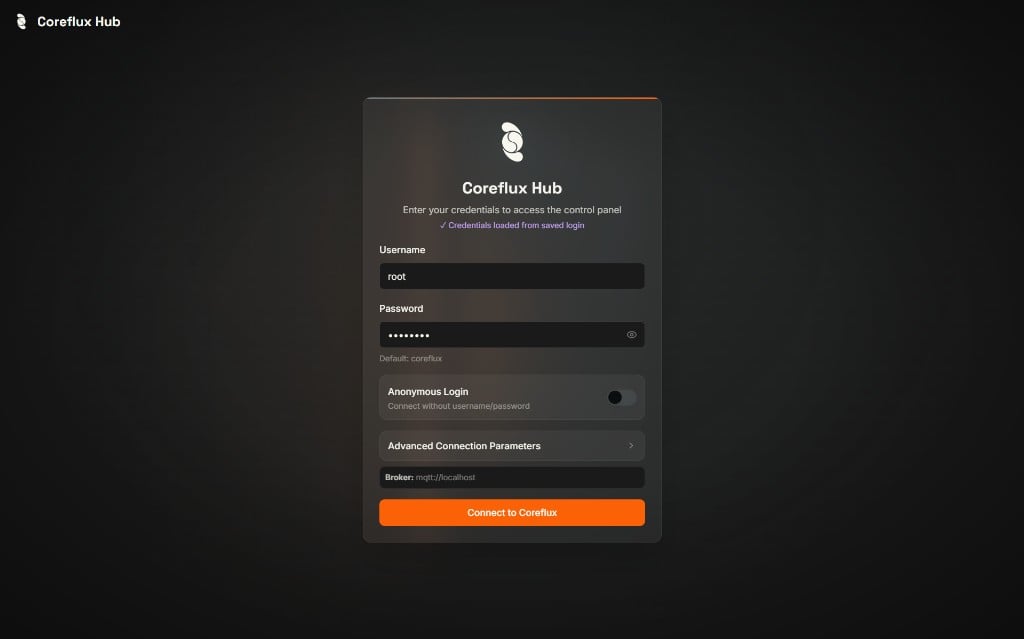
Enter your credentials (the defaults above) on the login page and click Connect to Coreflux.
Coreflux HUB login page
3
Confirm the dashboard loaded
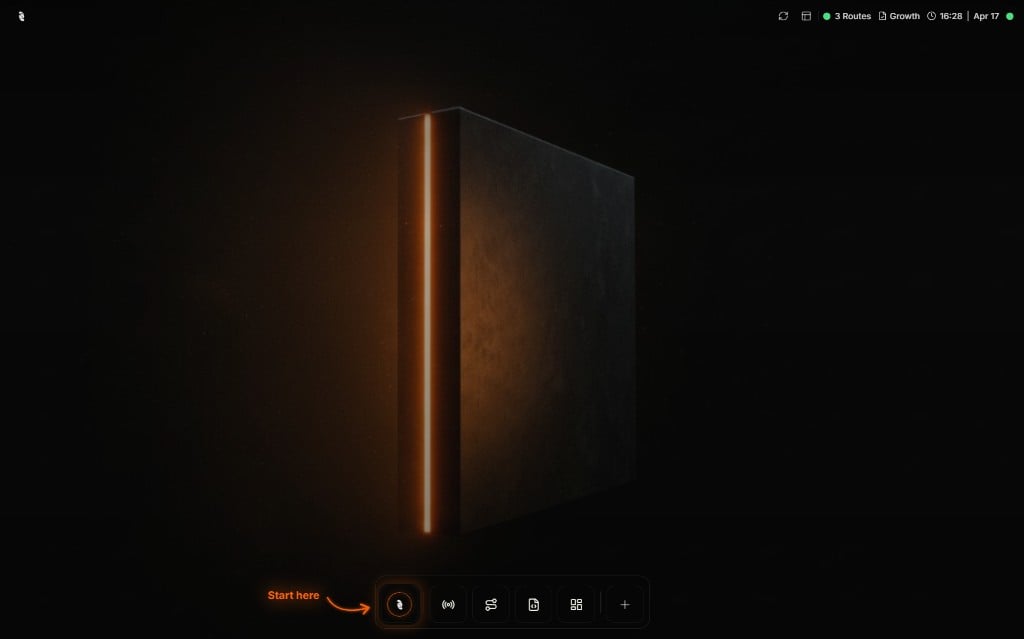
After a successful login, you should see the HUB home screen with the bottom navigation bar.
Coreflux HUB after login — start from the first icon in the navigation bar
The status bar shows route count and license info—the broker is reachable from the HUB.
4
Browse MQTT data
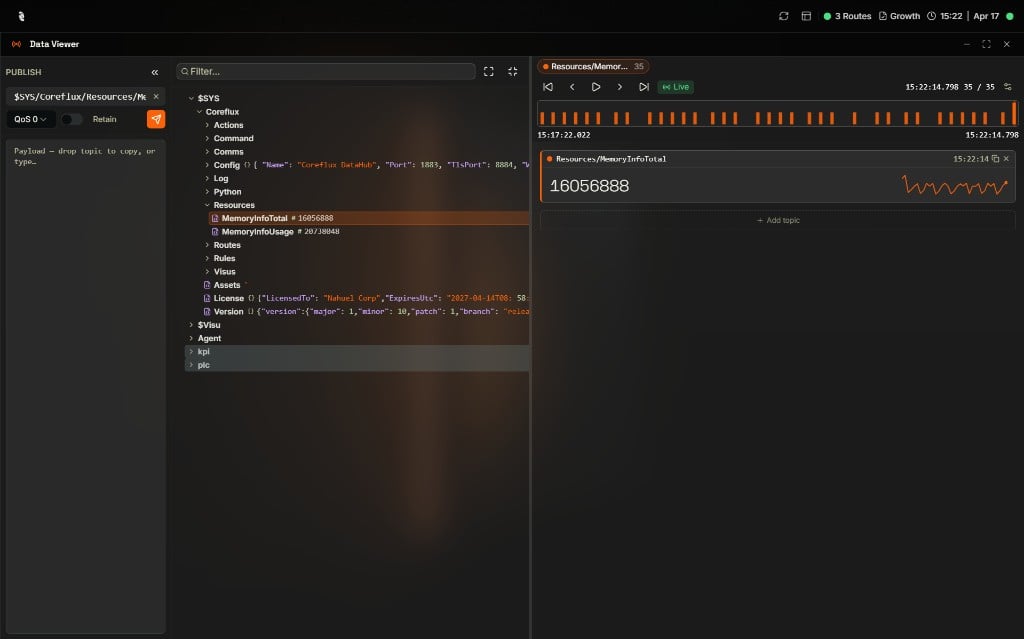
Select MQTT → Data Viewer. Expand $SYS/Coreflux in the Topic Tree—you should see broker topics such as Config, Version, and Resources updating live.
Data Viewer — Topic Tree, Publish panel, and live topic values
1
Open MQTT Explorer
Download MQTT Explorer or use any MQTT client of your choice.
2
Connect to the Broker
Create a new connection with these settings:
Setting
Value
Host
localhost
Port
1883
Username / Password
The default credentials above
3
Check System Topics
Subscribe to $SYS/# to see broker status messages. If you see topics such as $SYS/Coreflux/Version, the broker is running correctly.
You should see Coreflux system topics under $SYS/Coreflux/.
All Versions — Broker isn't running or won't accept connections
If you can’t connect, confirm the broker is actually up using the tooling for your install method.For a Docker install, inspect the container:
# Is the container running?docker ps# View broker logs (live)docker logs -f coreflux_broker# Restart the containerdocker restart coreflux_broker
For a service install, check the service status: sudo systemctl status coreflux (Linux, Raspberry Pi) or sc query CorefluxBroker (Windows).
All Versions — localhost doesn't load the HUB
Symptom: the HUB loads in some environments but not in a Docker-in-VM or remote setup.Fix: use the host’s actual address instead of localhost.
Docker Only — Docker daemon not running
Symptom: the command errors with “cannot connect to the Docker daemon”.Fix: start Docker Desktop (or the Docker service) and run the command again.
Docker Only — Port already in use
Symptom: an error binding a port, e.g. 8080 or 1883 is already allocated.Fix: stop the process using that port, or remap the host side of the port (for example -p 8081:8080).
Docker Only — Container exits immediately
Symptom:docker ps shows nothing after you start the broker.Fix: run docker logs coreflux_broker to see why it exited.
Set up the LoT language extension for syntax highlighting.
Last modified on October 22, 2026
Was this page helpful?
⌘I
{"docsConfig":{"theme":"luma","$schema":"https://mintlify.com/docs.json","name":"Coreflux Documentation","colors":{"primary":"#eb470b","light":"#fc833b","dark":"#c3330b"},"logo":{"light":"https://mintcdn.com/coreflux/7tBTxEEkDVX4IRGH/images/logo/logo_light_docs_glyph.png?fit=max\u0026auto=format\u0026n=7tBTxEEkDVX4IRGH\u0026q=85\u0026s=56a469c914780a6d8c40a4329c0b0879","dark":"https://mintcdn.com/coreflux/7tBTxEEkDVX4IRGH/images/logo/logo_dark_docs_glyph.png?fit=max\u0026auto=format\u0026n=7tBTxEEkDVX4IRGH\u0026q=85\u0026s=b14cc68d9c3e2e98017af536fefc8670"},"favicon":"https://mintcdn.com/coreflux/A0D_IE52Pl2ItO0u/images/favicon.ico?fit=max\u0026auto=format\u0026n=A0D_IE52Pl2ItO0u\u0026q=85\u0026s=e8416ed10b42351291ab50f0dcdb31a8","appearance":{"default":"dark"},"background":{"color":{"light":"#FFFFFF","dark":"#010c10"}},"navbar":{"primary":{"type":"button","label":"Start Free","href":"https://portal.coreflux.org/"}},"footer":{"socials":{"github":"https://github.com/CorefluxCommunity","discord":"https://discord.com/invite/A3pPrptNMm","linkedin":"https://www.linkedin.com/company/coreflux","youtube":"https://www.youtube.com/@Coreflux","website":"https://www.coreflux.org/"}},"fonts":{"family":"Plus Jakarta Sans"},"styling":{"eyebrows":"breadcrumbs","codeblocks":{"theme":{"light":"css-variables","dark":"css-variables"},"languages":{"custom":["/languages/lot.json"]}},"latex":true},"integrations":{"ga4":{"measurementId":"G-1WXMSGSFY6"}},"contextual":{"options":["chatgpt","claude","mcp","cursor","vscode"],"display":"header"},"metadata":{"timestamp":true},"navigation":{"pages":[]}},"deployment":{"deploymentMetadataValue":{"subdomain":"coreflux","hasAudioNarration":false,"actualSubdomain":"coreflux","customDomains":["docs.coreflux.org"],"gitSource":{"type":"github","owner":"corefluxcommunity","repo":"documentation","deployBranch":"main","contentDirectory":"","isPrivate":true,"mountPath":"","label":""},"chroma":{"liveDeploymentHistoryId":"6adf28df1cea9adffa70bbce","collectionId":"54e175c9-f8df-4f82-8be0-ec9bf6a23513","schemaVersion":"v3","latestBuiltDeploymentHistoryId":"6adf28df1cea9adffa70bbce"},"feedback":{"thumbs":true,"agentFeedback":true},"entitlements":{"AI_CHAT":{"status":"ENABLED"},"WEB_MCP":{"status":"ENABLED"},"NARRATION":{"status":"ENABLED"}},"buildId":"6adf28df1cea9adffa70bbce","clientVersion":"0.0.3990","searchFilterCounts":[{"language":"default","tag":"LoT Language","count":608},{"language":"default","tag":"LoT CONNECTOR","count":307},{"language":"default","tag":"REST API apps","count":268},{"language":"default","tag":"LoT ROUTE","count":146},{"language":"default","tag":"Coreflux MQTT Broker","count":82},{"language":"default","tag":"Developing and Managing Coreflux","count":72},{"language":"default","tag":"Coreflux HUB","count":71},{"language":"default","tag":"Best Practices and Usage Patterns","count":54},{"language":"default","tag":"Industrial Routes","count":52},{"language":"default","tag":"Quick Start","count":50}]},"assistantConfig":{"enableAskAiButton":true,"enableStarterQuestions":true,"enableContextualStarterQuestions":true,"enableAskAiSearchBar":true,"deflection":{"enabled":true,"email":"joao.leiriao@coreflux.org","showHelpButton":true}},"basePath":"","hasChatPermissions":true,"hasWebMcpPermissions":true,"toggles":[{"name":"kill-isr","enabled":true,"variant":{"name":"disabled","enabled":false,"feature_enabled":true},"impressionData":false},{"name":"agent-mintlify-slack","enabled":true,"variant":{"name":"disabled","enabled":false,"feature_enabled":true},"impressionData":false},{"name":"editor-v7-file-tree","enabled":true,"variant":{"name":"disabled","enabled":false,"feature_enabled":true},"impressionData":false},{"name":"agent-integrations-settings","enabled":true,"variant":{"name":"disabled","enabled":false,"feature_enabled":true},"impressionData":false},{"name":"automations-pr-grouping","enabled":true,"variant":{"name":"disabled","enabled":false,"feature_enabled":true},"impressionData":false},{"name":"custom-prefix","enabled":true,"variant":{"name":"disabled","enabled":false,"feature_enabled":true},"impressionData":false},{"name":"analytics-v7","enabled":true,"variant":{"name":"disabled","enabled":false,"feature_enabled":true},"impressionData":false},{"name":"user-flows-analytics","enabled":true,"variant":{"name":"disabled","enabled":false,"feature_enabled":true},"impressionData":false},{"name":"no-publish-flow","enabled":true,"variant":{"name":"disabled","enabled":false,"feature_enabled":true},"impressionData":false},{"name":"workos-onboarding","enabled":true,"variant":{"name":"disabled","enabled":false,"feature_enabled":true},"impressionData":false},{"name":"llms-txt-v2","enabled":true,"variant":{"name":"disabled","enabled":false,"feature_enabled":true},"impressionData":false},{"name":"pause-universal-search-reconcile","enabled":true,"variant":{"name":"disabled","enabled":false,"feature_enabled":true},"impressionData":false},{"name":"snapshot-serving-live","enabled":true,"variant":{"name":"disabled","enabled":false,"feature_enabled":true},"impressionData":false},{"name":"stripTemperatureMiddleware","enabled":true,"variant":{"name":"disabled","enabled":false,"feature_enabled":true},"impressionData":false},{"name":"per-site-search-delta","enabled":true,"variant":{"name":"disabled","enabled":false,"feature_enabled":true},"impressionData":false},{"name":"support-platform-pylon-zendesk","enabled":true,"variant":{"name":"disabled","enabled":false,"feature_enabled":true},"impressionData":false},{"name":"snapshot-serving","enabled":true,"variant":{"name":"disabled","enabled":false,"feature_enabled":true},"impressionData":false},{"name":"instant-rollback","enabled":true,"variant":{"name":"disabled","enabled":false,"feature_enabled":true},"impressionData":false},{"name":"granular-notifications-server","enabled":true,"variant":{"name":"disabled","enabled":false,"feature_enabled":true},"impressionData":false},{"name":"granular-notifications","enabled":true,"variant":{"name":"disabled","enabled":false,"feature_enabled":true},"impressionData":false},{"name":"editor-private-page-search","enabled":true,"variant":{"name":"disabled","enabled":false,"feature_enabled":true},"impressionData":false},{"name":"automations-fable","enabled":true,"variant":{"name":"disabled","enabled":false,"feature_enabled":true},"impressionData":false},{"name":"fixed-ai-action-pricing","enabled":true,"variant":{"name":"disabled","enabled":false,"feature_enabled":true},"impressionData":false},{"name":"automation-resolve-merge-conflict","enabled":true,"variant":{"name":"disabled","enabled":false,"feature_enabled":true},"impressionData":false},{"name":"scoped-publishing","enabled":true,"variant":{"name":"disabled","enabled":false,"feature_enabled":true},"impressionData":false},{"name":"mintql","enabled":true,"variant":{"name":"disabled","enabled":false,"feature_enabled":true},"impressionData":false},{"name":"page-level-analytics","enabled":true,"variant":{"name":"disabled","enabled":false,"feature_enabled":true},"impressionData":false},{"name":"editor-version-history-v2","enabled":true,"variant":{"name":"disabled","enabled":false,"feature_enabled":true},"impressionData":false},{"name":"editor-nav-generations","enabled":true,"variant":{"name":"disabled","enabled":false,"feature_enabled":true},"impressionData":false},{"name":"billing-page-v2","enabled":true,"variant":{"name":"disabled","enabled":false,"feature_enabled":true},"impressionData":false},{"name":"workspace-projects","enabled":true,"variant":{"name":"disabled","enabled":false,"feature_enabled":true},"impressionData":false},{"name":"assistant-v5","enabled":true,"variant":{"name":"disabled","enabled":false,"feature_enabled":true},"impressionData":false},{"name":"byok-sep-25","enabled":true,"variant":{"name":"disabled","enabled":false,"feature_enabled":true},"impressionData":false},{"name":"fork-pr-previews","enabled":true,"variant":{"name":"disabled","enabled":false,"feature_enabled":true},"impressionData":false},{"name":"revalidation-jwt","enabled":true,"variant":{"name":"disabled","enabled":false,"feature_enabled":true},"impressionData":false},{"name":"vite-origin","enabled":true,"variant":{"name":"disabled","enabled":false,"feature_enabled":true},"impressionData":false},{"name":"editor-agent-model-picker","enabled":true,"variant":{"name":"disabled","enabled":false,"feature_enabled":true},"impressionData":false},{"name":"billing-updated-9-15","enabled":true,"variant":{"name":"disabled","enabled":false,"feature_enabled":true},"impressionData":false},{"name":"workos-sso-scim","enabled":true,"variant":{"name":"disabled","enabled":false,"feature_enabled":true},"impressionData":false},{"name":"hobby-abuse-scan","enabled":true,"variant":{"name":"disabled","enabled":false,"feature_enabled":true},"impressionData":false},{"name":"dashboard-inbox","enabled":true,"variant":{"name":"disabled","enabled":false,"feature_enabled":true},"impressionData":false},{"name":"workos-signup","enabled":true,"variant":{"name":"disabled","enabled":false,"feature_enabled":true},"impressionData":false},{"name":"workos-enabled","enabled":true,"variant":{"name":"disabled","enabled":false,"feature_enabled":true},"impressionData":false}],"starterQuestions":[{"_id":"695521f38da86e410a42ce70","deploymentId":"69317161c82f64ea7c1871b0","questionText":"What is LoT and how does it work?","status":"active","generatedBy":"manual","createdAt":"2025-12-31T13:15:31.284Z","updatedAt":"2025-12-31T13:15:31.284Z","__v":0},{"_id":"695521ec8da86e410a42ce3c","deploymentId":"69317161c82f64ea7c1871b0","questionText":"How do I install Coreflux locally?","status":"active","generatedBy":"manual","createdAt":"2025-12-31T13:15:24.487Z","updatedAt":"2025-12-31T13:15:24.487Z","__v":0},{"_id":"695521e68da86e410a42ce23","deploymentId":"69317161c82f64ea7c1871b0","questionText":"How do I create my first action?","status":"active","generatedBy":"manual","createdAt":"2025-12-31T13:15:18.088Z","updatedAt":"2025-12-31T13:15:18.088Z","__v":0}],"isAtlas":false,"googleFontsInlined":true},"customCss":[{"filePath":"global.css","href":"/_mintlify/custom/coreflux/0c480ab36c4d46ee/global.css"}],"page":{"pagePath":"v2.2/quick-start/installation","slug":"/v2.2/quick-start/installation","pageMetadata":{"title":"Installation","description":"Get a Coreflux broker running in minutes — one Docker command, or native installs for Windows, Linux, and Raspberry Pi.","keywords":["install","installation","setup","deploy","docker","windows","linux","raspberry pi","download","MQTT broker","MQTTS 8883","binary","container","systemd","Coreflux HUB","HUB beta"],"icon":"download","href":"/v2.2/quick-start/installation"},"description":{"compiledSource":"\"use strict\";\nconst {jsx: _jsx} = arguments[0];\nconst {useMDXComponents: _provideComponents} = arguments[0];\nfunction _createMdxContent(props) {\n const _components = {\n p: \"p\",\n ..._provideComponents(),\n ...props.components\n };\n return _jsx(_components.p, {\n children: \"Get a Coreflux broker running in minutes — one Docker command, or native installs for Windows, Linux, and Raspberry Pi.\"\n });\n}\nfunction MDXContent(props = {}) {\n const {wrapper: MDXLayout} = {\n ..._provideComponents(),\n ...props.components\n };\n return MDXLayout ? _jsx(MDXLayout, {\n ...props,\n children: _jsx(_createMdxContent, {\n ...props\n })\n }) : _createMdxContent(props);\n}\nreturn {\n default: MDXContent\n};\n","frontmatter":{},"scope":{}},"pageType":"default","mdx":{"mdxSource":{"compiledSource":"\"use strict\";const{Fragment:_Fragment,jsx:_jsx,jsxs:_jsxs}=arguments[0];const{useMDXComponents:_provideComponents}=arguments[0];function _createMdxContent(props){const _components={a:`a`,code:`code`,hr:`hr`,li:`li`,ol:`ol`,p:`p`,pre:`pre`,span:`span`,strong:`strong`,tbody:`tbody`,td:`td`,th:`th`,thead:`thead`,tr:`tr`,ul:`ul`,..._provideComponents(),...props.components},{Accordion,AccordionGroup,Card,CardGroup,Check,CodeBlock,Frame,Heading,Note,OptimizedImage,Step,Steps,Tab,Table,Tabs,Tip}=_components;if(!Accordion)_missingMdxReference(`Accordion`,true);if(!AccordionGroup)_missingMdxReference(`AccordionGroup`,true);if(!Card)_missingMdxReference(`Card`,true);if(!CardGroup)_missingMdxReference(`CardGroup`,true);if(!Check)_missingMdxReference(`Check`,true);if(!CodeBlock)_missingMdxReference(`CodeBlock`,true);if(!Frame)_missingMdxReference(`Frame`,true);if(!Heading)_missingMdxReference(`Heading`,true);if(!Note)_missingMdxReference(`Note`,true);if(!OptimizedImage)_missingMdxReference(`OptimizedImage`,true);if(!Step)_missingMdxReference(`Step`,true);if(!Steps)_missingMdxReference(`Steps`,true);if(!Tab)_missingMdxReference(`Tab`,true);if(!Table)_missingMdxReference(`Table`,true);if(!Tabs)_missingMdxReference(`Tabs`,true);if(!Tip)_missingMdxReference(`Tip`,true);return _jsxs(_Fragment,{children:[_jsx(Heading,{level:`2`,id:`don’t-want-to-read-start-here`,children:`Don’t want to read? Start here`}),`\n`,_jsxs(_components.p,{children:[`If you already have `,_jsx(_components.a,{href:`https://docs.docker.com/get-started/get-docker/`,children:`Docker`}),` installed, this single command pulls and runs Coreflux locally—broker, LoT runtime, and `,_jsx(_components.a,{href:`/hub/overview`,children:`Coreflux HUB`}),` included:`]}),`\n`,_jsx(CodeBlock,{filename:``,wrap:`true`,numberOfLines:`1`,language:`shellscript`,children:_jsx(_components.pre,{className:`shiki shiki-themes css-variables css-variables`,style:{backgroundColor:`var(--mint-background)`,\"--shiki-dark-bg\":`var(--mint-background)`,color:`var(--mint-foreground)`,\"--shiki-dark\":`var(--mint-foreground)`},language:`shellscript`,children:_jsxs(_components.code,{language:`shellscript`,numberOfLines:`1`,children:[_jsxs(_components.span,{className:`line`,children:[_jsx(_components.span,{style:{color:`var(--mint-token-function, #0068d6)`,\"--shiki-dark\":`var(--mint-token-function, #0068d6)`},children:`docker`}),_jsx(_components.span,{style:{color:`var(--mint-token-string, #297a3a)`,\"--shiki-dark\":`var(--mint-token-string, #297a3a)`},children:` run`}),_jsx(_components.span,{style:{color:`var(--mint-token-string, #297a3a)`,\"--shiki-dark\":`var(--mint-token-string, #297a3a)`},children:` --pull=always`}),_jsx(_components.span,{style:{color:`var(--mint-token-string, #297a3a)`,\"--shiki-dark\":`var(--mint-token-string, #297a3a)`},children:` -d`}),_jsx(_components.span,{style:{color:`var(--mint-token-string, #297a3a)`,\"--shiki-dark\":`var(--mint-token-string, #297a3a)`},children:` --name`}),_jsx(_components.span,{style:{color:`var(--mint-token-string, #297a3a)`,\"--shiki-dark\":`var(--mint-token-string, #297a3a)`},children:` coreflux_broker`}),_jsx(_components.span,{style:{color:`var(--mint-token-string, #297a3a)`,\"--shiki-dark\":`var(--mint-token-string, #297a3a)`},children:` -p`}),_jsx(_components.span,{style:{color:`var(--mint-token-string, #297a3a)`,\"--shiki-dark\":`var(--mint-token-string, #297a3a)`},children:` 1883:1883`}),_jsx(_components.span,{style:{color:`var(--mint-token-string, #297a3a)`,\"--shiki-dark\":`var(--mint-token-string, #297a3a)`},children:` -p`}),_jsx(_components.span,{style:{color:`var(--mint-token-string, #297a3a)`,\"--shiki-dark\":`var(--mint-token-string, #297a3a)`},children:` 5000:5000`}),_jsx(_components.span,{style:{color:`var(--mint-token-string, #297a3a)`,\"--shiki-dark\":`var(--mint-token-string, #297a3a)`},children:` -p`}),_jsx(_components.span,{style:{color:`var(--mint-token-string, #297a3a)`,\"--shiki-dark\":`var(--mint-token-string, #297a3a)`},children:` 8080:8080`}),_jsx(_components.span,{style:{color:`var(--mint-token-string, #297a3a)`,\"--shiki-dark\":`var(--mint-token-string, #297a3a)`},children:` -p`}),_jsx(_components.span,{style:{color:`var(--mint-token-string, #297a3a)`,\"--shiki-dark\":`var(--mint-token-string, #297a3a)`},children:` 8443:8443`}),_jsx(_components.span,{style:{color:`var(--mint-token-string, #297a3a)`,\"--shiki-dark\":`var(--mint-token-string, #297a3a)`},children:` -v`}),_jsx(_components.span,{style:{color:`var(--mint-token-string, #297a3a)`,\"--shiki-dark\":`var(--mint-token-string, #297a3a)`},children:` project-volume:/etc/project`}),_jsx(_components.span,{style:{color:`var(--mint-token-string, #297a3a)`,\"--shiki-dark\":`var(--mint-token-string, #297a3a)`},children:` coreflux/coreflux-mqtt-broker:latest`})]}),`\n`]})})}),`\n`,_jsx(AccordionGroup,{children:_jsxs(Accordion,{title:`Default login credentials`,id:`default-login-credentials`,children:[_jsx(_components.p,{children:`Every local install method (Docker, Windows, Linux, Raspberry Pi) uses the same defaults:`}),_jsxs(Table,{children:[_jsx(_components.thead,{children:_jsxs(_components.tr,{children:[_jsx(_components.th,{children:`Setting`}),_jsx(_components.th,{children:`Value`})]})}),_jsxs(_components.tbody,{children:[_jsxs(_components.tr,{children:[_jsx(_components.td,{children:`Username`}),_jsx(_components.td,{children:_jsx(_components.code,{children:`root`})})]}),_jsxs(_components.tr,{children:[_jsx(_components.td,{children:`Password`}),_jsx(_components.td,{children:_jsx(_components.code,{children:`coreflux`})})]})]})]})]})}),`\n`,_jsxs(_components.p,{children:[`That’s the whole install. Open the HUB at `,_jsx(_components.code,{children:`http://localhost:8080`}),` and you’re running.`]}),`\n`,_jsx(Tip,{children:_jsxs(_components.p,{children:[_jsx(_components.strong,{children:`Coreflux runs as a single install.`}),` No separate installers, no databases, no message queues, no orchestration needed—just download and run.`]})}),`\n`,_jsx(_components.p,{children:`Want the details or other platforms? Keep reading.`}),`\n`,_jsx(_components.hr,{}),`\n`,_jsx(Heading,{level:`2`,id:`install-coreflux`,children:`Install Coreflux`}),`\n`,_jsxs(_components.p,{children:[`Most people should use `,_jsx(_components.strong,{children:`Docker`}),` (below). Specific hardware or production targets are in the remaining tabs.`]}),`\n`,_jsxs(Tabs,{children:[_jsxs(Tab,{title:`Docker`,icon:`docker`,id:`docker`,\"data-child-tab-ids\":`[\"i-know-docker\",\"new-to-docker\"]`,children:[_jsx(Check,{children:_jsxs(_components.p,{children:[_jsx(_components.strong,{children:`~2 min`}),` if Docker is already installed — broker running locally.`]})}),_jsxs(Tabs,{children:[_jsxs(Tab,{title:`I know Docker`,id:`i-know-docker`,children:[_jsx(_components.p,{children:`Pull and run the broker (Docker fetches the latest image automatically):`}),_jsx(CodeBlock,{filename:``,wrap:`true`,numberOfLines:`1`,language:`shellscript`,children:_jsx(_components.pre,{className:`shiki shiki-themes css-variables css-variables`,style:{backgroundColor:`var(--mint-background)`,\"--shiki-dark-bg\":`var(--mint-background)`,color:`var(--mint-foreground)`,\"--shiki-dark\":`var(--mint-foreground)`},language:`shellscript`,children:_jsxs(_components.code,{language:`shellscript`,numberOfLines:`1`,children:[_jsxs(_components.span,{className:`line`,children:[_jsx(_components.span,{style:{color:`var(--mint-token-function, #0068d6)`,\"--shiki-dark\":`var(--mint-token-function, #0068d6)`},children:`docker`}),_jsx(_components.span,{style:{color:`var(--mint-token-string, #297a3a)`,\"--shiki-dark\":`var(--mint-token-string, #297a3a)`},children:` run`}),_jsx(_components.span,{style:{color:`var(--mint-token-string, #297a3a)`,\"--shiki-dark\":`var(--mint-token-string, #297a3a)`},children:` --pull=always`}),_jsx(_components.span,{style:{color:`var(--mint-token-string, #297a3a)`,\"--shiki-dark\":`var(--mint-token-string, #297a3a)`},children:` -d`}),_jsx(_components.span,{style:{color:`var(--mint-token-string, #297a3a)`,\"--shiki-dark\":`var(--mint-token-string, #297a3a)`},children:` --name`}),_jsx(_components.span,{style:{color:`var(--mint-token-string, #297a3a)`,\"--shiki-dark\":`var(--mint-token-string, #297a3a)`},children:` coreflux_broker`}),_jsx(_components.span,{style:{color:`var(--mint-token-string, #297a3a)`,\"--shiki-dark\":`var(--mint-token-string, #297a3a)`},children:` -p`}),_jsx(_components.span,{style:{color:`var(--mint-token-string, #297a3a)`,\"--shiki-dark\":`var(--mint-token-string, #297a3a)`},children:` 1883:1883`}),_jsx(_components.span,{style:{color:`var(--mint-token-string, #297a3a)`,\"--shiki-dark\":`var(--mint-token-string, #297a3a)`},children:` -p`}),_jsx(_components.span,{style:{color:`var(--mint-token-string, #297a3a)`,\"--shiki-dark\":`var(--mint-token-string, #297a3a)`},children:` 5000:5000`}),_jsx(_components.span,{style:{color:`var(--mint-token-string, #297a3a)`,\"--shiki-dark\":`var(--mint-token-string, #297a3a)`},children:` -p`}),_jsx(_components.span,{style:{color:`var(--mint-token-string, #297a3a)`,\"--shiki-dark\":`var(--mint-token-string, #297a3a)`},children:` 8080:8080`}),_jsx(_components.span,{style:{color:`var(--mint-token-string, #297a3a)`,\"--shiki-dark\":`var(--mint-token-string, #297a3a)`},children:` -p`}),_jsx(_components.span,{style:{color:`var(--mint-token-string, #297a3a)`,\"--shiki-dark\":`var(--mint-token-string, #297a3a)`},children:` 8443:8443`}),_jsx(_components.span,{style:{color:`var(--mint-token-string, #297a3a)`,\"--shiki-dark\":`var(--mint-token-string, #297a3a)`},children:` -v`}),_jsx(_components.span,{style:{color:`var(--mint-token-string, #297a3a)`,\"--shiki-dark\":`var(--mint-token-string, #297a3a)`},children:` project-volume:/etc/project`}),_jsx(_components.span,{style:{color:`var(--mint-token-string, #297a3a)`,\"--shiki-dark\":`var(--mint-token-string, #297a3a)`},children:` coreflux/coreflux-mqtt-broker:latest`})]}),`\n`]})})})]}),_jsxs(Tab,{title:`New to Docker`,id:`new-to-docker`,children:[_jsxs(_components.p,{children:[_jsx(_components.strong,{children:`What is Docker?`}),` Docker runs Coreflux inside a self-contained container, so you don’t install runtimes or dependencies on your machine by hand—everything the broker needs ships in the image. You only need Docker itself installed first. Get it from the `,_jsx(_components.a,{href:`https://docs.docker.com/get-started/get-docker/`,children:`official Docker install page`}),`, then confirm it’s working before you run the broker:`]}),_jsx(CodeBlock,{filename:``,wrap:`true`,numberOfLines:`1`,language:`shellscript`,children:_jsx(_components.pre,{className:`shiki shiki-themes css-variables css-variables`,style:{backgroundColor:`var(--mint-background)`,\"--shiki-dark-bg\":`var(--mint-background)`,color:`var(--mint-foreground)`,\"--shiki-dark\":`var(--mint-foreground)`},language:`shellscript`,children:_jsxs(_components.code,{language:`shellscript`,numberOfLines:`1`,children:[_jsxs(_components.span,{className:`line`,children:[_jsx(_components.span,{style:{color:`var(--mint-token-function, #0068d6)`,\"--shiki-dark\":`var(--mint-token-function, #0068d6)`},children:`docker`}),_jsx(_components.span,{style:{color:`var(--mint-token-string, #297a3a)`,\"--shiki-dark\":`var(--mint-token-string, #297a3a)`},children:` --version`})]}),`\n`]})})}),_jsxs(_components.p,{children:[`Once Docker reports a version, pull and run the broker. Docker fetches the latest image automatically (you can also browse it on `,_jsx(_components.a,{href:`https://hub.docker.com/r/coreflux/coreflux-mqtt-broker`,children:`Docker Hub`}),`):`]}),_jsx(CodeBlock,{filename:``,wrap:`true`,numberOfLines:`1`,language:`shellscript`,children:_jsx(_components.pre,{className:`shiki shiki-themes css-variables css-variables`,style:{backgroundColor:`var(--mint-background)`,\"--shiki-dark-bg\":`var(--mint-background)`,color:`var(--mint-foreground)`,\"--shiki-dark\":`var(--mint-foreground)`},language:`shellscript`,children:_jsxs(_components.code,{language:`shellscript`,numberOfLines:`1`,children:[_jsxs(_components.span,{className:`line`,children:[_jsx(_components.span,{style:{color:`var(--mint-token-function, #0068d6)`,\"--shiki-dark\":`var(--mint-token-function, #0068d6)`},children:`docker`}),_jsx(_components.span,{style:{color:`var(--mint-token-string, #297a3a)`,\"--shiki-dark\":`var(--mint-token-string, #297a3a)`},children:` run`}),_jsx(_components.span,{style:{color:`var(--mint-token-string, #297a3a)`,\"--shiki-dark\":`var(--mint-token-string, #297a3a)`},children:` --pull=always`}),_jsx(_components.span,{style:{color:`var(--mint-token-string, #297a3a)`,\"--shiki-dark\":`var(--mint-token-string, #297a3a)`},children:` -d`}),_jsx(_components.span,{style:{color:`var(--mint-token-string, #297a3a)`,\"--shiki-dark\":`var(--mint-token-string, #297a3a)`},children:` --name`}),_jsx(_components.span,{style:{color:`var(--mint-token-string, #297a3a)`,\"--shiki-dark\":`var(--mint-token-string, #297a3a)`},children:` coreflux_broker`}),_jsx(_components.span,{style:{color:`var(--mint-token-string, #297a3a)`,\"--shiki-dark\":`var(--mint-token-string, #297a3a)`},children:` -p`}),_jsx(_components.span,{style:{color:`var(--mint-token-string, #297a3a)`,\"--shiki-dark\":`var(--mint-token-string, #297a3a)`},children:` 1883:1883`}),_jsx(_components.span,{style:{color:`var(--mint-token-string, #297a3a)`,\"--shiki-dark\":`var(--mint-token-string, #297a3a)`},children:` -p`}),_jsx(_components.span,{style:{color:`var(--mint-token-string, #297a3a)`,\"--shiki-dark\":`var(--mint-token-string, #297a3a)`},children:` 5000:5000`}),_jsx(_components.span,{style:{color:`var(--mint-token-string, #297a3a)`,\"--shiki-dark\":`var(--mint-token-string, #297a3a)`},children:` -p`}),_jsx(_components.span,{style:{color:`var(--mint-token-string, #297a3a)`,\"--shiki-dark\":`var(--mint-token-string, #297a3a)`},children:` 8080:8080`}),_jsx(_components.span,{style:{color:`var(--mint-token-string, #297a3a)`,\"--shiki-dark\":`var(--mint-token-string, #297a3a)`},children:` -p`}),_jsx(_components.span,{style:{color:`var(--mint-token-string, #297a3a)`,\"--shiki-dark\":`var(--mint-token-string, #297a3a)`},children:` 8443:8443`}),_jsx(_components.span,{style:{color:`var(--mint-token-string, #297a3a)`,\"--shiki-dark\":`var(--mint-token-string, #297a3a)`},children:` -v`}),_jsx(_components.span,{style:{color:`var(--mint-token-string, #297a3a)`,\"--shiki-dark\":`var(--mint-token-string, #297a3a)`},children:` project-volume:/etc/project`}),_jsx(_components.span,{style:{color:`var(--mint-token-string, #297a3a)`,\"--shiki-dark\":`var(--mint-token-string, #297a3a)`},children:` coreflux/coreflux-mqtt-broker:latest`})]}),`\n`]})})})]})]}),_jsxs(Table,{children:[_jsx(_components.thead,{children:_jsxs(_components.tr,{children:[_jsx(_components.th,{children:`Port`}),_jsx(_components.th,{children:`Protocol`}),_jsx(_components.th,{children:`Description`})]})}),_jsxs(_components.tbody,{children:[_jsxs(_components.tr,{children:[_jsx(_components.td,{\"data-numeric\":`true`,children:_jsx(_components.code,{children:`1883`})}),_jsx(_components.td,{children:`TCP`}),_jsx(_components.td,{children:`MQTT (unencrypted)`})]}),_jsxs(_components.tr,{children:[_jsx(_components.td,{\"data-numeric\":`true`,children:_jsx(_components.code,{children:`5000`})}),_jsx(_components.td,{children:`WebSocket`}),_jsx(_components.td,{children:`WebSocket connections`})]}),_jsxs(_components.tr,{children:[_jsx(_components.td,{\"data-numeric\":`true`,children:_jsx(_components.code,{children:`8080`})}),_jsx(_components.td,{children:`HTTP`}),_jsxs(_components.td,{children:[_jsx(_components.a,{href:`/hub/overview`,children:`Coreflux HUB`}),` (unencrypted)`]})]}),_jsxs(_components.tr,{children:[_jsx(_components.td,{\"data-numeric\":`true`,children:_jsx(_components.code,{children:`8443`})}),_jsx(_components.td,{children:`HTTPS`}),_jsxs(_components.td,{children:[_jsx(_components.a,{href:`/hub/overview`,children:`Coreflux HUB`}),` (TLS)`]})]})]})]}),_jsxs(_components.p,{children:[`Open the HUB at `,_jsx(_components.code,{children:`http://localhost:8080`}),` (or `,_jsx(_components.code,{children:`https://localhost:8443`}),` with TLS) after the container starts.`]}),_jsxs(_components.p,{children:[`That’s it—Coreflux is now running locally and ready to use. Confirm it works under `,_jsx(_components.a,{href:`#verify-installation`,children:`Verify Installation`}),` below.`]}),_jsxs(AccordionGroup,{children:[_jsxs(Accordion,{title:`What does this command do?`,id:`what-does-this-command-do`,children:[_jsx(_components.p,{children:`Breaking the command down piece by piece:`}),_jsxs(_components.ul,{children:[`\n`,_jsxs(_components.li,{children:[_jsx(_components.code,{children:`--pull=always`}),` — always fetch the latest broker image before starting, so you never run a stale version.`]}),`\n`,_jsxs(_components.li,{children:[_jsx(_components.code,{children:`-d`}),` — runs the container `,_jsx(_components.strong,{children:`detached`}),` (in the background), so your terminal stays free.`]}),`\n`,_jsxs(_components.li,{children:[_jsx(_components.code,{children:`--name coreflux_broker`}),` — names the container `,_jsx(_components.code,{children:`coreflux_broker`}),` so you can reference it later (for example `,_jsx(_components.code,{children:`docker logs coreflux_broker`}),`).`]}),`\n`,_jsxs(_components.li,{children:[_jsx(_components.code,{children:`-p 1883:1883 -p 5000:5000 -p 8080:8080 -p 8443:8443`}),` — each `,_jsx(_components.code,{children:`-p host:container`}),` maps a port on your machine to the same port inside the container. See the port table above for what each one is for.`]}),`\n`,_jsxs(_components.li,{children:[_jsx(_components.code,{children:`-v project-volume:/etc/project`}),` — mounts a named volume so your project (LoT, routes, configuration) persists across restarts and image updates. The mount persists your broker project at `,_jsx(_components.code,{children:`/etc/project`}),` across container restarts, and Docker creates the named volume on first run.`]}),`\n`,_jsxs(_components.li,{children:[_jsx(_components.code,{children:`coreflux/coreflux-mqtt-broker:latest`}),` — the image to run, pulled from Docker Hub.`]}),`\n`]})]}),_jsxs(Accordion,{title:`TLS/SSL Ports (when using certificates)`,id:`tls-ssl-ports-when-using-certificates`,children:[_jsx(_components.p,{children:`If you configure TLS certificates, expose these additional ports:`}),_jsx(CodeBlock,{filename:``,wrap:`true`,numberOfLines:`1`,language:`shellscript`,children:_jsx(_components.pre,{className:`shiki shiki-themes css-variables css-variables`,style:{backgroundColor:`var(--mint-background)`,\"--shiki-dark-bg\":`var(--mint-background)`,color:`var(--mint-foreground)`,\"--shiki-dark\":`var(--mint-foreground)`},language:`shellscript`,children:_jsxs(_components.code,{language:`shellscript`,numberOfLines:`1`,children:[_jsxs(_components.span,{className:`line`,children:[_jsx(_components.span,{style:{color:`var(--mint-token-function, #0068d6)`,\"--shiki-dark\":`var(--mint-token-function, #0068d6)`},children:`docker`}),_jsx(_components.span,{style:{color:`var(--mint-token-string, #297a3a)`,\"--shiki-dark\":`var(--mint-token-string, #297a3a)`},children:` run`}),_jsx(_components.span,{style:{color:`var(--mint-token-string, #297a3a)`,\"--shiki-dark\":`var(--mint-token-string, #297a3a)`},children:` --pull=always`}),_jsx(_components.span,{style:{color:`var(--mint-token-string, #297a3a)`,\"--shiki-dark\":`var(--mint-token-string, #297a3a)`},children:` -d`}),_jsx(_components.span,{style:{color:`var(--mint-token-string, #297a3a)`,\"--shiki-dark\":`var(--mint-token-string, #297a3a)`},children:` --name`}),_jsx(_components.span,{style:{color:`var(--mint-token-string, #297a3a)`,\"--shiki-dark\":`var(--mint-token-string, #297a3a)`},children:` coreflux_broker`}),_jsx(_components.span,{style:{color:`var(--mint-token-string, #297a3a)`,\"--shiki-dark\":`var(--mint-token-string, #297a3a)`},children:` -p`}),_jsx(_components.span,{style:{color:`var(--mint-token-string, #297a3a)`,\"--shiki-dark\":`var(--mint-token-string, #297a3a)`},children:` 1883:1883`}),_jsx(_components.span,{style:{color:`var(--mint-token-string, #297a3a)`,\"--shiki-dark\":`var(--mint-token-string, #297a3a)`},children:` -p`}),_jsx(_components.span,{style:{color:`var(--mint-token-string, #297a3a)`,\"--shiki-dark\":`var(--mint-token-string, #297a3a)`},children:` 5000:5000`}),_jsx(_components.span,{style:{color:`var(--mint-token-string, #297a3a)`,\"--shiki-dark\":`var(--mint-token-string, #297a3a)`},children:` -p`}),_jsx(_components.span,{style:{color:`var(--mint-token-string, #297a3a)`,\"--shiki-dark\":`var(--mint-token-string, #297a3a)`},children:` 8080:8080`}),_jsx(_components.span,{style:{color:`var(--mint-token-string, #297a3a)`,\"--shiki-dark\":`var(--mint-token-string, #297a3a)`},children:` -p`}),_jsx(_components.span,{style:{color:`var(--mint-token-string, #297a3a)`,\"--shiki-dark\":`var(--mint-token-string, #297a3a)`},children:` 8443:8443`}),_jsx(_components.span,{style:{color:`var(--mint-token-string, #297a3a)`,\"--shiki-dark\":`var(--mint-token-string, #297a3a)`},children:` -p`}),_jsx(_components.span,{style:{color:`var(--mint-token-string, #297a3a)`,\"--shiki-dark\":`var(--mint-token-string, #297a3a)`},children:` 8883:8883`}),_jsx(_components.span,{style:{color:`var(--mint-token-string, #297a3a)`,\"--shiki-dark\":`var(--mint-token-string, #297a3a)`},children:` -p`}),_jsx(_components.span,{style:{color:`var(--mint-token-string, #297a3a)`,\"--shiki-dark\":`var(--mint-token-string, #297a3a)`},children:` 443:443`}),_jsx(_components.span,{style:{color:`var(--mint-token-string, #297a3a)`,\"--shiki-dark\":`var(--mint-token-string, #297a3a)`},children:` -v`}),_jsx(_components.span,{style:{color:`var(--mint-token-string, #297a3a)`,\"--shiki-dark\":`var(--mint-token-string, #297a3a)`},children:` project-volume:/etc/project`}),_jsx(_components.span,{style:{color:`var(--mint-token-string, #297a3a)`,\"--shiki-dark\":`var(--mint-token-string, #297a3a)`},children:` coreflux/coreflux-mqtt-broker:latest`})]}),`\n`]})})}),_jsxs(Table,{children:[_jsx(_components.thead,{children:_jsxs(_components.tr,{children:[_jsx(_components.th,{children:`Port`}),_jsx(_components.th,{children:`Protocol`}),_jsx(_components.th,{children:`Description`})]})}),_jsxs(_components.tbody,{children:[_jsxs(_components.tr,{children:[_jsx(_components.td,{\"data-numeric\":`true`,children:_jsx(_components.code,{children:`8883`})}),_jsx(_components.td,{children:`TCP/TLS`}),_jsx(_components.td,{children:`MQTT over TLS`})]}),_jsxs(_components.tr,{children:[_jsx(_components.td,{\"data-numeric\":`true`,children:_jsx(_components.code,{children:`443`})}),_jsx(_components.td,{children:`WSS`}),_jsx(_components.td,{children:`WebSocket over TLS`})]})]})]}),_jsxs(_components.p,{children:[`See `,_jsx(_components.a,{href:`/latest/mqtt-broker/configuration`,children:`Broker Configuration`}),` for TLS setup.`]})]})]})]}),_jsxs(Tab,{title:`Windows`,icon:`windows`,id:`windows`,children:[_jsx(Check,{children:_jsxs(_components.p,{children:[_jsx(_components.strong,{children:`~10 min`}),` — broker running as a Windows service.`]})}),_jsxs(_components.p,{children:[`Download and install Coreflux, then register it as a Windows service using the native `,_jsx(_components.code,{children:`sc`}),` tool.`]}),_jsxs(_components.ol,{children:[`\n`,_jsxs(_components.li,{children:[`Download the Windows zip from `,_jsx(_components.a,{href:`https://www.coreflux.org`,children:`coreflux.org > Start Free`})]}),`\n`,_jsxs(_components.li,{children:[`Extract the zip file to your preferred location (e.g., `,_jsx(_components.code,{children:`C:\\\\Coreflux`}),`)`]}),`\n`,_jsxs(_components.li,{children:[`Open Command Prompt `,_jsx(_components.strong,{children:`as Administrator`}),` and run:`]}),`\n`]}),_jsx(CodeBlock,{filename:``,wrap:`true`,numberOfLines:`3`,language:`vb`,children:_jsx(_components.pre,{className:`shiki shiki-themes css-variables css-variables`,style:{backgroundColor:`var(--mint-background)`,\"--shiki-dark-bg\":`var(--mint-background)`,color:`var(--mint-foreground)`,\"--shiki-dark\":`var(--mint-foreground)`},language:`vb`,children:_jsxs(_components.code,{language:`vb`,numberOfLines:`3`,children:[_jsxs(_components.span,{className:`line`,children:[_jsx(_components.span,{style:{color:`var(--mint-foreground)`,\"--shiki-dark\":`var(--mint-foreground)`},children:`sc create CorefluxBroker binPath`}),_jsx(_components.span,{style:{color:`var(--mint-token-keyword, #bd2864)`,\"--shiki-dark\":`var(--mint-token-keyword, #bd2864)`},children:`=`}),_jsx(_components.span,{style:{color:`var(--mint-token-string-expression, #297a3a)`,\"--shiki-dark\":`var(--mint-token-string-expression, #297a3a)`},children:` \"C:\\\\Coreflux\\\\CorefluxMQTTBroker.exe\"`}),_jsx(_components.span,{style:{color:`var(--mint-foreground)`,\"--shiki-dark\":`var(--mint-foreground)`},children:` start`}),_jsx(_components.span,{style:{color:`var(--mint-token-keyword, #bd2864)`,\"--shiki-dark\":`var(--mint-token-keyword, #bd2864)`},children:`=`}),_jsx(_components.span,{style:{color:`var(--mint-foreground)`,\"--shiki-dark\":`var(--mint-foreground)`},children:` auto DisplayName`}),_jsx(_components.span,{style:{color:`var(--mint-token-keyword, #bd2864)`,\"--shiki-dark\":`var(--mint-token-keyword, #bd2864)`},children:`=`}),_jsx(_components.span,{style:{color:`var(--mint-token-string-expression, #297a3a)`,\"--shiki-dark\":`var(--mint-token-string-expression, #297a3a)`},children:` \"Coreflux MQTT Broker\"`})]}),`\n`,_jsxs(_components.span,{className:`line`,children:[_jsx(_components.span,{style:{color:`var(--mint-foreground)`,\"--shiki-dark\":`var(--mint-foreground)`},children:`sc description CorefluxBroker `}),_jsx(_components.span,{style:{color:`var(--mint-token-string-expression, #297a3a)`,\"--shiki-dark\":`var(--mint-token-string-expression, #297a3a)`},children:`\"Coreflux MQTT Broker Service\"`})]}),`\n`,_jsx(_components.span,{className:`line`,children:_jsx(_components.span,{style:{color:`var(--mint-foreground)`,\"--shiki-dark\":`var(--mint-foreground)`},children:`sc start CorefluxBroker`})}),`\n`]})})}),_jsx(_components.p,{children:`That’s it—the service is now registered, set to start automatically on boot, and running, so Coreflux is ready to use.`}),_jsxs(AccordionGroup,{children:[_jsxs(Accordion,{title:`Manage the service`,id:`manage-the-service`,children:[_jsx(_components.p,{children:`Use these native Windows commands to control the service:`}),_jsx(CodeBlock,{filename:``,wrap:`true`,numberOfLines:`3`,language:`vb`,children:_jsx(_components.pre,{className:`shiki shiki-themes css-variables css-variables`,style:{backgroundColor:`var(--mint-background)`,\"--shiki-dark-bg\":`var(--mint-background)`,color:`var(--mint-foreground)`,\"--shiki-dark\":`var(--mint-foreground)`},language:`vb`,children:_jsxs(_components.code,{language:`vb`,numberOfLines:`3`,children:[_jsx(_components.span,{className:`line`,children:_jsx(_components.span,{style:{color:`var(--mint-foreground)`,\"--shiki-dark\":`var(--mint-foreground)`},children:`sc stop CorefluxBroker`})}),`\n`,_jsx(_components.span,{className:`line`,children:_jsx(_components.span,{style:{color:`var(--mint-foreground)`,\"--shiki-dark\":`var(--mint-foreground)`},children:`sc start CorefluxBroker`})}),`\n`,_jsx(_components.span,{className:`line`,children:_jsx(_components.span,{style:{color:`var(--mint-foreground)`,\"--shiki-dark\":`var(--mint-foreground)`},children:`sc query CorefluxBroker`})}),`\n`]})})}),_jsxs(_components.p,{children:[`You can also manage it from `,_jsx(_components.strong,{children:`Services`}),` (`,_jsx(_components.code,{children:`services.msc`}),`) in Windows.`]})]}),_jsxs(Accordion,{title:`Uninstall the service`,id:`uninstall-the-service`,children:[_jsx(_components.p,{children:`Stop and remove the service with:`}),_jsx(CodeBlock,{filename:``,wrap:`true`,numberOfLines:`2`,language:`vb`,children:_jsx(_components.pre,{className:`shiki shiki-themes css-variables css-variables`,style:{backgroundColor:`var(--mint-background)`,\"--shiki-dark-bg\":`var(--mint-background)`,color:`var(--mint-foreground)`,\"--shiki-dark\":`var(--mint-foreground)`},language:`vb`,children:_jsxs(_components.code,{language:`vb`,numberOfLines:`2`,children:[_jsx(_components.span,{className:`line`,children:_jsx(_components.span,{style:{color:`var(--mint-foreground)`,\"--shiki-dark\":`var(--mint-foreground)`},children:`sc stop CorefluxBroker`})}),`\n`,_jsxs(_components.span,{className:`line`,children:[_jsx(_components.span,{style:{color:`var(--mint-foreground)`,\"--shiki-dark\":`var(--mint-foreground)`},children:`sc `}),_jsx(_components.span,{style:{color:`var(--mint-token-keyword, #bd2864)`,\"--shiki-dark\":`var(--mint-token-keyword, #bd2864)`},children:`delete`}),_jsx(_components.span,{style:{color:`var(--mint-foreground)`,\"--shiki-dark\":`var(--mint-foreground)`},children:` CorefluxBroker`})]}),`\n`]})})})]})]})]}),_jsxs(Tab,{title:`Linux`,icon:`linux`,id:`linux`,children:[_jsx(Check,{children:_jsxs(_components.p,{children:[_jsx(_components.strong,{children:`~10 min`}),` — broker running locally or as a systemd service.`]})}),_jsx(_components.p,{children:`Download and run the Coreflux binary on Linux x64 systems.`}),_jsx(_components.p,{children:_jsx(_components.strong,{children:`Quick Start (foreground):`})}),_jsxs(_components.ol,{children:[`\n`,_jsxs(_components.li,{children:[`Download the Linux zip from `,_jsx(_components.a,{href:`https://www.coreflux.org`,children:`coreflux.org > Start Free`})]}),`\n`,_jsxs(_components.li,{children:[`Extract and run (replace `,_jsx(_components.code,{children:`\u003cdownloaded-file>`}),` with your actual filename):`]}),`\n`]}),_jsx(CodeBlock,{filename:``,wrap:`true`,numberOfLines:`4`,language:`shellscript`,children:_jsx(_components.pre,{className:`shiki shiki-themes css-variables css-variables`,style:{backgroundColor:`var(--mint-background)`,\"--shiki-dark-bg\":`var(--mint-background)`,color:`var(--mint-foreground)`,\"--shiki-dark\":`var(--mint-foreground)`},language:`shellscript`,children:_jsxs(_components.code,{language:`shellscript`,numberOfLines:`4`,children:[_jsxs(_components.span,{className:`line`,children:[_jsx(_components.span,{style:{color:`var(--mint-token-function, #0068d6)`,\"--shiki-dark\":`var(--mint-token-function, #0068d6)`},children:`unzip`}),_jsx(_components.span,{style:{color:`var(--mint-token-keyword, #bd2864)`,\"--shiki-dark\":`var(--mint-token-keyword, #bd2864)`},children:` \u003c`}),_jsx(_components.span,{style:{color:`var(--mint-token-string, #297a3a)`,\"--shiki-dark\":`var(--mint-token-string, #297a3a)`},children:`downloaded-fil`}),_jsx(_components.span,{style:{color:`var(--mint-token-string, #297a3a)`,\"--shiki-dark\":`var(--mint-token-string, #297a3a)`},children:`e`}),_jsx(_components.span,{style:{color:`var(--mint-token-keyword, #bd2864)`,\"--shiki-dark\":`var(--mint-token-keyword, #bd2864)`},children:`>`}),_jsx(_components.span,{style:{color:`var(--mint-token-string, #297a3a)`,\"--shiki-dark\":`var(--mint-token-string, #297a3a)`},children:`.zip`}),_jsx(_components.span,{style:{color:`var(--mint-token-string, #297a3a)`,\"--shiki-dark\":`var(--mint-token-string, #297a3a)`},children:` -d`}),_jsx(_components.span,{style:{color:`var(--mint-token-string, #297a3a)`,\"--shiki-dark\":`var(--mint-token-string, #297a3a)`},children:` coreflux`})]}),`\n`,_jsxs(_components.span,{className:`line`,children:[_jsx(_components.span,{style:{color:`var(--mint-token-function, #0068d6)`,\"--shiki-dark\":`var(--mint-token-function, #0068d6)`},children:`cd`}),_jsx(_components.span,{style:{color:`var(--mint-token-string, #297a3a)`,\"--shiki-dark\":`var(--mint-token-string, #297a3a)`},children:` coreflux`})]}),`\n`,_jsxs(_components.span,{className:`line`,children:[_jsx(_components.span,{style:{color:`var(--mint-token-function, #0068d6)`,\"--shiki-dark\":`var(--mint-token-function, #0068d6)`},children:`chmod`}),_jsx(_components.span,{style:{color:`var(--mint-token-string, #297a3a)`,\"--shiki-dark\":`var(--mint-token-string, #297a3a)`},children:` +x`}),_jsx(_components.span,{style:{color:`var(--mint-token-string, #297a3a)`,\"--shiki-dark\":`var(--mint-token-string, #297a3a)`},children:` CorefluxMQTTBroker`})]}),`\n`,_jsx(_components.span,{className:`line`,children:_jsx(_components.span,{style:{color:`var(--mint-token-function, #0068d6)`,\"--shiki-dark\":`var(--mint-token-function, #0068d6)`},children:`./CorefluxMQTTBroker`})}),`\n`]})})}),_jsx(_components.p,{children:_jsx(_components.strong,{children:`Production Setup (systemd service):`})}),_jsxs(_components.ol,{children:[`\n`,_jsx(_components.li,{children:`Create a service file:`}),`\n`]}),_jsx(CodeBlock,{filename:``,wrap:`true`,numberOfLines:`1`,language:`shellscript`,children:_jsx(_components.pre,{className:`shiki shiki-themes css-variables css-variables`,style:{backgroundColor:`var(--mint-background)`,\"--shiki-dark-bg\":`var(--mint-background)`,color:`var(--mint-foreground)`,\"--shiki-dark\":`var(--mint-foreground)`},language:`shellscript`,children:_jsxs(_components.code,{language:`shellscript`,numberOfLines:`1`,children:[_jsxs(_components.span,{className:`line`,children:[_jsx(_components.span,{style:{color:`var(--mint-token-function, #0068d6)`,\"--shiki-dark\":`var(--mint-token-function, #0068d6)`},children:`sudo`}),_jsx(_components.span,{style:{color:`var(--mint-token-string, #297a3a)`,\"--shiki-dark\":`var(--mint-token-string, #297a3a)`},children:` nano`}),_jsx(_components.span,{style:{color:`var(--mint-token-string, #297a3a)`,\"--shiki-dark\":`var(--mint-token-string, #297a3a)`},children:` /etc/systemd/system/coreflux.service`})]}),`\n`]})})}),_jsxs(_components.ol,{start:`2`,children:[`\n`,_jsx(_components.li,{children:`Add this configuration (adjust paths as needed):`}),`\n`]}),_jsx(CodeBlock,{filename:``,wrap:`true`,numberOfLines:`14`,language:`ini`,children:_jsx(_components.pre,{className:`shiki shiki-themes css-variables css-variables`,style:{backgroundColor:`var(--mint-background)`,\"--shiki-dark-bg\":`var(--mint-background)`,color:`var(--mint-foreground)`,\"--shiki-dark\":`var(--mint-foreground)`},language:`ini`,children:_jsxs(_components.code,{language:`ini`,numberOfLines:`14`,children:[_jsx(_components.span,{className:`line`,children:_jsx(_components.span,{style:{color:`var(--mint-foreground)`,\"--shiki-dark\":`var(--mint-foreground)`},children:`[Unit]`})}),`\n`,_jsxs(_components.span,{className:`line`,children:[_jsx(_components.span,{style:{color:`var(--mint-token-keyword, #bd2864)`,\"--shiki-dark\":`var(--mint-token-keyword, #bd2864)`},children:`Description=`}),_jsx(_components.span,{style:{color:`var(--mint-foreground)`,\"--shiki-dark\":`var(--mint-foreground)`},children:`Coreflux MQTT Broker`})]}),`\n`,_jsxs(_components.span,{className:`line`,children:[_jsx(_components.span,{style:{color:`var(--mint-token-keyword, #bd2864)`,\"--shiki-dark\":`var(--mint-token-keyword, #bd2864)`},children:`After=`}),_jsx(_components.span,{style:{color:`var(--mint-foreground)`,\"--shiki-dark\":`var(--mint-foreground)`},children:`network.target`})]}),`\n`,_jsx(_components.span,{className:`line`}),`\n`,_jsx(_components.span,{className:`line`,children:_jsx(_components.span,{style:{color:`var(--mint-foreground)`,\"--shiki-dark\":`var(--mint-foreground)`},children:`[Service]`})}),`\n`,_jsxs(_components.span,{className:`line`,children:[_jsx(_components.span,{style:{color:`var(--mint-token-keyword, #bd2864)`,\"--shiki-dark\":`var(--mint-token-keyword, #bd2864)`},children:`Type=`}),_jsx(_components.span,{style:{color:`var(--mint-foreground)`,\"--shiki-dark\":`var(--mint-foreground)`},children:`simple`})]}),`\n`,_jsxs(_components.span,{className:`line`,children:[_jsx(_components.span,{style:{color:`var(--mint-token-keyword, #bd2864)`,\"--shiki-dark\":`var(--mint-token-keyword, #bd2864)`},children:`User=`}),_jsx(_components.span,{style:{color:`var(--mint-foreground)`,\"--shiki-dark\":`var(--mint-foreground)`},children:`root`})]}),`\n`,_jsxs(_components.span,{className:`line`,children:[_jsx(_components.span,{style:{color:`var(--mint-token-keyword, #bd2864)`,\"--shiki-dark\":`var(--mint-token-keyword, #bd2864)`},children:`WorkingDirectory=`}),_jsx(_components.span,{style:{color:`var(--mint-foreground)`,\"--shiki-dark\":`var(--mint-foreground)`},children:`/opt/coreflux`})]}),`\n`,_jsxs(_components.span,{className:`line`,children:[_jsx(_components.span,{style:{color:`var(--mint-token-keyword, #bd2864)`,\"--shiki-dark\":`var(--mint-token-keyword, #bd2864)`},children:`ExecStart=`}),_jsx(_components.span,{style:{color:`var(--mint-foreground)`,\"--shiki-dark\":`var(--mint-foreground)`},children:`/opt/coreflux/CorefluxMQTTBroker`})]}),`\n`,_jsxs(_components.span,{className:`line`,children:[_jsx(_components.span,{style:{color:`var(--mint-token-keyword, #bd2864)`,\"--shiki-dark\":`var(--mint-token-keyword, #bd2864)`},children:`Restart=`}),_jsx(_components.span,{style:{color:`var(--mint-foreground)`,\"--shiki-dark\":`var(--mint-foreground)`},children:`always`})]}),`\n`,_jsxs(_components.span,{className:`line`,children:[_jsx(_components.span,{style:{color:`var(--mint-token-keyword, #bd2864)`,\"--shiki-dark\":`var(--mint-token-keyword, #bd2864)`},children:`RestartSec=`}),_jsx(_components.span,{style:{color:`var(--mint-foreground)`,\"--shiki-dark\":`var(--mint-foreground)`},children:`5`})]}),`\n`,_jsx(_components.span,{className:`line`}),`\n`,_jsx(_components.span,{className:`line`,children:_jsx(_components.span,{style:{color:`var(--mint-foreground)`,\"--shiki-dark\":`var(--mint-foreground)`},children:`[Install]`})}),`\n`,_jsxs(_components.span,{className:`line`,children:[_jsx(_components.span,{style:{color:`var(--mint-token-keyword, #bd2864)`,\"--shiki-dark\":`var(--mint-token-keyword, #bd2864)`},children:`WantedBy=`}),_jsx(_components.span,{style:{color:`var(--mint-foreground)`,\"--shiki-dark\":`var(--mint-foreground)`},children:`multi-user.target`})]}),`\n`]})})}),_jsxs(_components.ol,{start:`3`,children:[`\n`,_jsx(_components.li,{children:`Enable and start the service:`}),`\n`]}),_jsx(CodeBlock,{filename:``,wrap:`true`,numberOfLines:`3`,language:`shellscript`,children:_jsx(_components.pre,{className:`shiki shiki-themes css-variables css-variables`,style:{backgroundColor:`var(--mint-background)`,\"--shiki-dark-bg\":`var(--mint-background)`,color:`var(--mint-foreground)`,\"--shiki-dark\":`var(--mint-foreground)`},language:`shellscript`,children:_jsxs(_components.code,{language:`shellscript`,numberOfLines:`3`,children:[_jsxs(_components.span,{className:`line`,children:[_jsx(_components.span,{style:{color:`var(--mint-token-function, #0068d6)`,\"--shiki-dark\":`var(--mint-token-function, #0068d6)`},children:`sudo`}),_jsx(_components.span,{style:{color:`var(--mint-token-string, #297a3a)`,\"--shiki-dark\":`var(--mint-token-string, #297a3a)`},children:` systemctl`}),_jsx(_components.span,{style:{color:`var(--mint-token-string, #297a3a)`,\"--shiki-dark\":`var(--mint-token-string, #297a3a)`},children:` daemon-reload`})]}),`\n`,_jsxs(_components.span,{className:`line`,children:[_jsx(_components.span,{style:{color:`var(--mint-token-function, #0068d6)`,\"--shiki-dark\":`var(--mint-token-function, #0068d6)`},children:`sudo`}),_jsx(_components.span,{style:{color:`var(--mint-token-string, #297a3a)`,\"--shiki-dark\":`var(--mint-token-string, #297a3a)`},children:` systemctl`}),_jsx(_components.span,{style:{color:`var(--mint-token-string, #297a3a)`,\"--shiki-dark\":`var(--mint-token-string, #297a3a)`},children:` enable`}),_jsx(_components.span,{style:{color:`var(--mint-token-string, #297a3a)`,\"--shiki-dark\":`var(--mint-token-string, #297a3a)`},children:` coreflux`})]}),`\n`,_jsxs(_components.span,{className:`line`,children:[_jsx(_components.span,{style:{color:`var(--mint-token-function, #0068d6)`,\"--shiki-dark\":`var(--mint-token-function, #0068d6)`},children:`sudo`}),_jsx(_components.span,{style:{color:`var(--mint-token-string, #297a3a)`,\"--shiki-dark\":`var(--mint-token-string, #297a3a)`},children:` systemctl`}),_jsx(_components.span,{style:{color:`var(--mint-token-string, #297a3a)`,\"--shiki-dark\":`var(--mint-token-string, #297a3a)`},children:` start`}),_jsx(_components.span,{style:{color:`var(--mint-token-string, #297a3a)`,\"--shiki-dark\":`var(--mint-token-string, #297a3a)`},children:` coreflux`})]}),`\n`]})})}),_jsxs(_components.ol,{start:`4`,children:[`\n`,_jsx(_components.li,{children:`Check the status:`}),`\n`]}),_jsx(CodeBlock,{filename:``,wrap:`true`,numberOfLines:`1`,language:`shellscript`,children:_jsx(_components.pre,{className:`shiki shiki-themes css-variables css-variables`,style:{backgroundColor:`var(--mint-background)`,\"--shiki-dark-bg\":`var(--mint-background)`,color:`var(--mint-foreground)`,\"--shiki-dark\":`var(--mint-foreground)`},language:`shellscript`,children:_jsxs(_components.code,{language:`shellscript`,numberOfLines:`1`,children:[_jsxs(_components.span,{className:`line`,children:[_jsx(_components.span,{style:{color:`var(--mint-token-function, #0068d6)`,\"--shiki-dark\":`var(--mint-token-function, #0068d6)`},children:`sudo`}),_jsx(_components.span,{style:{color:`var(--mint-token-string, #297a3a)`,\"--shiki-dark\":`var(--mint-token-string, #297a3a)`},children:` systemctl`}),_jsx(_components.span,{style:{color:`var(--mint-token-string, #297a3a)`,\"--shiki-dark\":`var(--mint-token-string, #297a3a)`},children:` status`}),_jsx(_components.span,{style:{color:`var(--mint-token-string, #297a3a)`,\"--shiki-dark\":`var(--mint-token-string, #297a3a)`},children:` coreflux`})]}),`\n`]})})}),_jsxs(_components.p,{children:[`A status of `,_jsx(_components.strong,{children:`active (running)`}),` means Coreflux is up and ready to use.`]})]}),_jsxs(Tab,{title:`Raspberry Pi`,icon:`raspberry-pi`,id:`raspberry-pi`,children:[_jsx(Check,{children:_jsxs(_components.p,{children:[_jsx(_components.strong,{children:`~10 min`}),` — broker running on your Raspberry Pi.`]})}),_jsx(_components.p,{children:`Download and run the Coreflux binary on Raspberry Pi (64-bit ARM).`}),_jsx(_components.p,{children:_jsx(_components.strong,{children:`Quick Start (foreground):`})}),_jsxs(_components.ol,{children:[`\n`,_jsxs(_components.li,{children:[`Download the Raspberry Pi zip from `,_jsx(_components.a,{href:`https://www.coreflux.org`,children:`coreflux.org > Start Free`})]}),`\n`,_jsxs(_components.li,{children:[`Extract and run (replace `,_jsx(_components.code,{children:`\u003cdownloaded-file>`}),` with your actual filename):`]}),`\n`]}),_jsx(CodeBlock,{filename:``,wrap:`true`,numberOfLines:`4`,language:`shellscript`,children:_jsx(_components.pre,{className:`shiki shiki-themes css-variables css-variables`,style:{backgroundColor:`var(--mint-background)`,\"--shiki-dark-bg\":`var(--mint-background)`,color:`var(--mint-foreground)`,\"--shiki-dark\":`var(--mint-foreground)`},language:`shellscript`,children:_jsxs(_components.code,{language:`shellscript`,numberOfLines:`4`,children:[_jsxs(_components.span,{className:`line`,children:[_jsx(_components.span,{style:{color:`var(--mint-token-function, #0068d6)`,\"--shiki-dark\":`var(--mint-token-function, #0068d6)`},children:`unzip`}),_jsx(_components.span,{style:{color:`var(--mint-token-keyword, #bd2864)`,\"--shiki-dark\":`var(--mint-token-keyword, #bd2864)`},children:` \u003c`}),_jsx(_components.span,{style:{color:`var(--mint-token-string, #297a3a)`,\"--shiki-dark\":`var(--mint-token-string, #297a3a)`},children:`downloaded-fil`}),_jsx(_components.span,{style:{color:`var(--mint-token-string, #297a3a)`,\"--shiki-dark\":`var(--mint-token-string, #297a3a)`},children:`e`}),_jsx(_components.span,{style:{color:`var(--mint-token-keyword, #bd2864)`,\"--shiki-dark\":`var(--mint-token-keyword, #bd2864)`},children:`>`}),_jsx(_components.span,{style:{color:`var(--mint-token-string, #297a3a)`,\"--shiki-dark\":`var(--mint-token-string, #297a3a)`},children:`.zip`}),_jsx(_components.span,{style:{color:`var(--mint-token-string, #297a3a)`,\"--shiki-dark\":`var(--mint-token-string, #297a3a)`},children:` -d`}),_jsx(_components.span,{style:{color:`var(--mint-token-string, #297a3a)`,\"--shiki-dark\":`var(--mint-token-string, #297a3a)`},children:` coreflux`})]}),`\n`,_jsxs(_components.span,{className:`line`,children:[_jsx(_components.span,{style:{color:`var(--mint-token-function, #0068d6)`,\"--shiki-dark\":`var(--mint-token-function, #0068d6)`},children:`cd`}),_jsx(_components.span,{style:{color:`var(--mint-token-string, #297a3a)`,\"--shiki-dark\":`var(--mint-token-string, #297a3a)`},children:` coreflux`})]}),`\n`,_jsxs(_components.span,{className:`line`,children:[_jsx(_components.span,{style:{color:`var(--mint-token-function, #0068d6)`,\"--shiki-dark\":`var(--mint-token-function, #0068d6)`},children:`chmod`}),_jsx(_components.span,{style:{color:`var(--mint-token-string, #297a3a)`,\"--shiki-dark\":`var(--mint-token-string, #297a3a)`},children:` +x`}),_jsx(_components.span,{style:{color:`var(--mint-token-string, #297a3a)`,\"--shiki-dark\":`var(--mint-token-string, #297a3a)`},children:` CorefluxMQTTBroker`})]}),`\n`,_jsx(_components.span,{className:`line`,children:_jsx(_components.span,{style:{color:`var(--mint-token-function, #0068d6)`,\"--shiki-dark\":`var(--mint-token-function, #0068d6)`},children:`./CorefluxMQTTBroker`})}),`\n`]})})}),_jsx(_components.p,{children:_jsx(_components.strong,{children:`Production Setup (systemd service):`})}),_jsxs(_components.ol,{children:[`\n`,_jsx(_components.li,{children:`Create a service file:`}),`\n`]}),_jsx(CodeBlock,{filename:``,wrap:`true`,numberOfLines:`1`,language:`shellscript`,children:_jsx(_components.pre,{className:`shiki shiki-themes css-variables css-variables`,style:{backgroundColor:`var(--mint-background)`,\"--shiki-dark-bg\":`var(--mint-background)`,color:`var(--mint-foreground)`,\"--shiki-dark\":`var(--mint-foreground)`},language:`shellscript`,children:_jsxs(_components.code,{language:`shellscript`,numberOfLines:`1`,children:[_jsxs(_components.span,{className:`line`,children:[_jsx(_components.span,{style:{color:`var(--mint-token-function, #0068d6)`,\"--shiki-dark\":`var(--mint-token-function, #0068d6)`},children:`sudo`}),_jsx(_components.span,{style:{color:`var(--mint-token-string, #297a3a)`,\"--shiki-dark\":`var(--mint-token-string, #297a3a)`},children:` nano`}),_jsx(_components.span,{style:{color:`var(--mint-token-string, #297a3a)`,\"--shiki-dark\":`var(--mint-token-string, #297a3a)`},children:` /etc/systemd/system/coreflux.service`})]}),`\n`]})})}),_jsxs(_components.ol,{start:`2`,children:[`\n`,_jsx(_components.li,{children:`Add this configuration:`}),`\n`]}),_jsx(CodeBlock,{filename:``,wrap:`true`,numberOfLines:`14`,language:`ini`,children:_jsx(_components.pre,{className:`shiki shiki-themes css-variables css-variables`,style:{backgroundColor:`var(--mint-background)`,\"--shiki-dark-bg\":`var(--mint-background)`,color:`var(--mint-foreground)`,\"--shiki-dark\":`var(--mint-foreground)`},language:`ini`,children:_jsxs(_components.code,{language:`ini`,numberOfLines:`14`,children:[_jsx(_components.span,{className:`line`,children:_jsx(_components.span,{style:{color:`var(--mint-foreground)`,\"--shiki-dark\":`var(--mint-foreground)`},children:`[Unit]`})}),`\n`,_jsxs(_components.span,{className:`line`,children:[_jsx(_components.span,{style:{color:`var(--mint-token-keyword, #bd2864)`,\"--shiki-dark\":`var(--mint-token-keyword, #bd2864)`},children:`Description=`}),_jsx(_components.span,{style:{color:`var(--mint-foreground)`,\"--shiki-dark\":`var(--mint-foreground)`},children:`Coreflux MQTT Broker`})]}),`\n`,_jsxs(_components.span,{className:`line`,children:[_jsx(_components.span,{style:{color:`var(--mint-token-keyword, #bd2864)`,\"--shiki-dark\":`var(--mint-token-keyword, #bd2864)`},children:`After=`}),_jsx(_components.span,{style:{color:`var(--mint-foreground)`,\"--shiki-dark\":`var(--mint-foreground)`},children:`network.target`})]}),`\n`,_jsx(_components.span,{className:`line`}),`\n`,_jsx(_components.span,{className:`line`,children:_jsx(_components.span,{style:{color:`var(--mint-foreground)`,\"--shiki-dark\":`var(--mint-foreground)`},children:`[Service]`})}),`\n`,_jsxs(_components.span,{className:`line`,children:[_jsx(_components.span,{style:{color:`var(--mint-token-keyword, #bd2864)`,\"--shiki-dark\":`var(--mint-token-keyword, #bd2864)`},children:`Type=`}),_jsx(_components.span,{style:{color:`var(--mint-foreground)`,\"--shiki-dark\":`var(--mint-foreground)`},children:`simple`})]}),`\n`,_jsxs(_components.span,{className:`line`,children:[_jsx(_components.span,{style:{color:`var(--mint-token-keyword, #bd2864)`,\"--shiki-dark\":`var(--mint-token-keyword, #bd2864)`},children:`User=`}),_jsx(_components.span,{style:{color:`var(--mint-foreground)`,\"--shiki-dark\":`var(--mint-foreground)`},children:`root`})]}),`\n`,_jsxs(_components.span,{className:`line`,children:[_jsx(_components.span,{style:{color:`var(--mint-token-keyword, #bd2864)`,\"--shiki-dark\":`var(--mint-token-keyword, #bd2864)`},children:`WorkingDirectory=`}),_jsx(_components.span,{style:{color:`var(--mint-foreground)`,\"--shiki-dark\":`var(--mint-foreground)`},children:`/home/pi/coreflux`})]}),`\n`,_jsxs(_components.span,{className:`line`,children:[_jsx(_components.span,{style:{color:`var(--mint-token-keyword, #bd2864)`,\"--shiki-dark\":`var(--mint-token-keyword, #bd2864)`},children:`ExecStart=`}),_jsx(_components.span,{style:{color:`var(--mint-foreground)`,\"--shiki-dark\":`var(--mint-foreground)`},children:`/home/pi/coreflux/CorefluxMQTTBroker`})]}),`\n`,_jsxs(_components.span,{className:`line`,children:[_jsx(_components.span,{style:{color:`var(--mint-token-keyword, #bd2864)`,\"--shiki-dark\":`var(--mint-token-keyword, #bd2864)`},children:`Restart=`}),_jsx(_components.span,{style:{color:`var(--mint-foreground)`,\"--shiki-dark\":`var(--mint-foreground)`},children:`always`})]}),`\n`,_jsxs(_components.span,{className:`line`,children:[_jsx(_components.span,{style:{color:`var(--mint-token-keyword, #bd2864)`,\"--shiki-dark\":`var(--mint-token-keyword, #bd2864)`},children:`RestartSec=`}),_jsx(_components.span,{style:{color:`var(--mint-foreground)`,\"--shiki-dark\":`var(--mint-foreground)`},children:`5`})]}),`\n`,_jsx(_components.span,{className:`line`}),`\n`,_jsx(_components.span,{className:`line`,children:_jsx(_components.span,{style:{color:`var(--mint-foreground)`,\"--shiki-dark\":`var(--mint-foreground)`},children:`[Install]`})}),`\n`,_jsxs(_components.span,{className:`line`,children:[_jsx(_components.span,{style:{color:`var(--mint-token-keyword, #bd2864)`,\"--shiki-dark\":`var(--mint-token-keyword, #bd2864)`},children:`WantedBy=`}),_jsx(_components.span,{style:{color:`var(--mint-foreground)`,\"--shiki-dark\":`var(--mint-foreground)`},children:`multi-user.target`})]}),`\n`]})})}),_jsxs(_components.ol,{start:`3`,children:[`\n`,_jsx(_components.li,{children:`Enable and start the service:`}),`\n`]}),_jsx(CodeBlock,{filename:``,wrap:`true`,numberOfLines:`3`,language:`shellscript`,children:_jsx(_components.pre,{className:`shiki shiki-themes css-variables css-variables`,style:{backgroundColor:`var(--mint-background)`,\"--shiki-dark-bg\":`var(--mint-background)`,color:`var(--mint-foreground)`,\"--shiki-dark\":`var(--mint-foreground)`},language:`shellscript`,children:_jsxs(_components.code,{language:`shellscript`,numberOfLines:`3`,children:[_jsxs(_components.span,{className:`line`,children:[_jsx(_components.span,{style:{color:`var(--mint-token-function, #0068d6)`,\"--shiki-dark\":`var(--mint-token-function, #0068d6)`},children:`sudo`}),_jsx(_components.span,{style:{color:`var(--mint-token-string, #297a3a)`,\"--shiki-dark\":`var(--mint-token-string, #297a3a)`},children:` systemctl`}),_jsx(_components.span,{style:{color:`var(--mint-token-string, #297a3a)`,\"--shiki-dark\":`var(--mint-token-string, #297a3a)`},children:` daemon-reload`})]}),`\n`,_jsxs(_components.span,{className:`line`,children:[_jsx(_components.span,{style:{color:`var(--mint-token-function, #0068d6)`,\"--shiki-dark\":`var(--mint-token-function, #0068d6)`},children:`sudo`}),_jsx(_components.span,{style:{color:`var(--mint-token-string, #297a3a)`,\"--shiki-dark\":`var(--mint-token-string, #297a3a)`},children:` systemctl`}),_jsx(_components.span,{style:{color:`var(--mint-token-string, #297a3a)`,\"--shiki-dark\":`var(--mint-token-string, #297a3a)`},children:` enable`}),_jsx(_components.span,{style:{color:`var(--mint-token-string, #297a3a)`,\"--shiki-dark\":`var(--mint-token-string, #297a3a)`},children:` coreflux`})]}),`\n`,_jsxs(_components.span,{className:`line`,children:[_jsx(_components.span,{style:{color:`var(--mint-token-function, #0068d6)`,\"--shiki-dark\":`var(--mint-token-function, #0068d6)`},children:`sudo`}),_jsx(_components.span,{style:{color:`var(--mint-token-string, #297a3a)`,\"--shiki-dark\":`var(--mint-token-string, #297a3a)`},children:` systemctl`}),_jsx(_components.span,{style:{color:`var(--mint-token-string, #297a3a)`,\"--shiki-dark\":`var(--mint-token-string, #297a3a)`},children:` start`}),_jsx(_components.span,{style:{color:`var(--mint-token-string, #297a3a)`,\"--shiki-dark\":`var(--mint-token-string, #297a3a)`},children:` coreflux`})]}),`\n`]})})}),_jsxs(_components.ol,{start:`4`,children:[`\n`,_jsx(_components.li,{children:`Check the status:`}),`\n`]}),_jsx(CodeBlock,{filename:``,wrap:`true`,numberOfLines:`1`,language:`shellscript`,children:_jsx(_components.pre,{className:`shiki shiki-themes css-variables css-variables`,style:{backgroundColor:`var(--mint-background)`,\"--shiki-dark-bg\":`var(--mint-background)`,color:`var(--mint-foreground)`,\"--shiki-dark\":`var(--mint-foreground)`},language:`shellscript`,children:_jsxs(_components.code,{language:`shellscript`,numberOfLines:`1`,children:[_jsxs(_components.span,{className:`line`,children:[_jsx(_components.span,{style:{color:`var(--mint-token-function, #0068d6)`,\"--shiki-dark\":`var(--mint-token-function, #0068d6)`},children:`sudo`}),_jsx(_components.span,{style:{color:`var(--mint-token-string, #297a3a)`,\"--shiki-dark\":`var(--mint-token-string, #297a3a)`},children:` systemctl`}),_jsx(_components.span,{style:{color:`var(--mint-token-string, #297a3a)`,\"--shiki-dark\":`var(--mint-token-string, #297a3a)`},children:` status`}),_jsx(_components.span,{style:{color:`var(--mint-token-string, #297a3a)`,\"--shiki-dark\":`var(--mint-token-string, #297a3a)`},children:` coreflux`})]}),`\n`]})})}),_jsxs(_components.p,{children:[`A status of `,_jsx(_components.strong,{children:`active (running)`}),` means Coreflux is up and ready to use on your Raspberry Pi.`]})]})]}),`\n`,_jsx(_components.hr,{}),`\n`,_jsx(Heading,{level:`2`,id:`using-the-coreflux-hub`,children:`Using the Coreflux HUB`}),`\n`,_jsxs(_components.p,{children:[`The Coreflux HUB is available in two ways: via the Docker image (browser-based, no extra install) or as a standalone desktop application for Windows and Linux, available on `,_jsx(_components.a,{href:`https://www.coreflux.org`,children:`Coreflux.org`}),`.`]}),`\n`,_jsxs(Tabs,{children:[_jsxs(Tab,{title:`Docker`,id:`docker-2`,children:[_jsxs(_components.p,{children:[`Nothing extra to do—the HUB is `,_jsx(_components.strong,{children:`already included`}),` when you run the Docker install command above, because it maps ports `,_jsx(_components.code,{children:`8080`}),` (HTTP) and `,_jsx(_components.code,{children:`8443`}),` (HTTPS). Open it at `,_jsx(_components.code,{children:`http://localhost:8080`}),` (or `,_jsx(_components.code,{children:`https://localhost:8443`}),` with TLS). See the `,_jsx(_components.a,{href:`/hub/overview`,children:`Coreflux HUB Overview`}),` for what you can do once it’s up.`]}),_jsx(Note,{children:_jsxs(_components.p,{children:[`If the HUB ports are not mapped on Docker, the broker still runs normally—you simply won’t be able to open the HUB in the browser. See `,_jsx(_components.a,{href:`/hub/overview`,children:`Coreflux HUB Overview`}),` for what you can do once it’s up.`]})})]}),_jsxs(Tab,{title:`Standalone Desktop App`,id:`standalone-desktop-app`,children:[_jsxs(_components.p,{children:[`The standalone HUB is a desktop application available for `,_jsx(_components.strong,{children:`Windows x64`}),`, `,_jsx(_components.strong,{children:`Linux x64`}),`, and `,_jsx(_components.strong,{children:`Linux ARM64`}),`. It does not require a broker installation on the same machine.`]}),_jsxs(_components.ol,{children:[`\n`,_jsxs(_components.li,{children:[`Download the HUB executable for your platform from `,_jsx(_components.a,{href:`https://www.coreflux.org`,children:`coreflux.org`}),`.`]}),`\n`,_jsx(_components.li,{children:`Run the executable — the HUB window opens immediately.`}),`\n`,_jsx(_components.li,{children:`Connect to your Coreflux broker from inside the app using the broker’s host address and credentials.`}),`\n`]})]})]}),`\n`,_jsx(_components.hr,{}),`\n`,_jsx(Heading,{level:`2`,id:`verify-installation`,children:`Verify Installation`}),`\n`,_jsxs(_components.p,{children:[`The quickest visual check is the `,_jsx(_components.a,{href:`/hub/overview`,children:`Coreflux HUB`}),` in your browser. You can also confirm directly by connecting an MQTT client and seeing Coreflux’s system topics—that’s how the broker is actually used. Use the `,_jsx(_components.a,{href:`#dont-want-to-read-start-here`,children:`default credentials`}),` from the top of the page.`]}),`\n`,_jsxs(Tabs,{children:[_jsx(Tab,{title:`Coreflux HUB`,icon:`globe`,id:`coreflux-hub`,children:_jsxs(Steps,{children:[_jsx(Step,{title:`Open the HUB`,children:_jsxs(_components.p,{children:[`For Docker, open `,_jsx(_components.code,{children:`http://localhost:8080`}),` (or `,_jsx(_components.code,{children:`https://localhost:8443`}),` with TLS).`]})}),_jsxs(Step,{title:`Sign in`,children:[_jsxs(_components.p,{children:[`Enter your credentials (the defaults above) on the login page and click `,_jsx(_components.strong,{children:`Connect to Coreflux`}),`.`]}),_jsx(Frame,{caption:`Coreflux HUB login page`,children:_jsx(OptimizedImage,{src:`https://mintcdn.com/coreflux/EldKmEArSuwejnkZ/images/connections/hub-login.png?fit=max\u0026auto=format\u0026n=EldKmEArSuwejnkZ\u0026q=85\u0026s=acfc7e8f53c602bb3efe3ca53557a589`,alt:`Coreflux HUB login with username, password, and Connect to Coreflux`,\"data-og-width\":`1024`,width:`1024`,\"data-og-height\":`639`,height:`639`,\"data-path\":`images/connections/hub-login.png`,\"data-optimize\":`true`,\"data-opv\":`3`,srcset:`https://mintcdn.com/coreflux/EldKmEArSuwejnkZ/images/connections/hub-login.png?w=280\u0026fit=max\u0026auto=format\u0026n=EldKmEArSuwejnkZ\u0026q=85\u0026s=201b37e2a9f6d99b7f4ab5826a88c4d4 280w, https://mintcdn.com/coreflux/EldKmEArSuwejnkZ/images/connections/hub-login.png?w=560\u0026fit=max\u0026auto=format\u0026n=EldKmEArSuwejnkZ\u0026q=85\u0026s=b9027742fcb13f9f10ed93cd2f77e46c 560w, https://mintcdn.com/coreflux/EldKmEArSuwejnkZ/images/connections/hub-login.png?w=840\u0026fit=max\u0026auto=format\u0026n=EldKmEArSuwejnkZ\u0026q=85\u0026s=4ad1bd275c78518329f0aaa52d23855d 840w, https://mintcdn.com/coreflux/EldKmEArSuwejnkZ/images/connections/hub-login.png?w=1100\u0026fit=max\u0026auto=format\u0026n=EldKmEArSuwejnkZ\u0026q=85\u0026s=0385688c84d601b8108f521883c5bfd5 1100w, https://mintcdn.com/coreflux/EldKmEArSuwejnkZ/images/connections/hub-login.png?w=1650\u0026fit=max\u0026auto=format\u0026n=EldKmEArSuwejnkZ\u0026q=85\u0026s=946648a39b1c177101215d7f25a5dc60 1650w, https://mintcdn.com/coreflux/EldKmEArSuwejnkZ/images/connections/hub-login.png?w=2500\u0026fit=max\u0026auto=format\u0026n=EldKmEArSuwejnkZ\u0026q=85\u0026s=e86918a9bba6e2ffaea9a2dc549f0eb4 2500w`})})]}),_jsxs(Step,{title:`Confirm the dashboard loaded`,children:[_jsx(_components.p,{children:`After a successful login, you should see the HUB home screen with the bottom navigation bar.`}),_jsx(Frame,{caption:`Coreflux HUB after login — start from the first icon in the navigation bar`,children:_jsx(OptimizedImage,{src:`https://mintcdn.com/coreflux/7tBTxEEkDVX4IRGH/images/overview/hub-overview-start.png?fit=max\u0026auto=format\u0026n=7tBTxEEkDVX4IRGH\u0026q=85\u0026s=bab525c05994ccb1c98530f1b50f40e1`,alt:`Coreflux HUB dashboard with Start here pointing to the first navigation icon`,\"data-og-width\":`1024`,width:`1024`,\"data-og-height\":`639`,height:`639`,\"data-path\":`images/overview/hub-overview-start.png`,\"data-optimize\":`true`,\"data-opv\":`3`,srcset:`https://mintcdn.com/coreflux/7tBTxEEkDVX4IRGH/images/overview/hub-overview-start.png?w=280\u0026fit=max\u0026auto=format\u0026n=7tBTxEEkDVX4IRGH\u0026q=85\u0026s=56223b1235f1f1aec504d51dc3032288 280w, https://mintcdn.com/coreflux/7tBTxEEkDVX4IRGH/images/overview/hub-overview-start.png?w=560\u0026fit=max\u0026auto=format\u0026n=7tBTxEEkDVX4IRGH\u0026q=85\u0026s=dac02d805fa9d65394a9fdc1ba81ce2e 560w, https://mintcdn.com/coreflux/7tBTxEEkDVX4IRGH/images/overview/hub-overview-start.png?w=840\u0026fit=max\u0026auto=format\u0026n=7tBTxEEkDVX4IRGH\u0026q=85\u0026s=d92e88313ab0ebcdc5f8444ebe6c5fff 840w, https://mintcdn.com/coreflux/7tBTxEEkDVX4IRGH/images/overview/hub-overview-start.png?w=1100\u0026fit=max\u0026auto=format\u0026n=7tBTxEEkDVX4IRGH\u0026q=85\u0026s=2223d90f2d101c1ad24751db4572e69a 1100w, https://mintcdn.com/coreflux/7tBTxEEkDVX4IRGH/images/overview/hub-overview-start.png?w=1650\u0026fit=max\u0026auto=format\u0026n=7tBTxEEkDVX4IRGH\u0026q=85\u0026s=51a04ccbd494f717d1db03f09206a6e5 1650w, https://mintcdn.com/coreflux/7tBTxEEkDVX4IRGH/images/overview/hub-overview-start.png?w=2500\u0026fit=max\u0026auto=format\u0026n=7tBTxEEkDVX4IRGH\u0026q=85\u0026s=3e0b9111cb2299a651a28acaa67cf85e 2500w`})}),_jsx(Check,{children:_jsx(_components.p,{children:`The status bar shows route count and license info—the broker is reachable from the HUB.`})})]}),_jsxs(Step,{title:`Browse MQTT data`,children:[_jsxs(_components.p,{children:[`Select `,_jsx(_components.strong,{children:`MQTT`}),` → `,_jsx(_components.strong,{children:`Data Viewer`}),`. Expand `,_jsx(_components.strong,{children:`$SYS/Coreflux`}),` in the Topic Tree—you should see broker topics such as `,_jsx(_components.strong,{children:`Config`}),`, `,_jsx(_components.strong,{children:`Version`}),`, and `,_jsx(_components.strong,{children:`Resources`}),` updating live.`]}),_jsx(Frame,{caption:`Data Viewer — Topic Tree, Publish panel, and live topic values`,children:_jsx(OptimizedImage,{src:`https://mintcdn.com/coreflux/7tBTxEEkDVX4IRGH/images/mqtt/data-viewer/mqtt-explorer-overview.png?fit=max\u0026auto=format\u0026n=7tBTxEEkDVX4IRGH\u0026q=85\u0026s=e9fdfa778a5c182a4c8a3404a3707f30`,alt:`Coreflux HUB Data Viewer with Publish panel, Topic Tree, and tracked topic details`,\"data-og-width\":`1024`,width:`1024`,\"data-og-height\":`639`,height:`639`,\"data-path\":`images/mqtt/data-viewer/mqtt-explorer-overview.png`,\"data-optimize\":`true`,\"data-opv\":`3`,srcset:`https://mintcdn.com/coreflux/7tBTxEEkDVX4IRGH/images/mqtt/data-viewer/mqtt-explorer-overview.png?w=280\u0026fit=max\u0026auto=format\u0026n=7tBTxEEkDVX4IRGH\u0026q=85\u0026s=7d31caf79033256b723489994af01a26 280w, https://mintcdn.com/coreflux/7tBTxEEkDVX4IRGH/images/mqtt/data-viewer/mqtt-explorer-overview.png?w=560\u0026fit=max\u0026auto=format\u0026n=7tBTxEEkDVX4IRGH\u0026q=85\u0026s=4af3d5dee350c67edde2f59ec4c0fa3f 560w, https://mintcdn.com/coreflux/7tBTxEEkDVX4IRGH/images/mqtt/data-viewer/mqtt-explorer-overview.png?w=840\u0026fit=max\u0026auto=format\u0026n=7tBTxEEkDVX4IRGH\u0026q=85\u0026s=e944f760157d0131bdbfe3451ac8d897 840w, https://mintcdn.com/coreflux/7tBTxEEkDVX4IRGH/images/mqtt/data-viewer/mqtt-explorer-overview.png?w=1100\u0026fit=max\u0026auto=format\u0026n=7tBTxEEkDVX4IRGH\u0026q=85\u0026s=9d70020c2593e7a7fe4ab8470f42f758 1100w, https://mintcdn.com/coreflux/7tBTxEEkDVX4IRGH/images/mqtt/data-viewer/mqtt-explorer-overview.png?w=1650\u0026fit=max\u0026auto=format\u0026n=7tBTxEEkDVX4IRGH\u0026q=85\u0026s=05dd4f6c66daa109a33c03cbd76fbd1a 1650w, https://mintcdn.com/coreflux/7tBTxEEkDVX4IRGH/images/mqtt/data-viewer/mqtt-explorer-overview.png?w=2500\u0026fit=max\u0026auto=format\u0026n=7tBTxEEkDVX4IRGH\u0026q=85\u0026s=b56baad7954c8c996c3525706d047baf 2500w`})})]})]})}),_jsx(Tab,{title:`MQTT Client`,icon:`terminal`,id:`mqtt-client`,children:_jsxs(Steps,{children:[_jsx(Step,{title:`Open MQTT Explorer`,children:_jsxs(_components.p,{children:[`Download `,_jsx(_components.a,{href:`https://mqtt-explorer.com/`,children:`MQTT Explorer`}),` or use any MQTT client of your choice.`]})}),_jsxs(Step,{title:`Connect to the Broker`,children:[_jsx(_components.p,{children:`Create a new connection with these settings:`}),_jsxs(Table,{children:[_jsx(_components.thead,{children:_jsxs(_components.tr,{children:[_jsx(_components.th,{children:`Setting`}),_jsx(_components.th,{children:`Value`})]})}),_jsxs(_components.tbody,{children:[_jsxs(_components.tr,{children:[_jsx(_components.td,{children:`Host`}),_jsx(_components.td,{children:_jsx(_components.code,{children:`localhost`})})]}),_jsxs(_components.tr,{children:[_jsx(_components.td,{children:`Port`}),_jsx(_components.td,{\"data-numeric\":`true`,children:_jsx(_components.code,{children:`1883`})})]}),_jsxs(_components.tr,{children:[_jsx(_components.td,{children:`Username / Password`}),_jsx(_components.td,{children:`The default credentials above`})]})]})]})]}),_jsxs(Step,{title:`Check System Topics`,children:[_jsxs(_components.p,{children:[`Subscribe to `,_jsx(_components.code,{children:`$SYS/#`}),` to see broker status messages. If you see topics such as `,_jsx(_components.code,{children:`$SYS/Coreflux/Version`}),`, the broker is running correctly.`]}),_jsx(Check,{children:_jsxs(_components.p,{children:[`You should see Coreflux system topics under `,_jsx(_components.code,{children:`$SYS/Coreflux/`}),`.`]})})]})]})})]}),`\n`,_jsx(Heading,{level:`3`,id:`if-verification-fails`,children:`If verification fails`}),`\n`,_jsx(_components.p,{children:`Pick the symptom that matches your setup:`}),`\n`,_jsxs(AccordionGroup,{children:[_jsxs(Accordion,{title:`All Versions — Broker isn't running or won't accept connections`,id:`all-versions-broker-isnt-running-or-wont-accept-connections`,children:[_jsx(_components.p,{children:`If you can’t connect, confirm the broker is actually up using the tooling for your install method.`}),_jsxs(_components.p,{children:[`For a `,_jsx(_components.strong,{children:`Docker`}),` install, inspect the container:`]}),_jsx(CodeBlock,{filename:``,wrap:`true`,numberOfLines:`8`,language:`shellscript`,children:_jsx(_components.pre,{className:`shiki shiki-themes css-variables css-variables`,style:{backgroundColor:`var(--mint-background)`,\"--shiki-dark-bg\":`var(--mint-background)`,color:`var(--mint-foreground)`,\"--shiki-dark\":`var(--mint-foreground)`},language:`shellscript`,children:_jsxs(_components.code,{language:`shellscript`,numberOfLines:`8`,children:[_jsx(_components.span,{className:`line`,children:_jsx(_components.span,{style:{color:`var(--mint-token-comment, #666666)`,\"--shiki-dark\":`var(--mint-token-comment, #666666)`},children:`# Is the container running?`})}),`\n`,_jsxs(_components.span,{className:`line`,children:[_jsx(_components.span,{style:{color:`var(--mint-token-function, #0068d6)`,\"--shiki-dark\":`var(--mint-token-function, #0068d6)`},children:`docker`}),_jsx(_components.span,{style:{color:`var(--mint-token-string, #297a3a)`,\"--shiki-dark\":`var(--mint-token-string, #297a3a)`},children:` ps`})]}),`\n`,_jsx(_components.span,{className:`line`}),`\n`,_jsx(_components.span,{className:`line`,children:_jsx(_components.span,{style:{color:`var(--mint-token-comment, #666666)`,\"--shiki-dark\":`var(--mint-token-comment, #666666)`},children:`# View broker logs (live)`})}),`\n`,_jsxs(_components.span,{className:`line`,children:[_jsx(_components.span,{style:{color:`var(--mint-token-function, #0068d6)`,\"--shiki-dark\":`var(--mint-token-function, #0068d6)`},children:`docker`}),_jsx(_components.span,{style:{color:`var(--mint-token-string, #297a3a)`,\"--shiki-dark\":`var(--mint-token-string, #297a3a)`},children:` logs`}),_jsx(_components.span,{style:{color:`var(--mint-token-string, #297a3a)`,\"--shiki-dark\":`var(--mint-token-string, #297a3a)`},children:` -f`}),_jsx(_components.span,{style:{color:`var(--mint-token-string, #297a3a)`,\"--shiki-dark\":`var(--mint-token-string, #297a3a)`},children:` coreflux_broker`})]}),`\n`,_jsx(_components.span,{className:`line`}),`\n`,_jsx(_components.span,{className:`line`,children:_jsx(_components.span,{style:{color:`var(--mint-token-comment, #666666)`,\"--shiki-dark\":`var(--mint-token-comment, #666666)`},children:`# Restart the container`})}),`\n`,_jsxs(_components.span,{className:`line`,children:[_jsx(_components.span,{style:{color:`var(--mint-token-function, #0068d6)`,\"--shiki-dark\":`var(--mint-token-function, #0068d6)`},children:`docker`}),_jsx(_components.span,{style:{color:`var(--mint-token-string, #297a3a)`,\"--shiki-dark\":`var(--mint-token-string, #297a3a)`},children:` restart`}),_jsx(_components.span,{style:{color:`var(--mint-token-string, #297a3a)`,\"--shiki-dark\":`var(--mint-token-string, #297a3a)`},children:` coreflux_broker`})]}),`\n`]})})}),_jsxs(_components.p,{children:[`For a `,_jsx(_components.strong,{children:`service install`}),`, check the service status: `,_jsx(_components.code,{children:`sudo systemctl status coreflux`}),` (Linux, Raspberry Pi) or `,_jsx(_components.code,{children:`sc query CorefluxBroker`}),` (Windows).`]})]}),_jsxs(Accordion,{title:`All Versions — localhost doesn't load the HUB`,id:`all-versions-localhost-doesnt-load-the-hub`,children:[_jsxs(_components.p,{children:[_jsx(_components.strong,{children:`Symptom:`}),` the HUB loads in some environments but not in a Docker-in-VM or remote setup.`]}),_jsxs(_components.p,{children:[_jsx(_components.strong,{children:`Fix:`}),` use the host’s actual address instead of `,_jsx(_components.code,{children:`localhost`}),`.`]})]}),_jsxs(Accordion,{title:`Docker Only — Docker daemon not running`,id:`docker-only-docker-daemon-not-running`,children:[_jsxs(_components.p,{children:[_jsx(_components.strong,{children:`Symptom:`}),` the command errors with “cannot connect to the Docker daemon”.`]}),_jsxs(_components.p,{children:[_jsx(_components.strong,{children:`Fix:`}),` start Docker Desktop (or the Docker service) and run the command again.`]})]}),_jsxs(Accordion,{title:`Docker Only — Port already in use`,id:`docker-only-port-already-in-use`,children:[_jsxs(_components.p,{children:[_jsx(_components.strong,{children:`Symptom:`}),` an error binding a port, e.g. `,_jsx(_components.code,{children:`8080`}),` or `,_jsx(_components.code,{children:`1883`}),` is already allocated.`]}),_jsxs(_components.p,{children:[_jsx(_components.strong,{children:`Fix:`}),` stop the process using that port, or remap the host side of the port (for example `,_jsx(_components.code,{children:`-p 8081:8080`}),`).`]})]}),_jsxs(Accordion,{title:`Docker Only — Container exits immediately`,id:`docker-only-container-exits-immediately`,children:[_jsxs(_components.p,{children:[_jsx(_components.strong,{children:`Symptom:`}),` `,_jsx(_components.code,{children:`docker ps`}),` shows nothing after you start the broker.`]}),_jsxs(_components.p,{children:[_jsx(_components.strong,{children:`Fix:`}),` run `,_jsx(_components.code,{children:`docker logs coreflux_broker`}),` to see why it exited.`]})]})]}),`\n`,_jsx(_components.hr,{}),`\n`,_jsx(Heading,{level:`2`,id:`next-steps`,children:`Next Steps`}),`\n`,_jsxs(CardGroup,{cols:2,children:[_jsx(Card,{title:`Getting Started`,icon:`rocket`,href:`/latest/quick-start/getting-started`,children:_jsx(_components.p,{children:`Create your first LoT Action in under 15 minutes.`})}),_jsx(Card,{title:`VS Code Extension`,icon:`code`,href:`/latest/quick-start/vscode`,children:_jsx(_components.p,{children:`Set up the LoT language extension for syntax highlighting.`})})]})]})}function MDXContent(props={}){const{wrapper:MDXLayout}={..._provideComponents(),...props.components};return MDXLayout?_jsx(MDXLayout,{...props,children:_jsx(_createMdxContent,{...props})}):_createMdxContent(props)}return{default:MDXContent};function _missingMdxReference(id,component){throw new Error(`Expected `+(component?`component`:`object`)+\" `\"+id+\"` to be defined: you likely forgot to import, pass, or provide it.\")}","frontmatter":{},"scope":{"codeStyling":{"theme":{"light":"css-variables","dark":"css-variables"},"languages":{"custom":["/languages/lot.json"]}},"config":{},"pageMetadata":{"title":"Installation","description":"Get a Coreflux broker running in minutes — one Docker command, or native installs for Windows, Linux, and Raspberry Pi.","keywords":["install","installation","setup","deploy","docker","windows","linux","raspberry pi","download","MQTT broker","MQTTS 8883","binary","container","systemd","Coreflux HUB","HUB beta"],"icon":"download","href":"/v2.2/quick-start/installation"}}},"mdxSourceWithNoJs":null},"mdxExtracts":{"tableOfContents":[{"title":"Don’t want to read? Start here","slug":"don’t-want-to-read-start-here","depth":2,"children":[]},{"title":"Install Coreflux","slug":"install-coreflux","depth":2,"children":[]},{"title":"Using the Coreflux HUB","slug":"using-the-coreflux-hub","depth":2,"children":[]},{"title":"Verify Installation","slug":"verify-installation","depth":2,"children":[{"title":"If verification fails","slug":"if-verification-fails","depth":3,"children":[]}]},{"title":"Next Steps","slug":"next-steps","depth":2,"children":[]}],"codeExamples":{}},"jsLinks":["/_mintlify/custom/coreflux/a521143ded12b642/scripts/mermaid-flow.js"],"subdomain":"coreflux","siteName":"Coreflux Documentation","title":"Installation - Coreflux Documentation","contextualStarterQuestions":[{"_id":"6ada2e20918154a2cbd628aa","deploymentId":"69317161c82f64ea7c1871b0","questionText":"How do I install Coreflux?","status":"active","generatedBy":"contextual","path":"v2.2/quick-start/installation","createdAt":"2026-10-22T15:39:12.514Z","updatedAt":"2026-10-22T15:39:12.514Z","__v":0},{"_id":"6ada2e20918154a2cbd628ab","deploymentId":"69317161c82f64ea7c1871b0","questionText":"What are the default login credentials?","status":"active","generatedBy":"contextual","path":"v2.2/quick-start/installation","createdAt":"2026-10-22T15:39:12.514Z","updatedAt":"2026-10-22T15:39:12.514Z","__v":0},{"_id":"6ada2e20918154a2cbd628ac","deploymentId":"69317161c82f64ea7c1871b0","questionText":"Can I run Coreflux without Docker?","status":"active","generatedBy":"contextual","path":"v2.2/quick-start/installation","createdAt":"2026-10-22T15:39:12.514Z","updatedAt":"2026-10-22T15:39:12.514Z","__v":0}],"navMaps":{"firstHrefInVersion":{"v2.22":{"href":"/latest/quick-start/installation","matchLevel":1},"v2.14":{"href":"/v2.14/quick-start/installation","matchLevel":1},"v2.2":{"href":"/v2.2/quick-start/installation","matchLevel":0},"v2.1":{"href":"/v2.1/quick-start/installation","matchLevel":1},"v2.0":{"href":"/v2.0/quick-start/installation","matchLevel":1},"v1.10":{"href":"/v1.10/quick-start/installation","matchLevel":1}},"firstHrefInLanguage":{}},"lastModified":"2026-10-22T15:38:54.417Z","gitLastModified":"2026-10-22T12:25:35.000Z","originalFileLocation":"v2.2/quick-start/installation.md"},"headHtml":"\u003cscript data-mint-head>(function(){var d=document.documentElement,p=null;if(!p){try{p=localStorage.getItem(\"isDarkMode\")}catch(e){}if(p==='true')p='dark';else if(p==='false')p='light';if(p!=='light'\u0026\u0026p!=='dark'\u0026\u0026p!=='system')p=\"dark\"}var r=p==='system'?(matchMedia(\"(prefers-color-scheme: dark)\").matches?'dark':'light'):p;d.classList.remove(r==='dark'?'light':'dark');d.classList.add(r);d.setAttribute(\"data-theme-preference\",p)})();\u003c/script>\u003cmeta data-mint-head name=\"description\" content=\"Get a Coreflux broker running in minutes — one Docker command, or native installs for Windows, Linux, and Raspberry Pi.\">\u003cmeta data-mint-head name=\"application-name\" content=\"Coreflux Documentation\">\u003cmeta data-mint-head name=\"generator\" content=\"Mintlify\">\u003clink data-mint-head rel=\"icon\" type=\"image/png\" sizes=\"192x192\" href=\"/mintlify-assets/_mintlify/favicons/coreflux/ZsajMlQvPJiYnJ5s/_generated/favicon/android-chrome-192x192.png\" media=\"(prefers-color-scheme: light)\">\u003clink data-mint-head rel=\"apple-touch-icon\" type=\"image/png\" sizes=\"180x180\" href=\"/mintlify-assets/_mintlify/favicons/coreflux/ZsajMlQvPJiYnJ5s/_generated/favicon/apple-touch-icon.png\">\u003clink data-mint-head rel=\"icon\" type=\"image/png\" sizes=\"16x16\" href=\"/mintlify-assets/_mintlify/favicons/coreflux/ZsajMlQvPJiYnJ5s/_generated/favicon/favicon-16x16.png\" media=\"(prefers-color-scheme: light)\">\u003clink data-mint-head rel=\"icon\" type=\"image/png\" sizes=\"32x32\" href=\"/mintlify-assets/_mintlify/favicons/coreflux/ZsajMlQvPJiYnJ5s/_generated/favicon/favicon-32x32.png\" media=\"(prefers-color-scheme: light)\">\u003clink data-mint-head rel=\"shortcut icon\" type=\"image/x-icon\" href=\"/mintlify-assets/_mintlify/favicons/coreflux/ZsajMlQvPJiYnJ5s/_generated/favicon/favicon.ico\" media=\"(prefers-color-scheme: light)\">\u003clink data-mint-head rel=\"icon\" type=\"image/png\" sizes=\"192x192\" href=\"/mintlify-assets/_mintlify/favicons/coreflux/ZsajMlQvPJiYnJ5s/_generated/favicon-dark/android-chrome-192x192.png\" media=\"(prefers-color-scheme: dark)\">\u003clink data-mint-head rel=\"icon\" type=\"image/png\" sizes=\"16x16\" href=\"/mintlify-assets/_mintlify/favicons/coreflux/ZsajMlQvPJiYnJ5s/_generated/favicon-dark/favicon-16x16.png\" media=\"(prefers-color-scheme: dark)\">\u003clink data-mint-head rel=\"icon\" type=\"image/png\" sizes=\"32x32\" href=\"/mintlify-assets/_mintlify/favicons/coreflux/ZsajMlQvPJiYnJ5s/_generated/favicon-dark/favicon-32x32.png\" media=\"(prefers-color-scheme: dark)\">\u003clink data-mint-head rel=\"shortcut icon\" type=\"image/x-icon\" href=\"/mintlify-assets/_mintlify/favicons/coreflux/ZsajMlQvPJiYnJ5s/_generated/favicon-dark/favicon.ico\" media=\"(prefers-color-scheme: dark)\">\u003cmeta data-mint-head property=\"og:title\" content=\"Installation - Coreflux Documentation\">\u003cmeta data-mint-head property=\"og:description\" content=\"Get a Coreflux broker running in minutes — one Docker command, or native installs for Windows, Linux, and Raspberry Pi.\">\u003cmeta data-mint-head property=\"og:site_name\" content=\"Coreflux Documentation\">\u003cmeta data-mint-head property=\"og:url\" content=\"https://docs.coreflux.org/v2.2/quick-start/installation\">\u003cmeta data-mint-head property=\"og:type\" content=\"website\">\u003cmeta data-mint-head property=\"og:image\" content=\"https://coreflux.mintlify.app/_mintlify/api/og/v2?division=Quick+Start\u0026amp;title=Installation\u0026amp;description=Get+a+Coreflux+broker+running+in+minutes+%E2%80%94+one+Docker+command%2C+or+native+installs+for+Windows%2C+Linux%2C+and+Raspberry+Pi.\u0026amp;theme=b63f1147494e66c8a7509625\u0026amp;signature=939241314ae6e880d52d3dda012f446af9a397f339027fbe0c1e874276a9ff83\">\u003cmeta data-mint-head property=\"og:image:width\" content=\"1200\">\u003cmeta data-mint-head property=\"og:image:height\" content=\"630\">\u003cmeta data-mint-head name=\"twitter:card\" content=\"summary_large_image\">\u003cmeta data-mint-head name=\"twitter:title\" content=\"Installation - Coreflux Documentation\">\u003cmeta data-mint-head name=\"twitter:description\" content=\"Get a Coreflux broker running in minutes — one Docker command, or native installs for Windows, Linux, and Raspberry Pi.\">\u003cmeta data-mint-head name=\"twitter:image\" content=\"https://coreflux.mintlify.app/_mintlify/api/og/v2?division=Quick+Start\u0026amp;title=Installation\u0026amp;description=Get+a+Coreflux+broker+running+in+minutes+%E2%80%94+one+Docker+command%2C+or+native+installs+for+Windows%2C+Linux%2C+and+Raspberry+Pi.\u0026amp;theme=b63f1147494e66c8a7509625\u0026amp;signature=939241314ae6e880d52d3dda012f446af9a397f339027fbe0c1e874276a9ff83\">\u003cmeta data-mint-head name=\"twitter:image:width\" content=\"1200\">\u003cmeta data-mint-head name=\"twitter:image:height\" content=\"630\">\u003cmeta data-mint-head name=\"msapplication-config\" content=\"/mintlify-assets/_mintlify/favicons/coreflux/ZsajMlQvPJiYnJ5s/_generated/favicon/browserconfig.xml\">\u003cmeta data-mint-head name=\"apple-mobile-web-app-title\" content=\"Coreflux Documentation\">\u003cmeta data-mint-head name=\"msapplication-TileColor\" content=\"#eb470b\">\u003clink data-mint-head rel=\"canonical\" href=\"https://docs.coreflux.org/v2.2/quick-start/installation\">\u003clink data-mint-head rel=\"alternate\" type=\"application/xml\" href=\"/sitemap.xml\">\u003clink data-mint-head rel=\"alternate\" type=\"text/markdown\" href=\"/v2.2/quick-start/installation.md\">\u003cscript data-mint-head type=\"application/ld+json\">{\"@context\":\"https://schema.org\",\"@graph\":[{\"@type\":\"Organization\",\"@id\":\"https://docs.coreflux.org/#organization\",\"name\":\"Coreflux Documentation\",\"url\":\"https://docs.coreflux.org\",\"logo\":{\"@type\":\"ImageObject\",\"url\":\"https://mintcdn.com/coreflux/7tBTxEEkDVX4IRGH/images/logo/logo_light_docs_glyph.png?fit=max\u0026auto=format\u0026n=7tBTxEEkDVX4IRGH\u0026q=85\u0026s=56a469c914780a6d8c40a4329c0b0879\"}},{\"@type\":\"WebSite\",\"@id\":\"https://docs.coreflux.org#website\",\"name\":\"Coreflux Documentation\",\"url\":\"https://docs.coreflux.org\",\"publisher\":{\"@id\":\"https://docs.coreflux.org/#organization\"}},{\"@type\":\"WebPage\",\"@id\":\"https://docs.coreflux.org/v2.2/quick-start/installation#webpage\",\"url\":\"https://docs.coreflux.org/v2.2/quick-start/installation\",\"name\":\"Installation\",\"description\":\"Get a Coreflux broker running in minutes — one Docker command, or native installs for Windows, Linux, and Raspberry Pi.\",\"dateModified\":\"2026-10-22T12:25:35.000Z\",\"isPartOf\":{\"@id\":\"https://docs.coreflux.org#website\"},\"breadcrumb\":{\"@id\":\"https://docs.coreflux.org/v2.2/quick-start/installation#breadcrumb\"}},{\"@type\":\"BreadcrumbList\",\"@id\":\"https://docs.coreflux.org/v2.2/quick-start/installation#breadcrumb\",\"itemListElement\":[{\"@type\":\"ListItem\",\"position\":1,\"name\":\"Quick Start\",\"item\":\"https://docs.coreflux.org/v2.2/index\"},{\"@type\":\"ListItem\",\"position\":2,\"name\":\"Installation\",\"item\":\"https://docs.coreflux.org/v2.2/quick-start/installation\"}]},{\"@type\":[\"Article\",\"TechArticle\"],\"@id\":\"https://docs.coreflux.org/v2.2/quick-start/installation#article\",\"headline\":\"Installation\",\"name\":\"Installation\",\"description\":\"Get a Coreflux broker running in minutes — one Docker command, or native installs for Windows, Linux, and Raspberry Pi.\",\"url\":\"https://docs.coreflux.org/v2.2/quick-start/installation\",\"mainEntityOfPage\":{\"@id\":\"https://docs.coreflux.org/v2.2/quick-start/installation#webpage\"},\"dateModified\":\"2026-10-22T12:25:35.000Z\",\"keywords\":\"install, installation, setup, deploy, docker, windows, linux, raspberry pi, download, MQTT broker, MQTTS 8883, binary, container, systemd, Coreflux HUB, HUB beta\",\"publisher\":{\"@id\":\"https://docs.coreflux.org/#organization\"},\"isPartOf\":{\"@id\":\"https://docs.coreflux.org#website\"}}]}\u003c/script>\u003cscript data-mint-head type=\"application/ld+json\">{\"@context\":\"https://schema.org\",\"@type\":\"WebSite\",\"name\":\"Coreflux Documentation\",\"creator\":{\"@type\":\"Organization\",\"name\":\"Mintlify\",\"url\":\"https://mintlify.com\"}}\u003c/script>","siteName":"Coreflux Documentation","nav":{"global":null,"versions":[{"version":"v2.22","default":true,"tag":"Latest","pages":[{"title":"v2.22","href":"/latest/quick-start/installation"}]},{"version":"v2.14","default":false,"pages":[{"title":"v2.14","href":"/v2.14/quick-start/installation"}]},{"version":"v2.2","groups":[{"group":"Quick Start","pages":[{"title":"Welcome","description":"Get, centralize, process, and send IoT data - all from one MQTT Broker with built-in LoT (Language of Things)","icon":"house","href":"/v2.2"},{"title":"Installation","icon":"download","href":"/v2.2/quick-start/installation"},{"title":"Getting Started","description":"Go from zero to your first working LoT Action in under 15 minutes.","icon":"rocket","href":"/v2.2/quick-start/getting-started"},{"title":"Using Coreflux HUB","icon":"globe","href":"/v2.2/quick-start/using-hub"},{"title":"Using LoT Notebooks","sidebarTitle":"Using LoT Notebooks","icon":"code","href":"/v2.2/quick-start/vscode"},{"title":"Using AI with Coreflux","icon":"wand-magic-sparkles","href":"/v2.2/quick-start/using-ai"},{"title":"Creating Agents in Coreflux","icon":"robot","href":"/v2.2/quick-start/creating-agents"},{"title":"Best Practices \u0026 Patterns","icon":"book-open","href":"/v2.2/quick-start/best-practices"}]},{"group":"Developing and Managing Coreflux","pages":[{"title":"Updating Your Coreflux","href":"/v2.2/updating-coreflux"},{"group":"Coreflux HUB","pages":[{"title":"Coreflux HUB Overview","href":"/v2.2/coreflux-hub/overview"},{"title":"AI Assistant","href":"/v2.2/coreflux-hub/ai-assistant"},{"group":"Viewing MQTT Data","pages":[{"title":"MQTT Overview","href":"/v2.2/coreflux-hub/mqtt/overview"},{"title":"Data Viewer","href":"/v2.2/coreflux-hub/mqtt/data-viewer"},{"title":"Connected Clients","href":"/v2.2/coreflux-hub/mqtt/connected-clients"}]},{"title":"Editing LoT in the HUB","href":"/v2.2/coreflux-hub/lot"},{"title":"Dashboards in the HUB","href":"/v2.2/coreflux-hub/dashboards"},{"group":"Managing Routes","pages":[{"title":"Routes Overview","href":"/v2.2/coreflux-hub/routes/overview"},{"title":"Route Configuration","href":"/v2.2/coreflux-hub/routes/configuration"},{"title":"Routes Monitoring","href":"/v2.2/coreflux-hub/routes/monitoring"}]},{"group":"Administering the Broker","pages":[{"title":"System Overview","href":"/v2.2/coreflux-hub/system/overview"},{"title":"System Configuration","href":"/v2.2/coreflux-hub/system/configuration"},{"title":"User Management","href":"/v2.2/coreflux-hub/system/user-management"},{"title":"Command Console","href":"/v2.2/coreflux-hub/system/command-console"},{"title":"Broker Logs","href":"/v2.2/coreflux-hub/system/broker-logs"}]}]},{"group":"Using AI with Coreflux","pages":[{"title":"Model Context Protocol (MCP)","href":"/v2.2/ai/mcp"},{"title":"Developing with LoT Using AI","href":"/v2.2/ai/developing-with-lot"},{"title":"AI-Assisted Development Best Practices","href":"/v2.2/ai/best-practices"}]},{"group":"VS Code - LoT Notebooks","pages":[{"title":"How to Use a LoT Notebook","href":"/v2.2/lot-notebooks/usage"},{"title":"How to Debug in LoT Notebooks","href":"/v2.2/lot-notebooks/debug"},{"title":"Tutorials","href":"/v2.2/lot-notebooks/tutorials"}]}]},{"group":"Coreflux MQTT Broker","pages":[{"group":"Coreflux MQTT Broker","pages":[{"title":"Coreflux MQTT Broker Overview","href":"/v2.2/mqtt-broker/overview"},{"title":"MQTT Protocol","href":"/v2.2/mqtt-broker/protocol"},{"group":"Configuring the Broker","pages":[{"title":"Broker Configuration","href":"/v2.2/mqtt-broker/configuration"},{"title":"Environment Variables \u0026 Secrets","href":"/v2.2/mqtt-broker/secrets-and-env"},{"title":"Startup Options \u0026 Deployment","href":"/v2.2/mqtt-broker/startup-options"}]},{"group":"Operating the Broker","pages":[{"title":"System ($SYS) Topics","href":"/v2.2/mqtt-broker/sys-topics"},{"title":"Broker Commands","href":"/v2.2/mqtt-broker/commands"}]}]},{"group":"High Availability","pages":[{"title":"Clustering","href":"/v2.2/lot-language/routes/system-routes"}]}]},{"group":"LoT Language","pages":[{"title":"Introduction to LoT","href":"/v2.2/lot-language/introduction"},{"group":"LoT ACTION","pages":[{"title":"ACTION Overview","href":"/v2.2/lot-language/actions/overview"},{"title":"ACTION Syntax Reference","href":"/v2.2/lot-language/actions/syntax"},{"title":"ACTION Triggers","href":"/v2.2/lot-language/actions/events"},{"title":"Callable ACTIONs","href":"/v2.2/lot-language/actions/callable-actions"},{"title":"ACTION Operations Reference","href":"/v2.2/lot-language/actions/operations"},{"title":"ACTION Python Integration","href":"/v2.2/lot-language/actions/python-integration"}]},{"group":"LoT MODEL","pages":[{"title":"MODEL Overview","href":"/v2.2/lot-language/models/overview"},{"title":"MODEL Syntax and Components","href":"/v2.2/lot-language/models/schema-definition"},{"title":"MODEL Publishing","href":"/v2.2/lot-language/models/publish-model"},{"title":"MODEL Inheritance","href":"/v2.2/lot-language/models/model-inheritance"},{"title":"MODEL Protobuf","href":"/v2.2/lot-language/models/protobuf"},{"title":"MODEL Examples","href":"/v2.2/lot-language/models/examples"}]},{"group":"LoT ROUTE","pages":[{"title":"Routes Overview","href":"/v2.2/lot-language/routes/overview"},{"group":"Data Pipeline Routes","pages":[{"title":"Data Pipeline Routes Overview","href":"/v2.2/lot-language/routes/data-pipeline/overview"},{"title":"MQTT Bridge Route","href":"/v2.2/lot-language/routes/data-pipeline/mqtt-bridge"},{"title":"Email Route","href":"/v2.2/lot-language/routes/data-pipeline/email"},{"title":"Kafka Route","href":"/v2.2/lot-language/routes/data-pipeline/kafka"}]},{"group":"Data Storage Routes","pages":[{"title":"Data Storage Routes Overview","href":"/v2.2/lot-language/routes/data-storage/overview"},{"title":"PostgreSQL Route","href":"/v2.2/lot-language/routes/data-storage/postgresql"},{"title":"MySQL Route","href":"/v2.2/lot-language/routes/data-storage/mysql"},{"title":"MariaDB Route","href":"/v2.2/lot-language/routes/data-storage/mariadb"},{"title":"SQL Server Route","href":"/v2.2/lot-language/routes/data-storage/sqlserver"},{"title":"MongoDB Route","href":"/v2.2/lot-language/routes/data-storage/mongodb"},{"title":"OpenSearch Route","href":"/v2.2/lot-language/routes/data-storage/opensearch"},{"title":"CrateDB Route","href":"/v2.2/lot-language/routes/data-storage/cratedb"},{"title":"Snowflake Route","href":"/v2.2/lot-language/routes/data-storage/snowflake"},{"title":"File Storage Route","href":"/v2.2/lot-language/routes/data-storage/file-storage"}]},{"title":"REST API Routes","href":"/v2.2/lot-language/routes/rest-api-routes"},{"group":"Industrial Routes","pages":[{"title":"Industrial Routes Overview","href":"/v2.2/lot-language/routes/industrial/overview"},{"title":"Modbus TCP Client Route","href":"/v2.2/lot-language/routes/industrial/modbus-tcp-client"},{"title":"Modbus Serial Client Route","href":"/v2.2/lot-language/routes/industrial/modbus-serial-client"},{"title":"Modbus TCP Server Route","href":"/v2.2/lot-language/routes/industrial/modbus-tcp-server"},{"title":"Siemens S7 Route","href":"/v2.2/lot-language/routes/industrial/siemens-s7"},{"title":"OPC UA Client Route","href":"/v2.2/lot-language/routes/industrial/opcua-client"},{"title":"OPC UA Server Route","href":"/v2.2/lot-language/routes/industrial/opcua-server"},{"title":"ADS Route (Beckhoff)","href":"/v2.2/lot-language/routes/industrial/ads"},{"title":"Allen-Bradley Route","href":"/v2.2/lot-language/routes/industrial/allen-bradley"},{"title":"EtherNet/IP Route","href":"/v2.2/lot-language/routes/industrial/ethernetip"},{"title":"FINS Route (Omron)","href":"/v2.2/lot-language/routes/industrial/fins"},{"title":"BACnet/IP Route","href":"/v2.2/lot-language/routes/industrial/bacnet"}]},{"title":"MCP Routes","href":"/v2.2/lot-language/routes/mcp-routes"},{"title":"AI Routes","href":"/v2.2/lot-language/routes/ai-routes"},{"title":"Media Routes","href":"/v2.2/lot-language/routes/media-routes"},{"title":"Route Examples","href":"/v2.2/lot-language/routes/examples"}]},{"group":"LoT RULE","pages":[{"title":"RULE Overview","href":"/v2.2/lot-language/rules/overview"},{"title":"RULE Syntax","href":"/v2.2/lot-language/rules/syntax"}]},{"group":"Best Practices and Usage Patterns","pages":[{"title":"Naming conventions","href":"/v2.2/lot-language/usage-patterns/naming-conventions"},{"title":"Designing your data layer","href":"/v2.2/lot-language/usage-patterns/data-layer"},{"title":"Working with JSON","href":"/v2.2/lot-language/usage-patterns/working-with-json"},{"title":"Writing reusable logic","href":"/v2.2/lot-language/usage-patterns/reusable-logic"},{"title":"Alarms and monitoring","href":"/v2.2/lot-language/usage-patterns/alarms-and-monitoring"},{"title":"Connecting to the outside world","href":"/v2.2/lot-language/usage-patterns/integrations"},{"title":"Production architecture","href":"/v2.2/lot-language/usage-patterns/production-architecture"},{"title":"Project organization","href":"/v2.2/lot-language/usage-patterns/project-organization"},{"title":"Anti-patterns","href":"/v2.2/lot-language/usage-patterns/anti-patterns"}]}]},{"group":"Product Updates","pages":[{"title":"Release Notes","href":"/product-updates/release-notes"}]}]},{"version":"v2.1","default":false,"pages":[{"title":"v2.1","href":"/v2.1/quick-start/installation"}]},{"version":"v2.0","default":false,"pages":[{"title":"v2.0","href":"/v2.0/quick-start/installation"}]},{"version":"v1.10","default":false,"pages":[{"title":"v1.10","href":"/v1.10/quick-start/installation"}]}]},"title":"Installation - Coreflux Documentation","buildId":"dpl_2oYXwqkEXirXBPk8wV1FtM5USFWi","deploymentId":"dpl_2oYXwqkEXirXBPk8wV1FtM5USFWi","dynamics":["07c022d89b","a74be98ba7"],"chunks":["Frame-BbYRHtLl.js","DynamicMarkdown-DN96a4Ur.js","zoom-image-lightbox-D7yRe3On.js","lightbox-handle-r17bVUz3.js"]}