The Bridge Between AI and Your Coreflux Environment
Modern AI assistants are powerful — but they don’t natively understand LoT (Language of Things) syntax, Coreflux broker configuration, or the nuances of industrial IoT architecture. Without access to the official documentation, an AI assistant will guess, often producing code that looks plausible but uses invented syntax.The Model Context Protocol (MCP) solves this. MCP is an open standard that lets AI assistants — like Claude, GitHub Copilot, or any MCP-compatible client — call external tools during a conversation. The Coreflux MCP Server exposes the entire Coreflux documentation as a set of tools your assistant can query in real time. When you ask “how do I create a time-based LoT Action?”, your assistant doesn’t guess — it looks up the answer in the official docs and responds with verified syntax and working examples.The result: you stay in your editor, describe what you want in plain English, and get accurate LoT code grounded in real documentation.
Like giving your AI assistant a library card for Coreflux. Instead of guessing about LoT syntax or broker configuration, your assistant can look it up directly in the official docs and give you an accurate, sourced answer.
MCP (Model Context Protocol) is a standard created by Anthropic that defines how AI assistants communicate with external services. It works like a plugin system: an MCP server exposes a set of tools, and an MCP client (your AI assistant) discovers and calls those tools during conversation.Here is what happens when you ask your AI assistant a Coreflux question:
Step
What Happens
1. You ask
You type a question in natural language — “Create a LoT Action that monitors temperature sensors”
2. AI recognizes the domain
Your assistant detects this is a Coreflux question and decides to consult the MCP tools
3. MCP tool call
The assistant calls the Coreflux MCP Server — searching the documentation or asking the docs assistant
4. Documentation responds
The MCP server returns relevant documentation snippets, syntax references, and code examples
5. AI synthesizes
Your assistant combines the documentation with your specific requirements to produce accurate, grounded LoT code
6. You review
You receive a response with correct syntax, proper patterns, and source references you can verify
This loop happens automatically once the MCP is connected. You don’t need to tell your assistant to “use the MCP” — it discovers the available tools and calls them whenever your question relates to Coreflux.
Component
Role
MCP Server
Coreflux’s hosted service that exposes documentation tools
MCP Client
Your AI assistant (Claude, Copilot, etc.) that calls those tools
Connect your AI assistant to the Coreflux documentation MCP server. Choose Native to install from the contextual menu on any documentation page, or Manual to paste the server URL into your editor’s configuration file.
Native
Manual
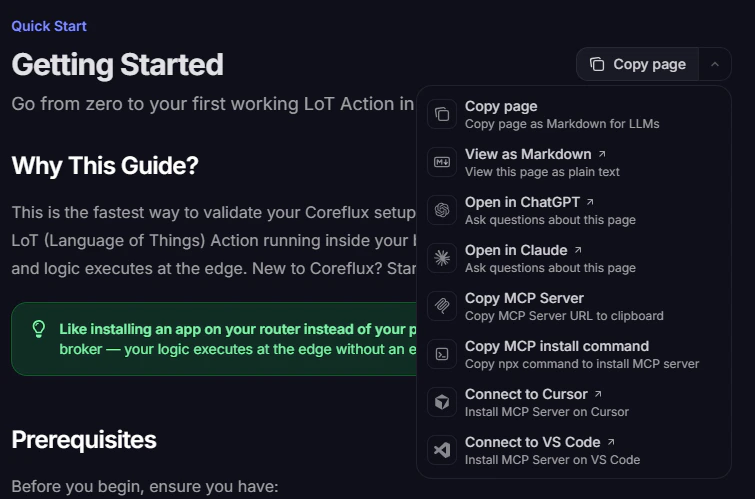
The fastest way to connect is through the contextual menu at the top of every documentation page. It copies the hosted MCP server URL or installs the server directly in supported editors — no JSON editing required.
Open the contextual menu from Copy page on any documentation page
Menu option
What it does
Copy MCP Server
Copies the hosted MCP server URL to your clipboard
Copy MCP install command
Copies the npx add-mcp command to install the server
Connect to Cursor
Opens Cursor and installs the MCP server
Connect to VS Code
Opens VS Code and installs the MCP server
VS Code
Cursor
Other clients
1
Open the contextual menu
On any Coreflux documentation page, click Copy page (top right) to expand the menu.
2
Connect to VS Code
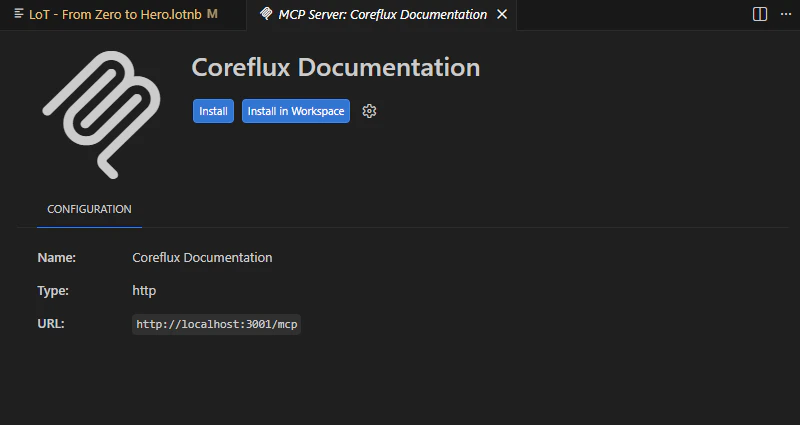
Select Connect to VS Code. VS Code opens the MCP server installation flow for Coreflux Documentation.
3
Install the server
On the MCP server page, click Install (current window) or Install in Workspace (project only). Confirm trust if prompted.
VS Code MCP server page after Connect to VS Code
4
Enable tools in Copilot
Reload the window if needed, then open Copilot Chat in Agent mode and enable the Coreflux tools in the tool picker.
1
Open the contextual menu
On any Coreflux documentation page, click Copy page (top right) to expand the menu.
2
Connect to Cursor
Select Connect to Cursor. Cursor opens the MCP server installation flow for Coreflux Documentation.
3
Install the server
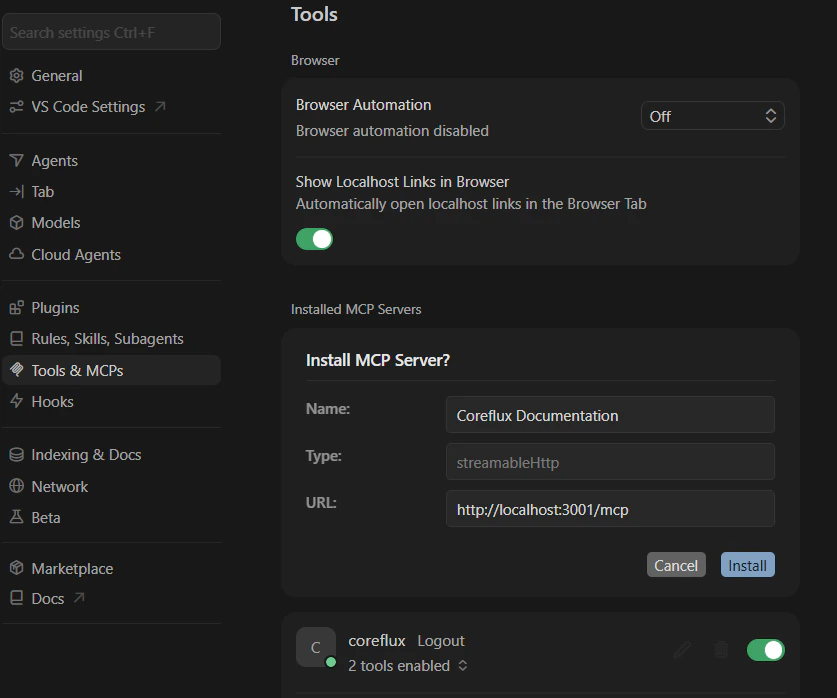
In Settings → Tools & MCPs, review the pre-filled Install MCP Server? form (name, type, and URL), then click Install.
Cursor Tools settings after Connect to Cursor
4
Confirm in Cursor
Verify Coreflux Documentation appears under Installed MCP Servers with tools enabled.
To install manually in Cursor instead, use Copy MCP Server or Copy MCP install command, then switch to the Manual tab and follow the Cursor steps.
For Claude Desktop, Claude.ai, or other MCP clients that are not in the menu:
1
Copy the server URL
Open the contextual menu and choose Copy MCP Server. Paste the URL into your client’s MCP configuration.
2
Or use the install command
Choose Copy MCP install command and run the copied npx add-mcp command in your terminal, then follow the prompts for your editor.
3
Finish setup in your client
Restart the client and confirm the Coreflux Documentation server is connected. See the Manual tab for editor-specific configuration examples.
Add the Coreflux MCP server URL to your client’s configuration file. Use this method when you need full control over the config or when the contextual menu is unavailable.Coreflux MCP Server URL:
https://docs.coreflux.org/mcp
The Coreflux AI Starter repository has pre-built MCP config files for Cursor, VS Code, and Claude Desktop — copy the file for your editor instead of writing JSON by hand.
Cursor
Claude Desktop
Claude.ai
VS Code
Cursor supports MCP servers natively. Add the Coreflux MCP to your global configuration or to a specific project.
1
Open MCP Configuration
Navigate to your Cursor MCP configuration file. You can use the global configuration at ~/.cursor/mcp.json, or create a project-level .cursor/mcp.json in your workspace root.
Restart Cursor or reload the window for the MCP server to be detected. You should see the Coreflux tools become available in your AI assistant’s tool list.
4
Verify the Connection
Open Cursor Settings and navigate to the MCP section. You should see coreflux listed as a connected server with its tools available.
If you already have other MCP servers configured, simply add the "coreflux" entry alongside them inside the existing mcpServers object.
Claude Desktop supports MCP servers through its configuration file.
Reload the window (Ctrl+Shift+P → Developer: Reload Window). The Coreflux MCP tools will become available in Copilot’s agent mode.
4
Confirm trust and enable tools
After reloading, confirm trust if prompted and open the “Configure Tools” button in the Chat input to verify the tools are enabled in the tool picker before proceeding.
5
Use in Copilot Chat
Open the Copilot Chat panel and switch to Agent mode. The Coreflux tools will be available for Copilot to call when relevant.
After setup, confirm the MCP is working by sending a test prompt to your AI assistant. The specific prompt doesn’t matter — what matters is that the assistant calls the Coreflux MCP tools rather than answering from memory.
Using the Coreflux documentation, show me the correct syntax for
a LoT Action that triggers every 30 seconds and publishes a
heartbeat message.
It’s working if your assistant calls one of the MCP tools during its response. In Cursor, you’ll see the tool calls in the assistant’s output. In Claude Desktop, look for the hammer icon indicating tool usage.
It’s not working if the assistant answers from general knowledge without calling any Coreflux tools. Double-check your MCP configuration and restart your client.
When the MCP is active, your assistant’s response will:
Reference specific LoT syntax from the documentation (not invented patterns)
Include working code examples that match the official docs
Cite source pages you can open to verify the information
Use correct terminology — LoT, Actions, Models, Rules, Routes — exactly as defined in the documentation
Without the MCP, the assistant might still produce LoT-like code, but it will be based on general training data rather than the official Coreflux documentation. Always verify the connection before starting a development session.
The more specific your question, the better the results. Instead of asking “tell me about routes,” try “how do I configure a PostgreSQL data storage route with authentication.” Specific queries help the tools return more relevant documentation.
Ask for Source References
When you need to verify information, ask your assistant to include documentation source links. The Coreflux MCP tools can return references to official pages so you can open and verify the answer yourself.
Use for Code Review
Before deploying LoT code, ask your assistant to validate the syntax against the documentation. For example: “Check the Coreflux docs — is this the correct syntax for a Modbus TCP route?” This ensures your code follows the latest documented patterns.
Leverage Conversation Context
The documentation assistant supports multi-turn conversations. Ask follow-up questions to drill deeper into a topic without repeating context — the assistant remembers what you discussed previously in the same conversation.
The Coreflux MCP Server is currently in beta. The server URL may change as the service evolves. Check this page for the latest configuration instructions.
A guide on utilizing AI agents to write, debug, and deploy LoT scripts directly through the MCP interface.
AI-Assisted Development Best Practices
Strategic advice on prompt engineering, security guardrails, and maintaining consistency when using AI to manage industrial assets.
Last modified on August 28, 2026
Was this page helpful?
⌘I
{"docsConfig":{"theme":"luma","$schema":"https://mintlify.com/docs.json","name":"Coreflux Documentation","colors":{"primary":"#eb470b","light":"#fc833b","dark":"#c3330b"},"logo":{"light":"https://mintcdn.com/coreflux/7tBTxEEkDVX4IRGH/images/logo/logo_light_docs_glyph.png?fit=max\u0026auto=format\u0026n=7tBTxEEkDVX4IRGH\u0026q=85\u0026s=56a469c914780a6d8c40a4329c0b0879","dark":"https://mintcdn.com/coreflux/7tBTxEEkDVX4IRGH/images/logo/logo_dark_docs_glyph.png?fit=max\u0026auto=format\u0026n=7tBTxEEkDVX4IRGH\u0026q=85\u0026s=b14cc68d9c3e2e98017af536fefc8670"},"favicon":"https://mintcdn.com/coreflux/A0D_IE52Pl2ItO0u/images/favicon.ico?fit=max\u0026auto=format\u0026n=A0D_IE52Pl2ItO0u\u0026q=85\u0026s=e8416ed10b42351291ab50f0dcdb31a8","appearance":{"default":"dark"},"background":{"color":{"light":"#FFFFFF","dark":"#010c10"}},"navbar":{"primary":{"type":"button","label":"Start Free","href":"https://portal.coreflux.org/"}},"footer":{"socials":{"github":"https://github.com/CorefluxCommunity","discord":"https://discord.com/invite/A3pPrptNMm","linkedin":"https://www.linkedin.com/company/coreflux","youtube":"https://www.youtube.com/@Coreflux","website":"https://www.coreflux.org/"}},"fonts":{"family":"Plus Jakarta Sans"},"styling":{"eyebrows":"breadcrumbs","codeblocks":{"theme":{"light":"css-variables","dark":"css-variables"},"languages":{"custom":["/languages/lot.json"]}},"latex":true},"integrations":{"ga4":{"measurementId":"G-1WXMSGSFY6"}},"contextual":{"options":["chatgpt","claude","mcp","cursor","vscode"],"display":"header"},"metadata":{"timestamp":true},"navigation":{"pages":[]}},"deployment":{"deploymentMetadataValue":{"subdomain":"coreflux","hasAudioNarration":false,"actualSubdomain":"coreflux","customDomains":["docs.coreflux.org"],"gitSource":{"type":"github","owner":"corefluxcommunity","repo":"documentation","deployBranch":"main","contentDirectory":"","isPrivate":true,"mountPath":"","label":""},"chroma":{"liveDeploymentHistoryId":"6adf28df1cea9adffa70bbce","collectionId":"54e175c9-f8df-4f82-8be0-ec9bf6a23513","schemaVersion":"v3","latestBuiltDeploymentHistoryId":"6adf28df1cea9adffa70bbce"},"feedback":{"thumbs":true,"agentFeedback":true},"entitlements":{"AI_CHAT":{"status":"ENABLED"},"WEB_MCP":{"status":"ENABLED"},"NARRATION":{"status":"ENABLED"}},"buildId":"6adf28df1cea9adffa70bbce","clientVersion":"0.0.3990","searchFilterCounts":[{"language":"default","tag":"LoT Language","count":608},{"language":"default","tag":"LoT CONNECTOR","count":307},{"language":"default","tag":"REST API apps","count":268},{"language":"default","tag":"LoT ROUTE","count":146},{"language":"default","tag":"Coreflux MQTT Broker","count":82},{"language":"default","tag":"Developing and Managing Coreflux","count":72},{"language":"default","tag":"Coreflux HUB","count":71},{"language":"default","tag":"Best Practices and Usage Patterns","count":54},{"language":"default","tag":"Industrial Routes","count":52},{"language":"default","tag":"Quick Start","count":50}]},"assistantConfig":{"enableAskAiButton":true,"enableStarterQuestions":true,"enableContextualStarterQuestions":true,"enableAskAiSearchBar":true,"deflection":{"enabled":true,"email":"joao.leiriao@coreflux.org","showHelpButton":true}},"basePath":"","hasChatPermissions":true,"hasWebMcpPermissions":true,"toggles":[{"name":"kill-isr","enabled":true,"variant":{"name":"disabled","enabled":false,"feature_enabled":true},"impressionData":false},{"name":"agent-mintlify-slack","enabled":true,"variant":{"name":"disabled","enabled":false,"feature_enabled":true},"impressionData":false},{"name":"editor-v7-file-tree","enabled":true,"variant":{"name":"disabled","enabled":false,"feature_enabled":true},"impressionData":false},{"name":"agent-integrations-settings","enabled":true,"variant":{"name":"disabled","enabled":false,"feature_enabled":true},"impressionData":false},{"name":"automations-pr-grouping","enabled":true,"variant":{"name":"disabled","enabled":false,"feature_enabled":true},"impressionData":false},{"name":"custom-prefix","enabled":true,"variant":{"name":"disabled","enabled":false,"feature_enabled":true},"impressionData":false},{"name":"analytics-v7","enabled":true,"variant":{"name":"disabled","enabled":false,"feature_enabled":true},"impressionData":false},{"name":"user-flows-analytics","enabled":true,"variant":{"name":"disabled","enabled":false,"feature_enabled":true},"impressionData":false},{"name":"no-publish-flow","enabled":true,"variant":{"name":"disabled","enabled":false,"feature_enabled":true},"impressionData":false},{"name":"workos-onboarding","enabled":true,"variant":{"name":"disabled","enabled":false,"feature_enabled":true},"impressionData":false},{"name":"llms-txt-v2","enabled":true,"variant":{"name":"disabled","enabled":false,"feature_enabled":true},"impressionData":false},{"name":"pause-universal-search-reconcile","enabled":true,"variant":{"name":"disabled","enabled":false,"feature_enabled":true},"impressionData":false},{"name":"snapshot-serving-live","enabled":true,"variant":{"name":"disabled","enabled":false,"feature_enabled":true},"impressionData":false},{"name":"stripTemperatureMiddleware","enabled":true,"variant":{"name":"disabled","enabled":false,"feature_enabled":true},"impressionData":false},{"name":"per-site-search-delta","enabled":true,"variant":{"name":"disabled","enabled":false,"feature_enabled":true},"impressionData":false},{"name":"support-platform-pylon-zendesk","enabled":true,"variant":{"name":"disabled","enabled":false,"feature_enabled":true},"impressionData":false},{"name":"snapshot-serving","enabled":true,"variant":{"name":"disabled","enabled":false,"feature_enabled":true},"impressionData":false},{"name":"instant-rollback","enabled":true,"variant":{"name":"disabled","enabled":false,"feature_enabled":true},"impressionData":false},{"name":"granular-notifications-server","enabled":true,"variant":{"name":"disabled","enabled":false,"feature_enabled":true},"impressionData":false},{"name":"granular-notifications","enabled":true,"variant":{"name":"disabled","enabled":false,"feature_enabled":true},"impressionData":false},{"name":"editor-private-page-search","enabled":true,"variant":{"name":"disabled","enabled":false,"feature_enabled":true},"impressionData":false},{"name":"automations-fable","enabled":true,"variant":{"name":"disabled","enabled":false,"feature_enabled":true},"impressionData":false},{"name":"fixed-ai-action-pricing","enabled":true,"variant":{"name":"disabled","enabled":false,"feature_enabled":true},"impressionData":false},{"name":"automation-resolve-merge-conflict","enabled":true,"variant":{"name":"disabled","enabled":false,"feature_enabled":true},"impressionData":false},{"name":"scoped-publishing","enabled":true,"variant":{"name":"disabled","enabled":false,"feature_enabled":true},"impressionData":false},{"name":"mintql","enabled":true,"variant":{"name":"disabled","enabled":false,"feature_enabled":true},"impressionData":false},{"name":"page-level-analytics","enabled":true,"variant":{"name":"disabled","enabled":false,"feature_enabled":true},"impressionData":false},{"name":"editor-version-history-v2","enabled":true,"variant":{"name":"disabled","enabled":false,"feature_enabled":true},"impressionData":false},{"name":"editor-nav-generations","enabled":true,"variant":{"name":"disabled","enabled":false,"feature_enabled":true},"impressionData":false},{"name":"billing-page-v2","enabled":true,"variant":{"name":"disabled","enabled":false,"feature_enabled":true},"impressionData":false},{"name":"workspace-projects","enabled":true,"variant":{"name":"disabled","enabled":false,"feature_enabled":true},"impressionData":false},{"name":"assistant-v5","enabled":true,"variant":{"name":"disabled","enabled":false,"feature_enabled":true},"impressionData":false},{"name":"byok-sep-25","enabled":true,"variant":{"name":"disabled","enabled":false,"feature_enabled":true},"impressionData":false},{"name":"fork-pr-previews","enabled":true,"variant":{"name":"disabled","enabled":false,"feature_enabled":true},"impressionData":false},{"name":"revalidation-jwt","enabled":true,"variant":{"name":"disabled","enabled":false,"feature_enabled":true},"impressionData":false},{"name":"vite-origin","enabled":true,"variant":{"name":"disabled","enabled":false,"feature_enabled":true},"impressionData":false},{"name":"editor-agent-model-picker","enabled":true,"variant":{"name":"disabled","enabled":false,"feature_enabled":true},"impressionData":false},{"name":"billing-updated-9-15","enabled":true,"variant":{"name":"disabled","enabled":false,"feature_enabled":true},"impressionData":false},{"name":"workos-sso-scim","enabled":true,"variant":{"name":"disabled","enabled":false,"feature_enabled":true},"impressionData":false},{"name":"hobby-abuse-scan","enabled":true,"variant":{"name":"disabled","enabled":false,"feature_enabled":true},"impressionData":false},{"name":"dashboard-inbox","enabled":true,"variant":{"name":"disabled","enabled":false,"feature_enabled":true},"impressionData":false},{"name":"workos-signup","enabled":true,"variant":{"name":"disabled","enabled":false,"feature_enabled":true},"impressionData":false},{"name":"workos-enabled","enabled":true,"variant":{"name":"disabled","enabled":false,"feature_enabled":true},"impressionData":false}],"starterQuestions":[{"_id":"695521f38da86e410a42ce70","deploymentId":"69317161c82f64ea7c1871b0","questionText":"What is LoT and how does it work?","status":"active","generatedBy":"manual","createdAt":"2025-12-31T13:15:31.284Z","updatedAt":"2025-12-31T13:15:31.284Z","__v":0},{"_id":"695521ec8da86e410a42ce3c","deploymentId":"69317161c82f64ea7c1871b0","questionText":"How do I install Coreflux locally?","status":"active","generatedBy":"manual","createdAt":"2025-12-31T13:15:24.487Z","updatedAt":"2025-12-31T13:15:24.487Z","__v":0},{"_id":"695521e68da86e410a42ce23","deploymentId":"69317161c82f64ea7c1871b0","questionText":"How do I create my first action?","status":"active","generatedBy":"manual","createdAt":"2025-12-31T13:15:18.088Z","updatedAt":"2025-12-31T13:15:18.088Z","__v":0}],"isAtlas":false,"googleFontsInlined":true},"customCss":[{"filePath":"global.css","href":"/_mintlify/custom/coreflux/0c480ab36c4d46ee/global.css"}],"page":{"pagePath":"v1.10/ai/mcp","slug":"/v1.10/ai/mcp","pageMetadata":{"title":"Model Context Protocol (MCP)","description":"Connect AI assistants to the Coreflux knowledge base using the Model Context Protocol","keywords":["MCP","Model Context Protocol","Cursor","Claude Desktop","VS Code","documentation search","AI assistant","install MCP","coreflux MCP server","model","context","protocol"],"href":"/v1.10/ai/mcp"},"description":{"compiledSource":"\"use strict\";\nconst {jsx: _jsx} = arguments[0];\nconst {useMDXComponents: _provideComponents} = arguments[0];\nfunction _createMdxContent(props) {\n const _components = {\n p: \"p\",\n ..._provideComponents(),\n ...props.components\n };\n return _jsx(_components.p, {\n children: \"Connect AI assistants to the Coreflux knowledge base using the Model Context Protocol\"\n });\n}\nfunction MDXContent(props = {}) {\n const {wrapper: MDXLayout} = {\n ..._provideComponents(),\n ...props.components\n };\n return MDXLayout ? _jsx(MDXLayout, {\n ...props,\n children: _jsx(_createMdxContent, {\n ...props\n })\n }) : _createMdxContent(props);\n}\nreturn {\n default: MDXContent\n};\n","frontmatter":{},"scope":{}},"pageType":"default","mdx":{"mdxSource":{"compiledSource":"\"use strict\";const{Fragment:_Fragment,jsx:_jsx,jsxs:_jsxs}=arguments[0];const{useMDXComponents:_provideComponents}=arguments[0];function _createMdxContent(props){const _components={a:`a`,code:`code`,em:`em`,hr:`hr`,li:`li`,p:`p`,pre:`pre`,span:`span`,strong:`strong`,tbody:`tbody`,td:`td`,th:`th`,thead:`thead`,tr:`tr`,ul:`ul`,..._provideComponents(),...props.components},{Accordion,AccordionGroup,Card,CardGroup,Check,CodeBlock,Frame,Heading,Note,OptimizedImage,Step,Steps,Tab,Table,Tabs,Tip,Warning}=_components;if(!Accordion)_missingMdxReference(`Accordion`,true);if(!AccordionGroup)_missingMdxReference(`AccordionGroup`,true);if(!Card)_missingMdxReference(`Card`,true);if(!CardGroup)_missingMdxReference(`CardGroup`,true);if(!Check)_missingMdxReference(`Check`,true);if(!CodeBlock)_missingMdxReference(`CodeBlock`,true);if(!Frame)_missingMdxReference(`Frame`,true);if(!Heading)_missingMdxReference(`Heading`,true);if(!Note)_missingMdxReference(`Note`,true);if(!OptimizedImage)_missingMdxReference(`OptimizedImage`,true);if(!Step)_missingMdxReference(`Step`,true);if(!Steps)_missingMdxReference(`Steps`,true);if(!Tab)_missingMdxReference(`Tab`,true);if(!Table)_missingMdxReference(`Table`,true);if(!Tabs)_missingMdxReference(`Tabs`,true);if(!Tip)_missingMdxReference(`Tip`,true);if(!Warning)_missingMdxReference(`Warning`,true);return _jsxs(_Fragment,{children:[_jsx(Heading,{level:`2`,id:`the-bridge-between-ai-and-your-coreflux-environment`,children:`The Bridge Between AI and Your Coreflux Environment`}),`\n`,_jsx(_components.p,{children:`Modern AI assistants are powerful — but they don’t natively understand LoT (Language of Things) syntax, Coreflux broker configuration, or the nuances of industrial IoT architecture. Without access to the official documentation, an AI assistant will guess, often producing code that looks plausible but uses invented syntax.`}),`\n`,_jsxs(_components.p,{children:[`The `,_jsx(_components.strong,{children:`Model Context Protocol (MCP)`}),` solves this. MCP is an open standard that lets AI assistants — like Claude, GitHub Copilot, or any MCP-compatible client — call external tools during a conversation. The `,_jsx(_components.strong,{children:`Coreflux MCP Server`}),` exposes the entire Coreflux documentation as a set of tools your assistant can query in real time. When you ask “how do I create a time-based LoT Action?”, your assistant doesn’t guess — it looks up the answer in the official docs and responds with verified syntax and working examples.`]}),`\n`,_jsx(_components.p,{children:`The result: you stay in your editor, describe what you want in plain English, and get accurate LoT code grounded in real documentation.`}),`\n`,_jsx(Tip,{children:_jsxs(_components.p,{children:[_jsx(_components.strong,{children:`Like giving your AI assistant a library card for Coreflux.`}),` Instead of guessing about LoT syntax or broker configuration, your assistant can look it up directly in the official docs and give you an accurate, sourced answer.`]})}),`\n`,_jsx(Heading,{level:`3`,id:`when-to-use-this`,children:`When to Use This`}),`\n`,_jsxs(_components.ul,{children:[`\n`,_jsxs(_components.li,{children:[`You want your AI assistant to `,_jsx(_components.strong,{children:`answer Coreflux questions accurately`}),` using official documentation`]}),`\n`,_jsxs(_components.li,{children:[`You need `,_jsx(_components.strong,{children:`LoT syntax help`}),` while coding in an AI-powered editor (Cursor, VS Code with Copilot)`]}),`\n`,_jsxs(_components.li,{children:[`You want to `,_jsx(_components.strong,{children:`search the documentation`}),` through natural language without leaving your workflow`]}),`\n`,_jsxs(_components.li,{children:[`You’re building with Coreflux and want your assistant to have `,_jsx(_components.strong,{children:`up-to-date reference material`})]}),`\n`]}),`\n`,_jsx(_components.hr,{}),`\n`,_jsx(Heading,{level:`2`,id:`how-it-works`,children:`How It Works`}),`\n`,_jsxs(_components.p,{children:[`MCP (Model Context Protocol) is a standard created by Anthropic that defines how AI assistants communicate with external services. It works like a plugin system: an MCP `,_jsx(_components.strong,{children:`server`}),` exposes a set of tools, and an MCP `,_jsx(_components.strong,{children:`client`}),` (your AI assistant) discovers and calls those tools during conversation.`]}),`\n`,_jsx(_components.p,{children:`Here is what happens when you ask your AI assistant a Coreflux question:`}),`\n`,_jsxs(Table,{children:[_jsx(_components.thead,{children:_jsxs(_components.tr,{children:[_jsx(_components.th,{children:`Step`}),_jsx(_components.th,{children:`What Happens`})]})}),_jsxs(_components.tbody,{children:[_jsxs(_components.tr,{children:[_jsx(_components.td,{children:_jsx(_components.strong,{children:`1. You ask`})}),_jsxs(_components.td,{children:[`You type a question in natural language — `,_jsx(_components.em,{children:`“Create a LoT Action that monitors temperature sensors”`})]})]}),_jsxs(_components.tr,{children:[_jsx(_components.td,{children:_jsx(_components.strong,{children:`2. AI recognizes the domain`})}),_jsx(_components.td,{children:`Your assistant detects this is a Coreflux question and decides to consult the MCP tools`})]}),_jsxs(_components.tr,{children:[_jsx(_components.td,{children:_jsx(_components.strong,{children:`3. MCP tool call`})}),_jsx(_components.td,{children:`The assistant calls the Coreflux MCP Server — searching the documentation or asking the docs assistant`})]}),_jsxs(_components.tr,{children:[_jsx(_components.td,{children:_jsx(_components.strong,{children:`4. Documentation responds`})}),_jsx(_components.td,{children:`The MCP server returns relevant documentation snippets, syntax references, and code examples`})]}),_jsxs(_components.tr,{children:[_jsx(_components.td,{children:_jsx(_components.strong,{children:`5. AI synthesizes`})}),_jsx(_components.td,{children:`Your assistant combines the documentation with your specific requirements to produce accurate, grounded LoT code`})]}),_jsxs(_components.tr,{children:[_jsx(_components.td,{children:_jsx(_components.strong,{children:`6. You review`})}),_jsx(_components.td,{children:`You receive a response with correct syntax, proper patterns, and source references you can verify`})]})]})]}),`\n`,_jsx(_components.p,{children:`This loop happens automatically once the MCP is connected. You don’t need to tell your assistant to “use the MCP” — it discovers the available tools and calls them whenever your question relates to Coreflux.`}),`\n`,_jsxs(Table,{children:[_jsx(_components.thead,{children:_jsxs(_components.tr,{children:[_jsx(_components.th,{children:`Component`}),_jsx(_components.th,{children:`Role`})]})}),_jsxs(_components.tbody,{children:[_jsxs(_components.tr,{children:[_jsx(_components.td,{children:_jsx(_components.strong,{children:`MCP Server`})}),_jsx(_components.td,{children:`Coreflux’s hosted service that exposes documentation tools`})]}),_jsxs(_components.tr,{children:[_jsx(_components.td,{children:_jsx(_components.strong,{children:`MCP Client`})}),_jsx(_components.td,{children:`Your AI assistant (Claude, Copilot, etc.) that calls those tools`})]}),_jsxs(_components.tr,{children:[_jsx(_components.td,{children:_jsx(_components.strong,{children:`Transport`})}),_jsx(_components.td,{children:`HTTP connection between client and server`})]})]})]}),`\n`,_jsx(_components.hr,{}),`\n`,_jsx(Heading,{level:`2`,id:`setup`,children:`Setup`}),`\n`,_jsxs(_components.p,{children:[`Connect your AI assistant to the Coreflux documentation MCP server. Choose `,_jsx(_components.strong,{children:`Native`}),` to install from the contextual menu on any documentation page, or `,_jsx(_components.strong,{children:`Manual`}),` to paste the server URL into your editor’s configuration file.`]}),`\n`,_jsxs(Tabs,{children:[_jsxs(Tab,{title:`Native`,icon:`bolt`,id:`native`,\"data-child-tab-ids\":`[\"vs-code\",\"cursor\",\"other-clients\"]`,children:[_jsxs(_components.p,{children:[`The fastest way to connect is through the `,_jsx(_components.strong,{children:`contextual menu`}),` at the top of every documentation page. It copies the hosted MCP server URL or installs the server directly in supported editors — no JSON editing required.`]}),_jsx(Frame,{caption:`Open the contextual menu from Copy page on any documentation page`,children:_jsx(OptimizedImage,{src:`https://mintcdn.com/coreflux/2Qlxw_T8xvkddvBy/images/MCP/action-menu-install-mcp.png?fit=max\u0026auto=format\u0026n=2Qlxw_T8xvkddvBy\u0026q=85\u0026s=ab62d6ffe924c7ef063007d4fc93c08b`,alt:`Documentation page contextual menu expanded, showing Copy page, View as Markdown, Open in ChatGPT, Open in Claude, Copy MCP Server, Copy MCP install command, Connect to Cursor, and Connect to VS Code`,\"data-og-width\":`755`,width:`755`,\"data-og-height\":`499`,height:`499`,\"data-path\":`images/MCP/action-menu-install-mcp.png`,\"data-optimize\":`true`,\"data-opv\":`3`,srcset:`https://mintcdn.com/coreflux/2Qlxw_T8xvkddvBy/images/MCP/action-menu-install-mcp.png?w=280\u0026fit=max\u0026auto=format\u0026n=2Qlxw_T8xvkddvBy\u0026q=85\u0026s=f473bb759ff2cdb80b314643b42e96d8 280w, https://mintcdn.com/coreflux/2Qlxw_T8xvkddvBy/images/MCP/action-menu-install-mcp.png?w=560\u0026fit=max\u0026auto=format\u0026n=2Qlxw_T8xvkddvBy\u0026q=85\u0026s=de8d91a41b824099b7c9d5cb41ab8b96 560w, https://mintcdn.com/coreflux/2Qlxw_T8xvkddvBy/images/MCP/action-menu-install-mcp.png?w=840\u0026fit=max\u0026auto=format\u0026n=2Qlxw_T8xvkddvBy\u0026q=85\u0026s=c831fce786ba5ce713eed9e7dee7154b 840w, https://mintcdn.com/coreflux/2Qlxw_T8xvkddvBy/images/MCP/action-menu-install-mcp.png?w=1100\u0026fit=max\u0026auto=format\u0026n=2Qlxw_T8xvkddvBy\u0026q=85\u0026s=02b38c7ae7eb798d617a8eeb6c174e46 1100w, https://mintcdn.com/coreflux/2Qlxw_T8xvkddvBy/images/MCP/action-menu-install-mcp.png?w=1650\u0026fit=max\u0026auto=format\u0026n=2Qlxw_T8xvkddvBy\u0026q=85\u0026s=0cd515b0a784637ba22f9ae199c1647b 1650w, https://mintcdn.com/coreflux/2Qlxw_T8xvkddvBy/images/MCP/action-menu-install-mcp.png?w=2500\u0026fit=max\u0026auto=format\u0026n=2Qlxw_T8xvkddvBy\u0026q=85\u0026s=16fde884a7ef2aaca5a13921b1209671 2500w`})}),_jsxs(Table,{children:[_jsx(_components.thead,{children:_jsxs(_components.tr,{children:[_jsx(_components.th,{children:`Menu option`}),_jsx(_components.th,{children:`What it does`})]})}),_jsxs(_components.tbody,{children:[_jsxs(_components.tr,{children:[_jsx(_components.td,{children:_jsx(_components.strong,{children:`Copy MCP Server`})}),_jsx(_components.td,{children:`Copies the hosted MCP server URL to your clipboard`})]}),_jsxs(_components.tr,{children:[_jsx(_components.td,{children:_jsx(_components.strong,{children:`Copy MCP install command`})}),_jsxs(_components.td,{children:[`Copies the `,_jsx(_components.code,{children:`npx add-mcp`}),` command to install the server`]})]}),_jsxs(_components.tr,{children:[_jsx(_components.td,{children:_jsx(_components.strong,{children:`Connect to Cursor`})}),_jsx(_components.td,{children:`Opens Cursor and installs the MCP server`})]}),_jsxs(_components.tr,{children:[_jsx(_components.td,{children:_jsx(_components.strong,{children:`Connect to VS Code`})}),_jsx(_components.td,{children:`Opens VS Code and installs the MCP server`})]})]})]}),_jsxs(Tabs,{children:[_jsx(Tab,{title:`VS Code`,icon:`window`,id:`vs-code`,children:_jsxs(Steps,{children:[_jsx(Step,{title:`Open the contextual menu`,children:_jsxs(_components.p,{children:[`On any Coreflux documentation page, click `,_jsx(_components.strong,{children:`Copy page`}),` (top right) to expand the menu.`]})}),_jsx(Step,{title:`Connect to VS Code`,children:_jsxs(_components.p,{children:[`Select `,_jsx(_components.strong,{children:`Connect to VS Code`}),`. VS Code opens the MCP server installation flow for `,_jsx(_components.strong,{children:`Coreflux Documentation`}),`.`]})}),_jsxs(Step,{title:`Install the server`,children:[_jsxs(_components.p,{children:[`On the MCP server page, click `,_jsx(_components.strong,{children:`Install`}),` (current window) or `,_jsx(_components.strong,{children:`Install in Workspace`}),` (project only). Confirm trust if prompted.`]}),_jsx(Frame,{caption:`VS Code MCP server page after Connect to VS Code`,children:_jsx(OptimizedImage,{src:`https://mintcdn.com/coreflux/2Qlxw_T8xvkddvBy/images/MCP/vscode-install-mcp.png?fit=max\u0026auto=format\u0026n=2Qlxw_T8xvkddvBy\u0026q=85\u0026s=e83435c5b09e548d23b3b3ef1cb90b4a`,alt:`VS Code MCP Server tab for Coreflux Documentation showing Install and Install in Workspace buttons and configuration with Type http and the MCP server URL`,\"data-og-width\":`800`,width:`800`,\"data-og-height\":`425`,height:`425`,\"data-path\":`images/MCP/vscode-install-mcp.png`,\"data-optimize\":`true`,\"data-opv\":`3`,srcset:`https://mintcdn.com/coreflux/2Qlxw_T8xvkddvBy/images/MCP/vscode-install-mcp.png?w=280\u0026fit=max\u0026auto=format\u0026n=2Qlxw_T8xvkddvBy\u0026q=85\u0026s=79222ed778ae4a8414afe18d57c07ff6 280w, https://mintcdn.com/coreflux/2Qlxw_T8xvkddvBy/images/MCP/vscode-install-mcp.png?w=560\u0026fit=max\u0026auto=format\u0026n=2Qlxw_T8xvkddvBy\u0026q=85\u0026s=fcaa5ff6b22b0f47fe109dc4d5a7a82b 560w, https://mintcdn.com/coreflux/2Qlxw_T8xvkddvBy/images/MCP/vscode-install-mcp.png?w=840\u0026fit=max\u0026auto=format\u0026n=2Qlxw_T8xvkddvBy\u0026q=85\u0026s=211c733f54cbf277e674961e4868789d 840w, https://mintcdn.com/coreflux/2Qlxw_T8xvkddvBy/images/MCP/vscode-install-mcp.png?w=1100\u0026fit=max\u0026auto=format\u0026n=2Qlxw_T8xvkddvBy\u0026q=85\u0026s=9e241286997f6a52730183184a65058a 1100w, https://mintcdn.com/coreflux/2Qlxw_T8xvkddvBy/images/MCP/vscode-install-mcp.png?w=1650\u0026fit=max\u0026auto=format\u0026n=2Qlxw_T8xvkddvBy\u0026q=85\u0026s=fe1b0a70aa7aba1385dcc6d09a14868a 1650w, https://mintcdn.com/coreflux/2Qlxw_T8xvkddvBy/images/MCP/vscode-install-mcp.png?w=2500\u0026fit=max\u0026auto=format\u0026n=2Qlxw_T8xvkddvBy\u0026q=85\u0026s=a4f1f6b437420e8de2edbb9a4949abdf 2500w`})})]}),_jsx(Step,{title:`Enable tools in Copilot`,children:_jsxs(_components.p,{children:[`Reload the window if needed, then open Copilot Chat in `,_jsx(_components.strong,{children:`Agent`}),` mode and enable the Coreflux tools in the tool picker.`]})})]})}),_jsxs(Tab,{title:`Cursor`,icon:`code`,id:`cursor`,children:[_jsxs(Steps,{children:[_jsx(Step,{title:`Open the contextual menu`,children:_jsxs(_components.p,{children:[`On any Coreflux documentation page, click `,_jsx(_components.strong,{children:`Copy page`}),` (top right) to expand the menu.`]})}),_jsx(Step,{title:`Connect to Cursor`,children:_jsxs(_components.p,{children:[`Select `,_jsx(_components.strong,{children:`Connect to Cursor`}),`. Cursor opens the MCP server installation flow for `,_jsx(_components.strong,{children:`Coreflux Documentation`}),`.`]})}),_jsxs(Step,{title:`Install the server`,children:[_jsxs(_components.p,{children:[`In `,_jsx(_components.strong,{children:`Settings → Tools \u0026 MCPs`}),`, review the pre-filled `,_jsx(_components.strong,{children:`Install MCP Server?`}),` form (name, type, and URL), then click `,_jsx(_components.strong,{children:`Install`}),`.`]}),_jsx(Frame,{caption:`Cursor Tools settings after Connect to Cursor`,children:_jsx(OptimizedImage,{src:`https://mintcdn.com/coreflux/2Qlxw_T8xvkddvBy/images/MCP/cursor-install-mcp.png?fit=max\u0026auto=format\u0026n=2Qlxw_T8xvkddvBy\u0026q=85\u0026s=4ba9395dd8281d8683178457bfcb5f20`,alt:`Cursor Settings Tools page showing Install MCP Server dialog for Coreflux Documentation with Name, Type streamableHttp, URL, and Install button`,\"data-og-width\":`837`,width:`837`,\"data-og-height\":`698`,height:`698`,\"data-path\":`images/MCP/cursor-install-mcp.png`,\"data-optimize\":`true`,\"data-opv\":`3`,srcset:`https://mintcdn.com/coreflux/2Qlxw_T8xvkddvBy/images/MCP/cursor-install-mcp.png?w=280\u0026fit=max\u0026auto=format\u0026n=2Qlxw_T8xvkddvBy\u0026q=85\u0026s=fa762b319ee8549ff343e8ed51979857 280w, https://mintcdn.com/coreflux/2Qlxw_T8xvkddvBy/images/MCP/cursor-install-mcp.png?w=560\u0026fit=max\u0026auto=format\u0026n=2Qlxw_T8xvkddvBy\u0026q=85\u0026s=28cbd915eaaa8530bfd1e67986c1b6bd 560w, https://mintcdn.com/coreflux/2Qlxw_T8xvkddvBy/images/MCP/cursor-install-mcp.png?w=840\u0026fit=max\u0026auto=format\u0026n=2Qlxw_T8xvkddvBy\u0026q=85\u0026s=163b55ba4950e103a3feea09f5168dfd 840w, https://mintcdn.com/coreflux/2Qlxw_T8xvkddvBy/images/MCP/cursor-install-mcp.png?w=1100\u0026fit=max\u0026auto=format\u0026n=2Qlxw_T8xvkddvBy\u0026q=85\u0026s=70720856d8f65193e1a7249655334b69 1100w, https://mintcdn.com/coreflux/2Qlxw_T8xvkddvBy/images/MCP/cursor-install-mcp.png?w=1650\u0026fit=max\u0026auto=format\u0026n=2Qlxw_T8xvkddvBy\u0026q=85\u0026s=c0c0dbe5e9ead32902180165d55bd296 1650w, https://mintcdn.com/coreflux/2Qlxw_T8xvkddvBy/images/MCP/cursor-install-mcp.png?w=2500\u0026fit=max\u0026auto=format\u0026n=2Qlxw_T8xvkddvBy\u0026q=85\u0026s=e0341c18ec4f46490796af1be1343a4a 2500w`})})]}),_jsx(Step,{title:`Confirm in Cursor`,children:_jsxs(_components.p,{children:[`Verify `,_jsx(_components.strong,{children:`Coreflux Documentation`}),` appears under `,_jsx(_components.strong,{children:`Installed MCP Servers`}),` with tools enabled.`]})})]}),_jsx(Note,{children:_jsxs(_components.p,{children:[`To install manually in Cursor instead, use `,_jsx(_components.strong,{children:`Copy MCP Server`}),` or `,_jsx(_components.strong,{children:`Copy MCP install command`}),`, then switch to the `,_jsx(_components.strong,{children:`Manual`}),` tab and follow the `,_jsx(_components.strong,{children:`Cursor`}),` steps.`]})})]}),_jsxs(Tab,{title:`Other clients`,icon:`plug`,id:`other-clients`,children:[_jsx(_components.p,{children:`For Claude Desktop, Claude.ai, or other MCP clients that are not in the menu:`}),_jsxs(Steps,{children:[_jsx(Step,{title:`Copy the server URL`,children:_jsxs(_components.p,{children:[`Open the contextual menu and choose `,_jsx(_components.strong,{children:`Copy MCP Server`}),`. Paste the URL into your client’s MCP configuration.`]})}),_jsx(Step,{title:`Or use the install command`,children:_jsxs(_components.p,{children:[`Choose `,_jsx(_components.strong,{children:`Copy MCP install command`}),` and run the copied `,_jsx(_components.code,{children:`npx add-mcp`}),` command in your terminal, then follow the prompts for your editor.`]})}),_jsx(Step,{title:`Finish setup in your client`,children:_jsxs(_components.p,{children:[`Restart the client and confirm the `,_jsx(_components.strong,{children:`Coreflux Documentation`}),` server is connected. See the `,_jsx(_components.strong,{children:`Manual`}),` tab for editor-specific configuration examples.`]})})]})]})]})]}),_jsxs(Tab,{title:`Manual`,icon:`wrench`,id:`manual`,\"data-child-tab-ids\":`[\"cursor-2\",\"claude-desktop\",\"claude-ai\",\"vs-code-2\"]`,children:[_jsx(_components.p,{children:`Add the Coreflux MCP server URL to your client’s configuration file. Use this method when you need full control over the config or when the contextual menu is unavailable.`}),_jsx(_components.p,{children:_jsx(_components.strong,{children:`Coreflux MCP Server URL:`})}),_jsx(CodeBlock,{filename:``,wrap:`true`,numberOfLines:`2`,language:`text`,children:_jsx(_components.pre,{className:`shiki shiki-themes css-variables css-variables`,style:{backgroundColor:`var(--mint-background)`,\"--shiki-dark-bg\":`var(--mint-background)`,color:`var(--mint-foreground)`,\"--shiki-dark\":`var(--mint-foreground)`},language:`text`,children:_jsxs(_components.code,{language:`text`,numberOfLines:`2`,children:[_jsx(_components.span,{className:`line`,children:_jsx(_components.span,{children:`https://docs.coreflux.org/mcp`})}),`\n`,_jsx(_components.span,{className:`line`,children:_jsx(_components.span,{})})]})})}),_jsx(Tip,{children:_jsxs(_components.p,{children:[`The `,_jsx(_components.a,{href:`https://github.com/CorefluxCommunity/coreflux-ai-starter`,children:`Coreflux AI Starter`}),` repository has pre-built MCP config files for Cursor, VS Code, and Claude Desktop — copy the file for your editor instead of writing JSON by hand.`]})}),_jsxs(Tabs,{children:[_jsxs(Tab,{title:`Cursor`,icon:`code`,id:`cursor-2`,children:[_jsx(_components.p,{children:`Cursor supports MCP servers natively. Add the Coreflux MCP to your global configuration or to a specific project.`}),_jsxs(Steps,{children:[_jsx(Step,{title:`Open MCP Configuration`,children:_jsxs(_components.p,{children:[`Navigate to your Cursor MCP configuration file. You can use the global configuration at `,_jsx(_components.code,{children:`~/.cursor/mcp.json`}),`, or create a project-level `,_jsx(_components.code,{children:`.cursor/mcp.json`}),` in your workspace root.`]})}),_jsxs(Step,{title:`Add the Coreflux MCP Server`,children:[_jsxs(_components.p,{children:[`Add the following entry to the `,_jsx(_components.code,{children:`mcpServers`}),` object:`]}),_jsx(CodeBlock,{filename:``,wrap:`true`,numberOfLines:`7`,language:`json`,children:_jsx(_components.pre,{className:`shiki shiki-themes css-variables css-variables`,style:{backgroundColor:`var(--mint-background)`,\"--shiki-dark-bg\":`var(--mint-background)`,color:`var(--mint-foreground)`,\"--shiki-dark\":`var(--mint-foreground)`},language:`json`,children:_jsxs(_components.code,{language:`json`,numberOfLines:`7`,children:[_jsx(_components.span,{className:`line`,children:_jsx(_components.span,{style:{color:`var(--mint-foreground)`,\"--shiki-dark\":`var(--mint-foreground)`},children:`{`})}),`\n`,_jsxs(_components.span,{className:`line`,children:[_jsx(_components.span,{style:{color:`var(--mint-token-keyword, #bd2864)`,\"--shiki-dark\":`var(--mint-token-keyword, #bd2864)`},children:` \"mcpServers\"`}),_jsx(_components.span,{style:{color:`var(--mint-token-punctuation, #171717)`,\"--shiki-dark\":`var(--mint-token-punctuation, #171717)`},children:`:`}),_jsx(_components.span,{style:{color:`var(--mint-foreground)`,\"--shiki-dark\":`var(--mint-foreground)`},children:` {`})]}),`\n`,_jsxs(_components.span,{className:`line`,children:[_jsx(_components.span,{style:{color:`var(--mint-token-keyword, #bd2864)`,\"--shiki-dark\":`var(--mint-token-keyword, #bd2864)`},children:` \"coreflux\"`}),_jsx(_components.span,{style:{color:`var(--mint-token-punctuation, #171717)`,\"--shiki-dark\":`var(--mint-token-punctuation, #171717)`},children:`:`}),_jsx(_components.span,{style:{color:`var(--mint-foreground)`,\"--shiki-dark\":`var(--mint-foreground)`},children:` {`})]}),`\n`,_jsxs(_components.span,{className:`line`,children:[_jsx(_components.span,{style:{color:`var(--mint-token-keyword, #bd2864)`,\"--shiki-dark\":`var(--mint-token-keyword, #bd2864)`},children:` \"url\"`}),_jsx(_components.span,{style:{color:`var(--mint-token-punctuation, #171717)`,\"--shiki-dark\":`var(--mint-token-punctuation, #171717)`},children:`:`}),_jsx(_components.span,{style:{color:`var(--mint-token-string-expression, #297a3a)`,\"--shiki-dark\":`var(--mint-token-string-expression, #297a3a)`},children:` \"https://docs.coreflux.org/mcp\"`})]}),`\n`,_jsx(_components.span,{className:`line`,children:_jsx(_components.span,{style:{color:`var(--mint-foreground)`,\"--shiki-dark\":`var(--mint-foreground)`},children:` }`})}),`\n`,_jsx(_components.span,{className:`line`,children:_jsx(_components.span,{style:{color:`var(--mint-foreground)`,\"--shiki-dark\":`var(--mint-foreground)`},children:` }`})}),`\n`,_jsx(_components.span,{className:`line`,children:_jsx(_components.span,{style:{color:`var(--mint-foreground)`,\"--shiki-dark\":`var(--mint-foreground)`},children:`}`})}),`\n`]})})})]}),_jsx(Step,{title:`Restart Cursor`,children:_jsx(_components.p,{children:`Restart Cursor or reload the window for the MCP server to be detected. You should see the Coreflux tools become available in your AI assistant’s tool list.`})}),_jsx(Step,{title:`Verify the Connection`,children:_jsxs(_components.p,{children:[`Open Cursor Settings and navigate to the `,_jsx(_components.strong,{children:`MCP`}),` section. You should see `,_jsx(_components.code,{children:`coreflux`}),` listed as a connected server with its tools available.`]})})]}),_jsx(Note,{children:_jsxs(_components.p,{children:[`If you already have other MCP servers configured, simply add the `,_jsx(_components.code,{children:`\"coreflux\"`}),` entry alongside them inside the existing `,_jsx(_components.code,{children:`mcpServers`}),` object.`]})})]}),_jsxs(Tab,{title:`Claude Desktop`,icon:`message-bot`,id:`claude-desktop`,\"data-child-tab-ids\":`[\"windows\",\"macos\",\"linux\"]`,children:[_jsx(_components.p,{children:`Claude Desktop supports MCP servers through its configuration file.`}),_jsxs(Steps,{children:[_jsxs(Step,{title:`Locate the Configuration File`,children:[_jsx(_components.p,{children:`Open the Claude Desktop configuration file at:`}),_jsxs(Tabs,{children:[_jsx(Tab,{title:`Windows`,id:`windows`,children:_jsx(CodeBlock,{filename:``,wrap:`true`,numberOfLines:`2`,language:`text`,children:_jsx(_components.pre,{className:`shiki shiki-themes css-variables css-variables`,style:{backgroundColor:`var(--mint-background)`,\"--shiki-dark-bg\":`var(--mint-background)`,color:`var(--mint-foreground)`,\"--shiki-dark\":`var(--mint-foreground)`},language:`text`,children:_jsxs(_components.code,{language:`text`,numberOfLines:`2`,children:[_jsx(_components.span,{className:`line`,children:_jsx(_components.span,{children:`%APPDATA%\\\\Claude\\\\claude_desktop_config.json`})}),`\n`,_jsx(_components.span,{className:`line`,children:_jsx(_components.span,{})})]})})})}),_jsx(Tab,{title:`macOS`,id:`macos`,children:_jsx(CodeBlock,{filename:``,wrap:`true`,numberOfLines:`2`,language:`text`,children:_jsx(_components.pre,{className:`shiki shiki-themes css-variables css-variables`,style:{backgroundColor:`var(--mint-background)`,\"--shiki-dark-bg\":`var(--mint-background)`,color:`var(--mint-foreground)`,\"--shiki-dark\":`var(--mint-foreground)`},language:`text`,children:_jsxs(_components.code,{language:`text`,numberOfLines:`2`,children:[_jsx(_components.span,{className:`line`,children:_jsx(_components.span,{children:`~/Library/Application Support/Claude/claude_desktop_config.json`})}),`\n`,_jsx(_components.span,{className:`line`,children:_jsx(_components.span,{})})]})})})}),_jsx(Tab,{title:`Linux`,id:`linux`,children:_jsx(CodeBlock,{filename:``,wrap:`true`,numberOfLines:`2`,language:`text`,children:_jsx(_components.pre,{className:`shiki shiki-themes css-variables css-variables`,style:{backgroundColor:`var(--mint-background)`,\"--shiki-dark-bg\":`var(--mint-background)`,color:`var(--mint-foreground)`,\"--shiki-dark\":`var(--mint-foreground)`},language:`text`,children:_jsxs(_components.code,{language:`text`,numberOfLines:`2`,children:[_jsx(_components.span,{className:`line`,children:_jsx(_components.span,{children:`~/.config/Claude/claude_desktop_config.json`})}),`\n`,_jsx(_components.span,{className:`line`,children:_jsx(_components.span,{})})]})})})})]}),_jsx(_components.p,{children:`If the file doesn’t exist, create it.`})]}),_jsxs(Step,{title:`Add the Coreflux MCP Server`,children:[_jsx(_components.p,{children:`Add or merge the following configuration:`}),_jsx(CodeBlock,{filename:``,wrap:`true`,numberOfLines:`7`,language:`json`,children:_jsx(_components.pre,{className:`shiki shiki-themes css-variables css-variables`,style:{backgroundColor:`var(--mint-background)`,\"--shiki-dark-bg\":`var(--mint-background)`,color:`var(--mint-foreground)`,\"--shiki-dark\":`var(--mint-foreground)`},language:`json`,children:_jsxs(_components.code,{language:`json`,numberOfLines:`7`,children:[_jsx(_components.span,{className:`line`,children:_jsx(_components.span,{style:{color:`var(--mint-foreground)`,\"--shiki-dark\":`var(--mint-foreground)`},children:`{`})}),`\n`,_jsxs(_components.span,{className:`line`,children:[_jsx(_components.span,{style:{color:`var(--mint-token-keyword, #bd2864)`,\"--shiki-dark\":`var(--mint-token-keyword, #bd2864)`},children:` \"mcpServers\"`}),_jsx(_components.span,{style:{color:`var(--mint-token-punctuation, #171717)`,\"--shiki-dark\":`var(--mint-token-punctuation, #171717)`},children:`:`}),_jsx(_components.span,{style:{color:`var(--mint-foreground)`,\"--shiki-dark\":`var(--mint-foreground)`},children:` {`})]}),`\n`,_jsxs(_components.span,{className:`line`,children:[_jsx(_components.span,{style:{color:`var(--mint-token-keyword, #bd2864)`,\"--shiki-dark\":`var(--mint-token-keyword, #bd2864)`},children:` \"coreflux\"`}),_jsx(_components.span,{style:{color:`var(--mint-token-punctuation, #171717)`,\"--shiki-dark\":`var(--mint-token-punctuation, #171717)`},children:`:`}),_jsx(_components.span,{style:{color:`var(--mint-foreground)`,\"--shiki-dark\":`var(--mint-foreground)`},children:` {`})]}),`\n`,_jsxs(_components.span,{className:`line`,children:[_jsx(_components.span,{style:{color:`var(--mint-token-keyword, #bd2864)`,\"--shiki-dark\":`var(--mint-token-keyword, #bd2864)`},children:` \"url\"`}),_jsx(_components.span,{style:{color:`var(--mint-token-punctuation, #171717)`,\"--shiki-dark\":`var(--mint-token-punctuation, #171717)`},children:`:`}),_jsx(_components.span,{style:{color:`var(--mint-token-string-expression, #297a3a)`,\"--shiki-dark\":`var(--mint-token-string-expression, #297a3a)`},children:` \"https://docs.coreflux.org/mcp\"`})]}),`\n`,_jsx(_components.span,{className:`line`,children:_jsx(_components.span,{style:{color:`var(--mint-foreground)`,\"--shiki-dark\":`var(--mint-foreground)`},children:` }`})}),`\n`,_jsx(_components.span,{className:`line`,children:_jsx(_components.span,{style:{color:`var(--mint-foreground)`,\"--shiki-dark\":`var(--mint-foreground)`},children:` }`})}),`\n`,_jsx(_components.span,{className:`line`,children:_jsx(_components.span,{style:{color:`var(--mint-foreground)`,\"--shiki-dark\":`var(--mint-foreground)`},children:`}`})}),`\n`]})})})]}),_jsx(Step,{title:`Restart Claude Desktop`,children:_jsx(_components.p,{children:`Fully quit and reopen Claude Desktop. The Coreflux tools will appear in Claude’s tool picker (the hammer icon) when starting a new conversation.`})})]})]}),_jsxs(Tab,{title:`Claude.ai`,icon:`globe`,id:`claude-ai`,children:[_jsx(_components.p,{children:`Claude.ai (the web interface) supports remote MCP server connections through its Integrations settings.`}),_jsxs(Steps,{children:[_jsx(Step,{title:`Open Claude.ai Settings`,children:_jsxs(_components.p,{children:[`Go to `,_jsx(_components.a,{href:`https://claude.ai`,children:`claude.ai`}),`, click your profile icon, and navigate to `,_jsx(_components.strong,{children:`Settings`}),`.`]})}),_jsx(Step,{title:`Navigate to Integrations`,children:_jsxs(_components.p,{children:[`Select the `,_jsx(_components.strong,{children:`Integrations`}),` section in the settings panel.`]})}),_jsxs(Step,{title:`Add the Coreflux MCP Server`,children:[_jsxs(_components.p,{children:[`Click `,_jsx(_components.strong,{children:`Add Integration`}),` (or `,_jsx(_components.strong,{children:`Add MCP Server`}),`), and enter the Coreflux MCP Server URL:`]}),_jsx(CodeBlock,{filename:``,wrap:`true`,numberOfLines:`2`,language:`text`,children:_jsx(_components.pre,{className:`shiki shiki-themes css-variables css-variables`,style:{backgroundColor:`var(--mint-background)`,\"--shiki-dark-bg\":`var(--mint-background)`,color:`var(--mint-foreground)`,\"--shiki-dark\":`var(--mint-foreground)`},language:`text`,children:_jsxs(_components.code,{language:`text`,numberOfLines:`2`,children:[_jsx(_components.span,{className:`line`,children:_jsx(_components.span,{children:`https://docs.coreflux.org/mcp`})}),`\n`,_jsx(_components.span,{className:`line`,children:_jsx(_components.span,{})})]})})}),_jsxs(_components.p,{children:[`Give it a name like `,_jsx(_components.strong,{children:`Coreflux`}),` and confirm.`]})]}),_jsx(Step,{title:`Start a Conversation`,children:_jsx(_components.p,{children:`Open a new conversation. The Coreflux tools will be available for Claude to use when relevant to your prompts.`})})]}),_jsx(Note,{children:_jsx(_components.p,{children:`Remote MCP server support on Claude.ai may require a Pro or Team plan. Check your plan’s feature availability.`})})]}),_jsxs(Tab,{title:`VS Code`,icon:`window`,id:`vs-code-2`,children:[_jsxs(_components.p,{children:[`VS Code supports MCP servers through GitHub Copilot’s agent mode. Ensure you have the `,_jsx(_components.strong,{children:`GitHub Copilot`}),` extension installed and updated.`]}),_jsxs(Steps,{children:[_jsx(Step,{title:`Open MCP Configuration`,children:_jsxs(_components.p,{children:[`Create or open the `,_jsx(_components.code,{children:`.vscode/mcp.json`}),` file in your workspace root. Alternatively, you can configure MCP servers globally in your VS Code `,_jsx(_components.code,{children:`settings.json`}),`.`]})}),_jsxs(Step,{title:`Add the Coreflux MCP Server`,children:[_jsxs(_components.p,{children:[`In `,_jsx(_components.code,{children:`.vscode/mcp.json`}),`, add:`]}),_jsx(CodeBlock,{filename:``,wrap:`true`,numberOfLines:`8`,language:`json`,children:_jsx(_components.pre,{className:`shiki shiki-themes css-variables css-variables`,style:{backgroundColor:`var(--mint-background)`,\"--shiki-dark-bg\":`var(--mint-background)`,color:`var(--mint-foreground)`,\"--shiki-dark\":`var(--mint-foreground)`},language:`json`,children:_jsxs(_components.code,{language:`json`,numberOfLines:`8`,children:[_jsx(_components.span,{className:`line`,children:_jsx(_components.span,{style:{color:`var(--mint-foreground)`,\"--shiki-dark\":`var(--mint-foreground)`},children:`{`})}),`\n`,_jsxs(_components.span,{className:`line`,children:[_jsx(_components.span,{style:{color:`var(--mint-token-keyword, #bd2864)`,\"--shiki-dark\":`var(--mint-token-keyword, #bd2864)`},children:` \"servers\"`}),_jsx(_components.span,{style:{color:`var(--mint-token-punctuation, #171717)`,\"--shiki-dark\":`var(--mint-token-punctuation, #171717)`},children:`:`}),_jsx(_components.span,{style:{color:`var(--mint-foreground)`,\"--shiki-dark\":`var(--mint-foreground)`},children:` {`})]}),`\n`,_jsxs(_components.span,{className:`line`,children:[_jsx(_components.span,{style:{color:`var(--mint-token-keyword, #bd2864)`,\"--shiki-dark\":`var(--mint-token-keyword, #bd2864)`},children:` \"coreflux\"`}),_jsx(_components.span,{style:{color:`var(--mint-token-punctuation, #171717)`,\"--shiki-dark\":`var(--mint-token-punctuation, #171717)`},children:`:`}),_jsx(_components.span,{style:{color:`var(--mint-foreground)`,\"--shiki-dark\":`var(--mint-foreground)`},children:` {`})]}),`\n`,_jsxs(_components.span,{className:`line`,children:[_jsx(_components.span,{style:{color:`var(--mint-token-keyword, #bd2864)`,\"--shiki-dark\":`var(--mint-token-keyword, #bd2864)`},children:` \"type\"`}),_jsx(_components.span,{style:{color:`var(--mint-token-punctuation, #171717)`,\"--shiki-dark\":`var(--mint-token-punctuation, #171717)`},children:`:`}),_jsx(_components.span,{style:{color:`var(--mint-token-string-expression, #297a3a)`,\"--shiki-dark\":`var(--mint-token-string-expression, #297a3a)`},children:` \"sse\"`}),_jsx(_components.span,{style:{color:`var(--mint-token-punctuation, #171717)`,\"--shiki-dark\":`var(--mint-token-punctuation, #171717)`},children:`,`})]}),`\n`,_jsxs(_components.span,{className:`line`,children:[_jsx(_components.span,{style:{color:`var(--mint-token-keyword, #bd2864)`,\"--shiki-dark\":`var(--mint-token-keyword, #bd2864)`},children:` \"url\"`}),_jsx(_components.span,{style:{color:`var(--mint-token-punctuation, #171717)`,\"--shiki-dark\":`var(--mint-token-punctuation, #171717)`},children:`:`}),_jsx(_components.span,{style:{color:`var(--mint-token-string-expression, #297a3a)`,\"--shiki-dark\":`var(--mint-token-string-expression, #297a3a)`},children:` \"https://docs.coreflux.org/mcp\"`})]}),`\n`,_jsx(_components.span,{className:`line`,children:_jsx(_components.span,{style:{color:`var(--mint-foreground)`,\"--shiki-dark\":`var(--mint-foreground)`},children:` }`})}),`\n`,_jsx(_components.span,{className:`line`,children:_jsx(_components.span,{style:{color:`var(--mint-foreground)`,\"--shiki-dark\":`var(--mint-foreground)`},children:` }`})}),`\n`,_jsx(_components.span,{className:`line`,children:_jsx(_components.span,{style:{color:`var(--mint-foreground)`,\"--shiki-dark\":`var(--mint-foreground)`},children:`}`})}),`\n`]})})}),_jsxs(_components.p,{children:[`Or in your global `,_jsx(_components.code,{children:`settings.json`}),`:`]}),_jsx(CodeBlock,{filename:``,wrap:`true`,numberOfLines:`10`,language:`json`,children:_jsx(_components.pre,{className:`shiki shiki-themes css-variables css-variables`,style:{backgroundColor:`var(--mint-background)`,\"--shiki-dark-bg\":`var(--mint-background)`,color:`var(--mint-foreground)`,\"--shiki-dark\":`var(--mint-foreground)`},language:`json`,children:_jsxs(_components.code,{language:`json`,numberOfLines:`10`,children:[_jsx(_components.span,{className:`line`,children:_jsx(_components.span,{style:{color:`var(--mint-foreground)`,\"--shiki-dark\":`var(--mint-foreground)`},children:`{`})}),`\n`,_jsxs(_components.span,{className:`line`,children:[_jsx(_components.span,{style:{color:`var(--mint-token-keyword, #bd2864)`,\"--shiki-dark\":`var(--mint-token-keyword, #bd2864)`},children:` \"mcp\"`}),_jsx(_components.span,{style:{color:`var(--mint-token-punctuation, #171717)`,\"--shiki-dark\":`var(--mint-token-punctuation, #171717)`},children:`:`}),_jsx(_components.span,{style:{color:`var(--mint-foreground)`,\"--shiki-dark\":`var(--mint-foreground)`},children:` {`})]}),`\n`,_jsxs(_components.span,{className:`line`,children:[_jsx(_components.span,{style:{color:`var(--mint-token-keyword, #bd2864)`,\"--shiki-dark\":`var(--mint-token-keyword, #bd2864)`},children:` \"servers\"`}),_jsx(_components.span,{style:{color:`var(--mint-token-punctuation, #171717)`,\"--shiki-dark\":`var(--mint-token-punctuation, #171717)`},children:`:`}),_jsx(_components.span,{style:{color:`var(--mint-foreground)`,\"--shiki-dark\":`var(--mint-foreground)`},children:` {`})]}),`\n`,_jsxs(_components.span,{className:`line`,children:[_jsx(_components.span,{style:{color:`var(--mint-token-keyword, #bd2864)`,\"--shiki-dark\":`var(--mint-token-keyword, #bd2864)`},children:` \"coreflux\"`}),_jsx(_components.span,{style:{color:`var(--mint-token-punctuation, #171717)`,\"--shiki-dark\":`var(--mint-token-punctuation, #171717)`},children:`:`}),_jsx(_components.span,{style:{color:`var(--mint-foreground)`,\"--shiki-dark\":`var(--mint-foreground)`},children:` {`})]}),`\n`,_jsxs(_components.span,{className:`line`,children:[_jsx(_components.span,{style:{color:`var(--mint-token-keyword, #bd2864)`,\"--shiki-dark\":`var(--mint-token-keyword, #bd2864)`},children:` \"type\"`}),_jsx(_components.span,{style:{color:`var(--mint-token-punctuation, #171717)`,\"--shiki-dark\":`var(--mint-token-punctuation, #171717)`},children:`:`}),_jsx(_components.span,{style:{color:`var(--mint-token-string-expression, #297a3a)`,\"--shiki-dark\":`var(--mint-token-string-expression, #297a3a)`},children:` \"sse\"`}),_jsx(_components.span,{style:{color:`var(--mint-token-punctuation, #171717)`,\"--shiki-dark\":`var(--mint-token-punctuation, #171717)`},children:`,`})]}),`\n`,_jsxs(_components.span,{className:`line`,children:[_jsx(_components.span,{style:{color:`var(--mint-token-keyword, #bd2864)`,\"--shiki-dark\":`var(--mint-token-keyword, #bd2864)`},children:` \"url\"`}),_jsx(_components.span,{style:{color:`var(--mint-token-punctuation, #171717)`,\"--shiki-dark\":`var(--mint-token-punctuation, #171717)`},children:`:`}),_jsx(_components.span,{style:{color:`var(--mint-token-string-expression, #297a3a)`,\"--shiki-dark\":`var(--mint-token-string-expression, #297a3a)`},children:` \"https://docs.coreflux.org/mcp\"`})]}),`\n`,_jsx(_components.span,{className:`line`,children:_jsx(_components.span,{style:{color:`var(--mint-foreground)`,\"--shiki-dark\":`var(--mint-foreground)`},children:` }`})}),`\n`,_jsx(_components.span,{className:`line`,children:_jsx(_components.span,{style:{color:`var(--mint-foreground)`,\"--shiki-dark\":`var(--mint-foreground)`},children:` }`})}),`\n`,_jsx(_components.span,{className:`line`,children:_jsx(_components.span,{style:{color:`var(--mint-foreground)`,\"--shiki-dark\":`var(--mint-foreground)`},children:` }`})}),`\n`,_jsx(_components.span,{className:`line`,children:_jsx(_components.span,{style:{color:`var(--mint-foreground)`,\"--shiki-dark\":`var(--mint-foreground)`},children:`}`})}),`\n`]})})})]}),_jsx(Step,{title:`Reload VS Code`,children:_jsxs(_components.p,{children:[`Reload the window (`,_jsx(_components.code,{children:`Ctrl+Shift+P`}),` → `,_jsx(_components.strong,{children:`Developer: Reload Window`}),`). The Coreflux MCP tools will become available in Copilot’s agent mode.`]})}),_jsx(Step,{title:`Confirm trust and enable tools`,children:_jsx(_components.p,{children:`After reloading, confirm trust if prompted and open the “Configure Tools” button in the Chat input to verify the tools are enabled in the tool picker before proceeding.`})}),_jsx(Step,{title:`Use in Copilot Chat`,children:_jsxs(_components.p,{children:[`Open the Copilot Chat panel and switch to `,_jsx(_components.strong,{children:`Agent`}),` mode. The Coreflux tools will be available for Copilot to call when relevant.`]})})]})]})]})]})]}),`\n`,_jsx(_components.hr,{}),`\n`,_jsx(Heading,{level:`2`,id:`verify-your-connection`,children:`Verify Your Connection`}),`\n`,_jsxs(_components.p,{children:[`After setup, confirm the MCP is working by sending a test prompt to your AI assistant. The specific prompt doesn’t matter — what matters is that the assistant `,_jsx(_components.strong,{children:`calls the Coreflux MCP tools`}),` rather than answering from memory.`]}),`\n`,_jsx(Heading,{level:`3`,id:`quick-test`,children:`Quick Test`}),`\n`,_jsx(_components.p,{children:`Send this prompt to your AI assistant:`}),`\n`,_jsx(CodeBlock,{filename:``,wrap:`true`,numberOfLines:`4`,language:`text`,children:_jsx(_components.pre,{className:`shiki shiki-themes css-variables css-variables`,style:{backgroundColor:`var(--mint-background)`,\"--shiki-dark-bg\":`var(--mint-background)`,color:`var(--mint-foreground)`,\"--shiki-dark\":`var(--mint-foreground)`},language:`text`,children:_jsxs(_components.code,{language:`text`,numberOfLines:`4`,children:[_jsx(_components.span,{className:`line`,children:_jsx(_components.span,{children:`Using the Coreflux documentation, show me the correct syntax for `})}),`\n`,_jsx(_components.span,{className:`line`,children:_jsx(_components.span,{children:`a LoT Action that triggers every 30 seconds and publishes a `})}),`\n`,_jsx(_components.span,{className:`line`,children:_jsx(_components.span,{children:`heartbeat message.`})}),`\n`,_jsx(_components.span,{className:`line`,children:_jsx(_components.span,{})})]})})}),`\n`,_jsx(Check,{children:_jsx(_components.p,{children:`It’s working if your assistant calls one of the MCP tools during its response. In Cursor, you’ll see the tool calls in the assistant’s output. In Claude Desktop, look for the hammer icon indicating tool usage.`})}),`\n`,_jsx(Warning,{children:_jsxs(_components.p,{children:[_jsx(_components.strong,{children:`It’s not working`}),` if the assistant answers from general knowledge without calling any Coreflux tools. Double-check your MCP configuration and restart your client.`]})}),`\n`,_jsx(Heading,{level:`3`,id:`what-a-connected-response-looks-like`,children:`What a Connected Response Looks Like`}),`\n`,_jsx(_components.p,{children:`When the MCP is active, your assistant’s response will:`}),`\n`,_jsxs(_components.ul,{children:[`\n`,_jsxs(_components.li,{children:[`Reference `,_jsx(_components.strong,{children:`specific LoT syntax`}),` from the documentation (not invented patterns)`]}),`\n`,_jsxs(_components.li,{children:[`Include `,_jsx(_components.strong,{children:`working code examples`}),` that match the official docs`]}),`\n`,_jsxs(_components.li,{children:[`Cite `,_jsx(_components.strong,{children:`source pages`}),` you can open to verify the information`]}),`\n`,_jsxs(_components.li,{children:[`Use `,_jsx(_components.strong,{children:`correct terminology`}),` — LoT, Actions, Models, Rules, Routes — exactly as defined in the documentation`]}),`\n`]}),`\n`,_jsx(_components.p,{children:`Without the MCP, the assistant might still produce LoT-like code, but it will be based on general training data rather than the official Coreflux documentation. Always verify the connection before starting a development session.`}),`\n`,_jsx(_components.hr,{}),`\n`,_jsx(Heading,{level:`2`,id:`best-practices`,children:`Best Practices`}),`\n`,_jsxs(AccordionGroup,{children:[_jsx(Accordion,{title:`Be Specific with Your Questions`,id:`be-specific-with-your-questions`,children:_jsx(_components.p,{children:`The more specific your question, the better the results. Instead of asking “tell me about routes,” try “how do I configure a PostgreSQL data storage route with authentication.” Specific queries help the tools return more relevant documentation.`})}),_jsx(Accordion,{title:`Ask for Source References`,id:`ask-for-source-references`,children:_jsx(_components.p,{children:`When you need to verify information, ask your assistant to include documentation source links. The Coreflux MCP tools can return references to official pages so you can open and verify the answer yourself.`})}),_jsx(Accordion,{title:`Use for Code Review`,id:`use-for-code-review`,children:_jsxs(_components.p,{children:[`Before deploying LoT code, ask your assistant to validate the syntax against the documentation. For example: `,_jsx(_components.em,{children:`“Check the Coreflux docs — is this the correct syntax for a Modbus TCP route?”`}),` This ensures your code follows the latest documented patterns.`]})}),_jsx(Accordion,{title:`Leverage Conversation Context`,id:`leverage-conversation-context`,children:_jsx(_components.p,{children:`The documentation assistant supports multi-turn conversations. Ask follow-up questions to drill deeper into a topic without repeating context — the assistant remembers what you discussed previously in the same conversation.`})})]}),`\n`,_jsx(Warning,{children:_jsxs(_components.p,{children:[`The Coreflux MCP Server is currently in `,_jsx(_components.strong,{children:`beta`}),`. The server URL may change as the service evolves. Check this page for the latest configuration instructions.`]})}),`\n`,_jsx(_components.hr,{}),`\n`,_jsx(Heading,{level:`2`,id:`next-steps`,children:`Next Steps`}),`\n`,_jsxs(CardGroup,{cols:2,children:[_jsx(Card,{title:`Developing LoT Using AI`,icon:`wand-magic-sparkles`,href:`/v1.10/ai/developing-with-lot`,children:_jsx(_components.p,{children:`A guide on utilizing AI agents to write, debug, and deploy LoT scripts directly through the MCP interface.`})}),_jsx(Card,{title:`AI-Assisted Development Best Practices`,icon:`list-check`,href:`/v1.10/ai/best-practices`,children:_jsx(_components.p,{children:`Strategic advice on prompt engineering, security guardrails, and maintaining consistency when using AI to manage industrial assets.`})})]})]})}function MDXContent(props={}){const{wrapper:MDXLayout}={..._provideComponents(),...props.components};return MDXLayout?_jsx(MDXLayout,{...props,children:_jsx(_createMdxContent,{...props})}):_createMdxContent(props)}return{default:MDXContent};function _missingMdxReference(id,component){throw new Error(`Expected `+(component?`component`:`object`)+\" `\"+id+\"` to be defined: you likely forgot to import, pass, or provide it.\")}","frontmatter":{},"scope":{"codeStyling":{"theme":{"light":"css-variables","dark":"css-variables"},"languages":{"custom":["/languages/lot.json"]}},"config":{},"pageMetadata":{"title":"Model Context Protocol (MCP)","description":"Connect AI assistants to the Coreflux knowledge base using the Model Context Protocol","keywords":["MCP","Model Context Protocol","Cursor","Claude Desktop","VS Code","documentation search","AI assistant","install MCP","coreflux MCP server","model","context","protocol"],"href":"/v1.10/ai/mcp"}}},"mdxSourceWithNoJs":null},"mdxExtracts":{"tableOfContents":[{"title":"The Bridge Between AI and Your Coreflux Environment","slug":"the-bridge-between-ai-and-your-coreflux-environment","depth":2,"children":[{"title":"When to Use This","slug":"when-to-use-this","depth":3,"children":[]}]},{"title":"How It Works","slug":"how-it-works","depth":2,"children":[]},{"title":"Setup","slug":"setup","depth":2,"children":[]},{"title":"Verify Your Connection","slug":"verify-your-connection","depth":2,"children":[{"title":"Quick Test","slug":"quick-test","depth":3,"children":[]},{"title":"What a Connected Response Looks Like","slug":"what-a-connected-response-looks-like","depth":3,"children":[]}]},{"title":"Best Practices","slug":"best-practices","depth":2,"children":[]},{"title":"Next Steps","slug":"next-steps","depth":2,"children":[]}],"codeExamples":{}},"jsLinks":["/_mintlify/custom/coreflux/a521143ded12b642/scripts/mermaid-flow.js"],"subdomain":"coreflux","siteName":"Coreflux Documentation","title":"Model Context Protocol (MCP) - Coreflux Documentation","contextualStarterQuestions":[{"_id":"6ada2e5c918154a2cbd633cf","deploymentId":"69317161c82f64ea7c1871b0","questionText":"How do I connect my AI assistant?","status":"active","generatedBy":"contextual","path":"v1.10/ai/mcp","createdAt":"2026-10-22T15:40:12.114Z","updatedAt":"2026-10-22T15:40:12.114Z","__v":0},{"_id":"6ada2e5c918154a2cbd633ce","deploymentId":"69317161c82f64ea7c1871b0","questionText":"What is the Model Context Protocol?","status":"active","generatedBy":"contextual","path":"v1.10/ai/mcp","createdAt":"2026-10-22T15:40:12.114Z","updatedAt":"2026-10-22T15:40:12.114Z","__v":0},{"_id":"6ada2e5c918154a2cbd633d0","deploymentId":"69317161c82f64ea7c1871b0","questionText":"Can it help with LoT syntax?","status":"active","generatedBy":"contextual","path":"v1.10/ai/mcp","createdAt":"2026-10-22T15:40:12.114Z","updatedAt":"2026-10-22T15:40:12.114Z","__v":0}],"navMaps":{"firstHrefInVersion":{"v2.22":{"href":"/ai/mcp","matchLevel":1},"v2.14":{"href":"/ai/mcp","matchLevel":1},"v2.2":{"href":"/v2.2/ai/mcp","matchLevel":1},"v2.1":{"href":"/v2.1/ai/mcp","matchLevel":1},"v2.0":{"href":"/v2.0/ai/mcp","matchLevel":1},"v1.10":{"href":"/v1.10/ai/mcp","matchLevel":0}},"firstHrefInLanguage":{}},"lastModified":"2026-10-22T15:38:59.621Z","gitLastModified":"2026-08-28T13:19:53.000Z","originalFileLocation":"v1.10/ai/mcp.md"},"headHtml":"\u003cscript data-mint-head>(function(){var d=document.documentElement,p=null;if(!p){try{p=localStorage.getItem(\"isDarkMode\")}catch(e){}if(p==='true')p='dark';else if(p==='false')p='light';if(p!=='light'\u0026\u0026p!=='dark'\u0026\u0026p!=='system')p=\"dark\"}var r=p==='system'?(matchMedia(\"(prefers-color-scheme: dark)\").matches?'dark':'light'):p;d.classList.remove(r==='dark'?'light':'dark');d.classList.add(r);d.setAttribute(\"data-theme-preference\",p)})();\u003c/script>\u003cmeta data-mint-head name=\"description\" content=\"Connect AI assistants to the Coreflux knowledge base using the Model Context Protocol\">\u003cmeta data-mint-head name=\"application-name\" content=\"Coreflux Documentation\">\u003cmeta data-mint-head name=\"generator\" content=\"Mintlify\">\u003clink data-mint-head rel=\"icon\" type=\"image/png\" sizes=\"192x192\" href=\"/mintlify-assets/_mintlify/favicons/coreflux/ZsajMlQvPJiYnJ5s/_generated/favicon/android-chrome-192x192.png\" media=\"(prefers-color-scheme: light)\">\u003clink data-mint-head rel=\"apple-touch-icon\" type=\"image/png\" sizes=\"180x180\" href=\"/mintlify-assets/_mintlify/favicons/coreflux/ZsajMlQvPJiYnJ5s/_generated/favicon/apple-touch-icon.png\">\u003clink data-mint-head rel=\"icon\" type=\"image/png\" sizes=\"16x16\" href=\"/mintlify-assets/_mintlify/favicons/coreflux/ZsajMlQvPJiYnJ5s/_generated/favicon/favicon-16x16.png\" media=\"(prefers-color-scheme: light)\">\u003clink data-mint-head rel=\"icon\" type=\"image/png\" sizes=\"32x32\" href=\"/mintlify-assets/_mintlify/favicons/coreflux/ZsajMlQvPJiYnJ5s/_generated/favicon/favicon-32x32.png\" media=\"(prefers-color-scheme: light)\">\u003clink data-mint-head rel=\"shortcut icon\" type=\"image/x-icon\" href=\"/mintlify-assets/_mintlify/favicons/coreflux/ZsajMlQvPJiYnJ5s/_generated/favicon/favicon.ico\" media=\"(prefers-color-scheme: light)\">\u003clink data-mint-head rel=\"icon\" type=\"image/png\" sizes=\"192x192\" href=\"/mintlify-assets/_mintlify/favicons/coreflux/ZsajMlQvPJiYnJ5s/_generated/favicon-dark/android-chrome-192x192.png\" media=\"(prefers-color-scheme: dark)\">\u003clink data-mint-head rel=\"icon\" type=\"image/png\" sizes=\"16x16\" href=\"/mintlify-assets/_mintlify/favicons/coreflux/ZsajMlQvPJiYnJ5s/_generated/favicon-dark/favicon-16x16.png\" media=\"(prefers-color-scheme: dark)\">\u003clink data-mint-head rel=\"icon\" type=\"image/png\" sizes=\"32x32\" href=\"/mintlify-assets/_mintlify/favicons/coreflux/ZsajMlQvPJiYnJ5s/_generated/favicon-dark/favicon-32x32.png\" media=\"(prefers-color-scheme: dark)\">\u003clink data-mint-head rel=\"shortcut icon\" type=\"image/x-icon\" href=\"/mintlify-assets/_mintlify/favicons/coreflux/ZsajMlQvPJiYnJ5s/_generated/favicon-dark/favicon.ico\" media=\"(prefers-color-scheme: dark)\">\u003cmeta data-mint-head property=\"og:title\" content=\"Model Context Protocol (MCP) - Coreflux Documentation\">\u003cmeta data-mint-head property=\"og:description\" content=\"Connect AI assistants to the Coreflux knowledge base using the Model Context Protocol\">\u003cmeta data-mint-head property=\"og:site_name\" content=\"Coreflux Documentation\">\u003cmeta data-mint-head property=\"og:url\" content=\"https://docs.coreflux.org/v1.10/ai/mcp\">\u003cmeta data-mint-head property=\"og:type\" content=\"website\">\u003cmeta data-mint-head property=\"og:image\" content=\"https://coreflux.mintlify.app/_mintlify/api/og/v2?division=Using+AI+with+Coreflux\u0026amp;title=Model+Context+Protocol+%28MCP%29\u0026amp;description=Connect+AI+assistants+to+the+Coreflux+knowledge+base+using+the+Model+Context+Protocol\u0026amp;theme=b63f1147494e66c8a7509625\u0026amp;signature=1fd772167cd4ed20238dccfc9d142373f880e9146a3d75e871ca5136cb135ee7\">\u003cmeta data-mint-head property=\"og:image:width\" content=\"1200\">\u003cmeta data-mint-head property=\"og:image:height\" content=\"630\">\u003cmeta data-mint-head name=\"twitter:card\" content=\"summary_large_image\">\u003cmeta data-mint-head name=\"twitter:title\" content=\"Model Context Protocol (MCP) - Coreflux Documentation\">\u003cmeta data-mint-head name=\"twitter:description\" content=\"Connect AI assistants to the Coreflux knowledge base using the Model Context Protocol\">\u003cmeta data-mint-head name=\"twitter:image\" content=\"https://coreflux.mintlify.app/_mintlify/api/og/v2?division=Using+AI+with+Coreflux\u0026amp;title=Model+Context+Protocol+%28MCP%29\u0026amp;description=Connect+AI+assistants+to+the+Coreflux+knowledge+base+using+the+Model+Context+Protocol\u0026amp;theme=b63f1147494e66c8a7509625\u0026amp;signature=1fd772167cd4ed20238dccfc9d142373f880e9146a3d75e871ca5136cb135ee7\">\u003cmeta data-mint-head name=\"twitter:image:width\" content=\"1200\">\u003cmeta data-mint-head name=\"twitter:image:height\" content=\"630\">\u003cmeta data-mint-head name=\"msapplication-config\" content=\"/mintlify-assets/_mintlify/favicons/coreflux/ZsajMlQvPJiYnJ5s/_generated/favicon/browserconfig.xml\">\u003cmeta data-mint-head name=\"apple-mobile-web-app-title\" content=\"Coreflux Documentation\">\u003cmeta data-mint-head name=\"msapplication-TileColor\" content=\"#eb470b\">\u003clink data-mint-head rel=\"canonical\" href=\"https://docs.coreflux.org/v1.10/ai/mcp\">\u003clink data-mint-head rel=\"alternate\" type=\"application/xml\" href=\"/sitemap.xml\">\u003clink data-mint-head rel=\"alternate\" type=\"text/markdown\" href=\"/v1.10/ai/mcp.md\">\u003cscript data-mint-head type=\"application/ld+json\">{\"@context\":\"https://schema.org\",\"@graph\":[{\"@type\":\"Organization\",\"@id\":\"https://docs.coreflux.org/#organization\",\"name\":\"Coreflux Documentation\",\"url\":\"https://docs.coreflux.org\",\"logo\":{\"@type\":\"ImageObject\",\"url\":\"https://mintcdn.com/coreflux/7tBTxEEkDVX4IRGH/images/logo/logo_light_docs_glyph.png?fit=max\u0026auto=format\u0026n=7tBTxEEkDVX4IRGH\u0026q=85\u0026s=56a469c914780a6d8c40a4329c0b0879\"}},{\"@type\":\"WebSite\",\"@id\":\"https://docs.coreflux.org#website\",\"name\":\"Coreflux Documentation\",\"url\":\"https://docs.coreflux.org\",\"publisher\":{\"@id\":\"https://docs.coreflux.org/#organization\"}},{\"@type\":\"WebPage\",\"@id\":\"https://docs.coreflux.org/v1.10/ai/mcp#webpage\",\"url\":\"https://docs.coreflux.org/v1.10/ai/mcp\",\"name\":\"Model Context Protocol (MCP)\",\"description\":\"Connect AI assistants to the Coreflux knowledge base using the Model Context Protocol\",\"dateModified\":\"2026-08-28T13:19:53.000Z\",\"isPartOf\":{\"@id\":\"https://docs.coreflux.org#website\"},\"breadcrumb\":{\"@id\":\"https://docs.coreflux.org/v1.10/ai/mcp#breadcrumb\"}},{\"@type\":\"BreadcrumbList\",\"@id\":\"https://docs.coreflux.org/v1.10/ai/mcp#breadcrumb\",\"itemListElement\":[{\"@type\":\"ListItem\",\"position\":1,\"name\":\"Coreflux Documentation\",\"item\":\"https://docs.coreflux.org\"},{\"@type\":\"ListItem\",\"position\":2,\"name\":\"Model Context Protocol (MCP)\",\"item\":\"https://docs.coreflux.org/v1.10/ai/mcp\"}]},{\"@type\":[\"Article\",\"TechArticle\"],\"@id\":\"https://docs.coreflux.org/v1.10/ai/mcp#article\",\"headline\":\"Model Context Protocol (MCP)\",\"name\":\"Model Context Protocol (MCP)\",\"description\":\"Connect AI assistants to the Coreflux knowledge base using the Model Context Protocol\",\"url\":\"https://docs.coreflux.org/v1.10/ai/mcp\",\"mainEntityOfPage\":{\"@id\":\"https://docs.coreflux.org/v1.10/ai/mcp#webpage\"},\"dateModified\":\"2026-08-28T13:19:53.000Z\",\"keywords\":\"MCP, Model Context Protocol, Cursor, Claude Desktop, VS Code, documentation search, AI assistant, install MCP, coreflux MCP server, model, context, protocol\",\"publisher\":{\"@id\":\"https://docs.coreflux.org/#organization\"},\"isPartOf\":{\"@id\":\"https://docs.coreflux.org#website\"}}]}\u003c/script>\u003cscript data-mint-head type=\"application/ld+json\">{\"@context\":\"https://schema.org\",\"@type\":\"WebSite\",\"name\":\"Coreflux Documentation\",\"creator\":{\"@type\":\"Organization\",\"name\":\"Mintlify\",\"url\":\"https://mintlify.com\"}}\u003c/script>","siteName":"Coreflux Documentation","nav":{"global":null,"versions":[{"version":"v2.22","default":true,"tag":"Latest","pages":[{"title":"v2.22","href":"/ai/mcp"}]},{"version":"v2.14","default":false,"pages":[{"title":"v2.14","href":"/ai/mcp"}]},{"version":"v2.2","pages":[{"title":"v2.2","href":"/v2.2/ai/mcp"}]},{"version":"v2.1","default":false,"pages":[{"title":"v2.1","href":"/v2.1/ai/mcp"}]},{"version":"v2.0","default":false,"pages":[{"title":"v2.0","href":"/v2.0/ai/mcp"}]},{"version":"v1.10","default":false,"groups":[{"group":"Quick Start","pages":[{"title":"Welcome","icon":"house","href":"/v1.10"},{"title":"Installation","icon":"download","href":"/v1.10/quick-start/installation"},{"title":"Getting Started","icon":"rocket","href":"/v1.10/quick-start/getting-started"},{"title":"Using LoT Notebooks","sidebarTitle":"Using LoT Notebooks","icon":"code","href":"/v1.10/quick-start/vscode"},{"title":"Using AI with Coreflux","icon":"wand-magic-sparkles","href":"/v1.10/quick-start/using-ai"},{"title":"Best Practices \u0026 Patterns","description":"Overview and table of contents for best practices—topic design, reusable logic, alarms, integrations, production architecture, and notebooks.","icon":"book-open","href":"/v1.10/quick-start/best-practices"}]},{"group":"Developing and Managing Coreflux","pages":[{"group":"Using AI with Coreflux","pages":[{"title":"Model Context Protocol (MCP)","href":"/v1.10/ai/mcp"},{"title":"Developing with LoT Using AI","description":"A beginner's guide to building IIoT solutions with LoT — let your AI assistant handle the syntax while you focus on what to build","href":"/v1.10/ai/developing-with-lot"},{"title":"AI-Assisted Development Best Practices","href":"/v1.10/ai/best-practices"}]},{"group":"VS Code - LoT Notebooks","pages":[{"title":"How to Use a LoT Notebook","href":"/v1.10/lot-notebooks/usage"},{"title":"How to Debug in LoT Notebooks","href":"/v1.10/lot-notebooks/debug"},{"title":"Tutorials","href":"/v1.10/lot-notebooks/tutorials"}]}]},{"group":"Coreflux MQTT Broker","pages":[{"group":"Coreflux MQTT Broker","pages":[{"title":"Coreflux MQTT Broker Overview","href":"/v1.10/mqtt-broker/overview"},{"title":"MQTT Protocol","href":"/v1.10/mqtt-broker/protocol"},{"group":"Configuring the Broker","pages":[{"title":"Broker Configuration","href":"/v1.10/mqtt-broker/configuration"},{"title":"Environment Variables \u0026 Secrets","href":"/v1.10/mqtt-broker/secrets-and-env"},{"title":"Startup Options \u0026 Deployment","href":"/v1.10/mqtt-broker/startup-options"}]},{"group":"Operating the Broker","pages":[{"title":"System ($SYS) Topics","href":"/v1.10/mqtt-broker/sys-topics"},{"title":"Broker Commands","href":"/v1.10/mqtt-broker/commands"}]}]},{"group":"High Availability","pages":[{"title":"Clustering","href":"/v1.10/lot-language/routes/system-routes"}]}]},{"group":"LoT Language","pages":[{"title":"Introduction to LoT","href":"/v1.10/lot-language/introduction"},{"group":"LoT ACTION","pages":[{"title":"ACTION Overview","href":"/v1.10/lot-language/actions/overview"},{"title":"ACTION Syntax Reference","href":"/v1.10/lot-language/actions/syntax"},{"title":"ACTION Triggers","href":"/v1.10/lot-language/actions/events"},{"title":"ACTION Operations Reference","href":"/v1.10/lot-language/actions/operations"},{"title":"ACTION Python Integration","href":"/v1.10/lot-language/actions/python-integration"}]},{"group":"LoT MODEL","pages":[{"title":"MODEL Overview","href":"/v1.10/lot-language/models/overview"},{"title":"MODEL Syntax and Components","href":"/v1.10/lot-language/models/schema-definition"},{"title":"MODEL Publishing","href":"/v1.10/lot-language/models/publish-model"},{"title":"MODEL Inheritance","href":"/v1.10/lot-language/models/model-inheritance"},{"title":"MODEL Examples","href":"/v1.10/lot-language/models/examples"}]},{"group":"LoT ROUTE","pages":[{"title":"Routes Overview","href":"/v1.10/lot-language/routes/overview"},{"title":"Data Pipeline Routes","href":"/v1.10/lot-language/routes/data-pipeline-routes"},{"group":"Data Storage Routes","pages":[{"title":"Data Storage Routes Overview","href":"/v1.10/lot-language/routes/data-storage/overview"},{"title":"PostgreSQL Route","href":"/v1.10/lot-language/routes/data-storage/postgresql"},{"title":"MySQL Route","href":"/v1.10/lot-language/routes/data-storage/mysql"},{"title":"MariaDB Route","href":"/v1.10/lot-language/routes/data-storage/mariadb"},{"title":"SQL Server Route","href":"/v1.10/lot-language/routes/data-storage/sqlserver"},{"title":"MongoDB Route","href":"/v1.10/lot-language/routes/data-storage/mongodb"},{"title":"OpenSearch Route","href":"/v1.10/lot-language/routes/data-storage/opensearch"},{"title":"CrateDB Route","href":"/v1.10/lot-language/routes/data-storage/cratedb"},{"title":"Snowflake Route","href":"/v1.10/lot-language/routes/data-storage/snowflake"},{"title":"File Storage Route","href":"/v1.10/lot-language/routes/data-storage/file-storage"}]},{"title":"REST API Routes","href":"/v1.10/lot-language/routes/rest-api-routes"},{"group":"Industrial Routes","pages":[{"title":"Industrial Routes Overview","href":"/v1.10/lot-language/routes/industrial/overview"},{"title":"Modbus TCP Route","href":"/v1.10/lot-language/routes/industrial/modbus-tcp"},{"title":"Modbus Serial Route","href":"/v1.10/lot-language/routes/industrial/modbus-serial"},{"title":"Siemens S7 Route","href":"/v1.10/lot-language/routes/industrial/siemens-s7"},{"title":"OPC UA Route","href":"/v1.10/lot-language/routes/industrial/opcua"},{"title":"ADS Route (Beckhoff)","href":"/v1.10/lot-language/routes/industrial/ads"},{"title":"Allen-Bradley Route","href":"/v1.10/lot-language/routes/industrial/allen-bradley"},{"title":"EtherNet/IP Route","href":"/v1.10/lot-language/routes/industrial/ethernetip"},{"title":"FINS Route (Omron)","href":"/v1.10/lot-language/routes/industrial/fins"}]},{"title":"MCP Routes","href":"/v1.10/lot-language/routes/mcp-routes"},{"title":"AI Routes","href":"/v1.10/lot-language/routes/ai-routes"},{"title":"Media Routes","href":"/v1.10/lot-language/routes/media-routes"},{"title":"Route Examples","href":"/v1.10/lot-language/routes/examples"}]},{"group":"LoT RULE","pages":[{"title":"RULE Overview","href":"/v1.10/lot-language/rules/overview"},{"title":"RULE Syntax","href":"/v1.10/lot-language/rules/syntax"}]},{"group":"Best Practices and Usage Patterns","pages":[{"title":"Naming conventions","href":"/v1.10/lot-language/usage-patterns/naming-conventions"},{"title":"Designing your data layer","href":"/v1.10/lot-language/usage-patterns/data-layer"},{"title":"Working with JSON","href":"/v1.10/lot-language/usage-patterns/working-with-json"},{"title":"Writing reusable logic","href":"/v1.10/lot-language/usage-patterns/reusable-logic"},{"title":"Alarms and monitoring","href":"/v1.10/lot-language/usage-patterns/alarms-and-monitoring"},{"title":"Connecting to the outside world","href":"/v1.10/lot-language/usage-patterns/integrations"},{"title":"Production architecture","href":"/v1.10/lot-language/usage-patterns/production-architecture"},{"title":"Project organization","href":"/v1.10/lot-language/usage-patterns/project-organization"},{"title":"Anti-patterns","href":"/v1.10/lot-language/usage-patterns/anti-patterns"}]}]},{"group":"Product Updates","pages":[{"title":"Release Notes","href":"/product-updates/release-notes"}]}]}]},"title":"Model Context Protocol (MCP) - Coreflux Documentation","buildId":"dpl_2oYXwqkEXirXBPk8wV1FtM5USFWi","deploymentId":"dpl_2oYXwqkEXirXBPk8wV1FtM5USFWi","dynamics":["07c022d89b","a74be98ba7"],"chunks":["Frame-BbYRHtLl.js","DynamicMarkdown-DN96a4Ur.js","zoom-image-lightbox-D7yRe3On.js","lightbox-handle-r17bVUz3.js"]}